

What happened
PHP published an emergency security advisory on October 21, 2026, for CVE-2026-109618 and CVE-2026-109619, collectively referred to in public reporting as PHP2Shell. Both vulnerabilities are rated CVSS v4.0 9.2 and can permit unauthenticated remote code execution. The PHP team says all PHP installations serving web requests are at risk, including PHP-FPM, Apache with mod_php, php-cgi, FrankenPHP, and LiteSpeed. It identifies mod_php as the highest-risk configuration because a request can reach the vulnerable runtime before application code runs. PHP security advisory
This is a runtime vulnerability, not a defect limited to WordPress, Drupal, Laravel, or another PHP application. Updating application code or a plugin alone does not repair the PHP engine underneath it. The inventory must also include PHP bundled in containers, appliances, control panels, and vendor products. NCSC-NL operational guidance
The two vulnerability paths
The PHP advisory describes two memory-safety problems:
- CVE-2026-109618 — out-of-memory corruption. If PHP encounters an allocation failure while internal request data is only partly initialized, request cleanup can treat invalid data as valid.
- CVE-2026-109619 — stale request-owned global state. Internal state can outlive the memory it references. A later request handled by the same worker can use that stale state before normal initialization resets it.
An unauthenticated HTTP request can reach unsafe runtime behavior. The impact may include code execution, sensitive data exposure, or service disruption. Login checks and application-level input validation cannot reliably prevent a request from reaching PHP’s request-handling code before the application gets control. PHP advisory Cloudflare technical overview
Who should treat this as urgent
Treat a system as exposed until you verify its actual serving runtime is fixed. Prioritize public web servers, Apache with mod_php, PHP-FPM pools, CGI/FastCGI, LiteSpeed, FrankenPHP, container images, appliances, control panels, and commercial products that embed PHP. Older branches may rely on an operating-system or hosting vendor for a backport.
The PHP project lists these fixed upstream releases:
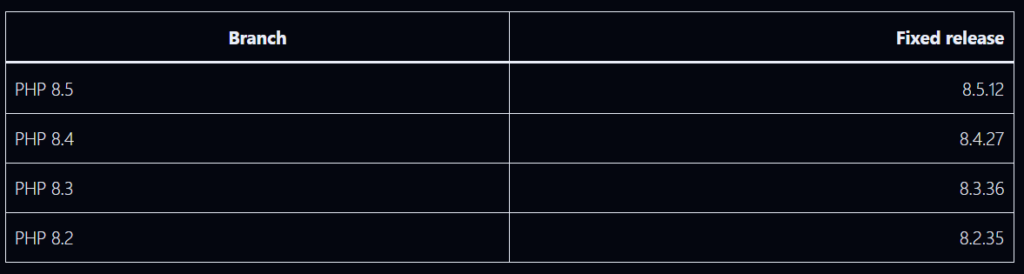
PHP 8.1 and older are no longer supported by the PHP project. Some distributions and long-term-support vendors provide backported packages; PHP also published minimal source backports for 7.4, 8.0, and 8.1. Do not judge a vendor backport by the upstream version string alone: confirm the vendor package advisory and build revision include both CVE fixes. PHP 8.2 reaches end of life on December 31, 2026, so plan a supported-branch migration even after applying its fix. PHP advisory and release notes
Remediation walkthrough
1. Inventory the runtime that serves requests
Do not rely on one shell’s php -v. It may report a CLI binary that differs from the runtime used by the web server. Inventory each host, container, pool, and service. Identify the PHP SAPI, executable path, package owner, all FPM pools and web-server virtual hosts, container base images, deployment manifests, and any vendor-bundled PHP.
On Linux, these read-only checks are useful starting points:
php -v
php --ini
php-fpm -v 2>/dev/null || php-fpm8.4 -v 2>/dev/null || true
ps -eo pid,comm,args | grep -E '[p]hp-fpm|[p]hp-cgi|[a]pache2|[h]ttpd|[l]sphp'
On Debian/Ubuntu, inspect installed packages and candidate versions:
dpkg-query -W 'php*' 2>/dev/null
apt-cache policy php8.4-fpm php8.4-cli
On RHEL-family systems:
rpm -qa 'php*' | sort
dnf updateinfo list --security | grep -i php
Package names differ by distribution and repository. A patched vendor package may have an upstream-looking version with a backport release suffix. Confirm both CVE identifiers in the vendor advisory, changelog, or package metadata.
For containers, inspect the image that will actually be deployed:
docker run --rm --entrypoint php your-image:tag -v
docker image inspect your-image:tag --format '{{.Id}} {{index .RepoDigests 0}}'
If you cannot establish which PHP runtime handles a route, treat it as unverified and keep it behind a protective boundary until you can.
2. Update to a fixed release
Use your operating system or hosting vendor’s supported package channel where possible.
Debian/Ubuntu example (adjust branch and package names to your deployment):
sudo apt-get update
sudo apt-get install --only-upgrade 'php8.4-*'
RHEL-family example:
sudo dnf update 'php*'
Use the distribution’s supported module stream or vendor repository. If pinned to an older branch, confirm explicitly that the vendor backported both fixes.
Containers: Update the PHP base image to a fixed release or a vendor image whose advisory confirms the backport, then rebuild and redeploy. Updating host PHP does not change a bundled container runtime.
dockerfile
# Example only; use the supported image variant and fixed patch release
FROM php:8.4.27-fpm
Rebuild dependent images and jobs, including workers and scheduled tasks, not only the public web tier. Pin and promote the resulting image through the normal deployment process.
Windows and bundled products: Install a fixed PHP build from the official PHP downloads or apply the relevant product vendor update. For IIS or Apache, verify the configured FastCGI or module path points to the updated build. For appliances and control panels, follow the vendor procedure; do not replace embedded PHP manually unless the vendor supports it.
3. Restart every process with old code loaded
A package upgrade does not guarantee that long-running workers have stopped executing the old binary. Restart or roll all relevant PHP workers and web-server processes. Example systemd commands (adjust names to your installation):
sudo systemctl restart php8.4-fpm
sudo systemctl reload-or-restart nginx
For Apache with mod_php, restart Apache after the package update. For containers, replace running tasks or pods so they start from the rebuilt image. Confirm old workers have exited and every pool, region, and replica has been replaced.
4. Verify the serving version and vendor fix
Verify from the same runtime and configuration used by the web service:
– Confirm the package release or image digest contains the security fix.
– Confirm the active FPM service or web-server module points at that package.
– Check a protected internal status endpoint or deployment telemetry if available. Do not publish a detailed `phpinfo()` page to the internet.
– Check every pool, virtual host, replica, region, and background worker.
– Confirm workers restarted after the update.
– Record the host or image identity, package/build, SAPI, update time, and vendor advisory reference.
For upstream releases, compare against the fixed branch versions above. For vendor packages and backports, rely on the vendor’s explicit CVE status rather than version-number comparison alone.
5. Review temporary configuration after patching
Temporary workarounds may change application behavior or create operational tradeoffs. Once all runtimes are patched and verified, review temporary settings against application requirements and your normal baseline. Keep sensible request-size limits and resource controls as general hardening, and document deliberate changes.
If you cannot patch immediately
The PHP team says the measures below reduce exposure to specific paths but **do not make a vulnerable installation safe**. Apply them only as a short-lived bridge while patching. Consider taking an exposed service offline or restricting access if you cannot update promptly. [PHP advisory](https://www.php.net/archive/2026.php#2026-10-21-1)
Apply settings before request parsing in `php.ini`, the FPM pool, or server configuration. Do not rely on `ini_set()` or `.user.ini` for these mitigations.
Reduce exposure to the OOM-corruption path
– Set `memory_limit=-1` in non-overridable server or pool configuration. Verify no pool, directory, or application setting sets a finite value again.
– Set a low `post_max_size`: PHP suggests 8 MB when uploads are not needed, or 32 MB when they are. Keep `upload_max_filesize` below `post_max_size`.
– Enforce decoded request-size and complexity limits at the web server or proxy: body size, input field count, multipart part count, header count, and nesting depth. Ensure limits also apply when there is no usable `Content-Length`.
– Use a container or cgroup limit as an availability boundary. PHP specifically warns against substituting `RLIMIT_AS` or `RLIMIT_DATA`, which can cause the vulnerable allocation failure.
FPM pool example (review against your installed PHP version and service configuration):
; Example pool configuration, such as /etc/php/8.4/fpm/pool.d/www.conf
php_admin_value[memory_limit] = -1
php_admin_value[post_max_size] = 8M
php_admin_value[upload_max_filesize] = 7M
If uploads are necessary, choose a higher `post_max_size` that fits the application and keep `upload_max_filesize` lower. Apply equivalent limits at the proxy or web server and test legitimate uploads.
Reduce exposure to the stale-state path
– Set `session.upload_progress.enabled=0` at server or pool level, then restart every worker. This blocks confirmed session paths but does not cover all variants.
– On PHP 8.5, set `fatal_error_backtraces=0` and restart every worker. This blocks only the confirmed fatal-backtrace path.
– Remove invalid or deprecated settings applied per request that emit diagnostics before initialization. Hiding diagnostics with `error_reporting`, `display_errors`, or `@` does not help.
– Fix attacker-reachable fatal errors and execution timeouts, including failures in callbacks, upload or import processing, and cleanup.
FPM pool example:
php_admin_value[session.upload_progress.enabled] = 0
; PHP 8.5 only:
php_admin_value[fatal_error_backtraces] = 0
Restart the relevant service after configuration changes. Confirm values are active in the serving SAPI, not only CLI output.
Add containment while patching
- Restrict public access or place the application in maintenance mode where practical.
- Limit ingress to trusted networks, VPN, or an authenticated gateway, ensuring there is no public route around the restriction.
- Keep a WAF or managed edge ruleset enabled as defense in depth and monitor its events. WAFs are not a complete fix and may miss variants.
- Keep body-size and multipart limits in place.
- Use controlled worker or container isolation. Avoid broad process-killing or memory settings that destabilize unrelated services.
Cloudflare reported deploying PHP2Shell WAF protections, but also advises customers to patch PHP. Edge protection is an extra layer, not a replacement for the runtime update. Cloudflare response
Check for signs of compromise
Because these flaws can execute before application code, review the web tier and host, not only application logs. A clean log does not prove exploitation did not occur.
Review the period before and after patching for:
- Unexpected child processes started by
php-fpm,php-cgi, Apache, or LiteSpeed. - New or modified PHP files in web roots, upload directories, temporary directories, and cache paths.
- New scheduled tasks, systemd services, startup scripts, SSH keys, users, or modified authorization files.
- Unexpected outbound connections or downloads from web-server identities.
- Authentication, proxy, WAF, web-server, PHP, endpoint, and cloud audit events.
- Sudden PHP worker crashes, out-of-memory events, abnormal request sizes, or repeated malformed multipart requests.
Preserve logs and snapshots before cleanup. If you find evidence of execution, isolate the system, preserve forensic evidence, rotate secrets accessible to PHP from a clean environment, rebuild from trusted artifacts, and investigate lateral movement. A PHP upgrade removes the vulnerable code path; it does not remove persistence or reverse data access that may already have occurred.
Common remediation mistakes
- Updating WordPress or a Composer dependency only. The vulnerable component is the PHP runtime.
- Checking only
php -v. CLI PHP may differ from FPM, mod_php, CGI, containers, or appliance PHP. - Assuming a WAF or one configuration toggle is a complete fix. The PHP advisory says updating is the only complete solution.
- Forgetting long-running workers. Old processes can continue using the old runtime after package changes.
- Comparing only the upstream version string. Vendor backports can fix older-looking versions; verify the package advisory.
- Patching the host but not the container image. The image may carry an independent PHP runtime.
- Stopping after the web server. Queue workers, scheduled jobs, secondary regions, and management interfaces also need inventory.
- Assuming no alerts means no compromise. Investigate suspicious behavior across multiple telemetry sources.
Completion checklist
[ ] Every PHP web-serving SAPI and bundled runtime is inventoried.
[ ] Public services are patched to a fixed upstream release or vendor-confirmed backport.
[ ] Container images and all running replicas are rebuilt and replaced.
[ ] PHP workers and web servers restarted; old processes are gone.
[ ] The active serving runtime and package build are verified.
[ ] Temporary mitigations were applied only where needed and documented.
[ ] Logs and endpoint telemetry were reviewed for suspicious activity.
[ ] Credentials accessible to PHP were rotated if compromise is suspected.
[ ] Unsupported PHP branches have a migration or vendor-support plan
Further reading
- Official PHP advisory and fixed release notes
- NCSC-NL operational information and affected software tracking
- Cloudflare’s technical summary and WAF response
- CERT-EU Security Advisory 2026-018
- Ubuntu: PHP2Shell vulnerability fixes