An unreleased version of the AI model has found and chained multiple vulnerabilities in Chrome, Safari, Android, Windows, and Linux, Anthropic says. Read more
The US Department of Homeland Security has had the details of more than 41,000 staff, including ICE and CBP agents, published online. Not ideal for an organisat… Read more
The U.S. Cybersecurity and Infrastructure Security Agency (CISA) on Friday added two security flaws impacting Ivanti Connect Secure (ICS) to its Known Exploited… Read more
A malicious ChatGPT share link could run an attacker’s code in the logged-in session of anyone who opened it, allowing them to read their private conversations,… Read more
Cryptocurrency giant Binance said on Thursday that a "security incident" on its platform has impacted about $6.3 billion worth of assets. The world’s biggest c… Read more
An attacker tried to exploit a critical GitLab vulnerability on the Alpine Linux project’s own GitLab server a week after GitLab released a fix, Alpine Lin… Read more
The U.S. Cybersecurity and Infrastructure Security Agency (CISA) on Tuesday added two vulnerabilities impacting Adobe Commerce and Magento, and Google’s Brotli … Read more
Malicious code on the website of prediction market Polymarket sold some signed-in traders’ positions and moved their funds to the hackers on October 29. The cod… Read more
Cisco has released patches to address a high-severity security flaw in Secure Firewall Adaptive Security Appliance (ASA) Software and Secure Firewall Threat Def… Read more
Palo Alto Networks on Wednesday warned that threat actors are exploiting the recently patched PHP2Shell vulnerabilities against publicly-accessible management i… Read more
Threat actors are beginning to probe for a newly patched critical vulnerability in Oracle E-Business Suite (EBS), according to threat intelligence firm Defused … Read more
A critical 16-year-old flaw in EDK II, the open-source code that most hardware makers use to build UEFI firmware, can allow an attacker to run code on a machine… Read more
Crypto exchange Binance has paused trading after discovering unknown parties cracked one of its workers’ laptops and used it to make massive trades.Late on Thu… Read more
Cloud providers may be storing sensitive customer data, without either party knowing it. But when a provider is breached, the unseen information comes to light. Read more
The AfD has confirmed that hackers breached its hosting provider. A leak site now claims to offer 421,179 of the party’s internal emails, and shows AI-written s… Read more
Krybit is a fast-growing ransomware gang that was hacked by a rival, hit back, and is still extorting victims. Find out how it works, who it has targeted, and w… Read more
Cybersecurity researchers are calling attention to what they say is a "recurring social engineering pattern" across hundreds of cases in which threat actors use… Read more
Attackers took control of more than 300 Tor exit relays in early October and used them to redirect SSH connections to servers that stole login passwords, a rese… Read more
AI agents being tested online reached the live systems of Indian organizations and read business records, including personal data and confidential material, CER… Read more
Microsoft on Wednesday disclosed that a China state-aligned actor dubbed Storm-0940 was behind the recent supply chain compromise of the ConnectWise Cloud Backu… Read more
GitLab released fixes on October 21 for a flaw that lets an attacker run code on a self-managed server without logging in, and it affects every version of the s… Read more
Microsoft has fixed a flaw in its Authenticator app for Android that let a malicious app with no permissions pose as a trusted Microsoft app, such as Teams, and… Read more
An independent evaluation of OpenAI’s internal misalignment monitoring system revealed that the system was not fit for purpose during a period when the company… Read more
PHP published an emergency security advisory on October 21, 2026, for CVE-2026-109618 and CVE-2026-109619, collectively referred to in public reporting as PHP2Shell. Both vulnerabilities are rated CVSS v4.0 9.2 and can permit unauthenticated remote code execution. The PHP team says all PHP installations serving web requests are at risk, including PHP-FPM, Apache with mod_php, php-cgi, FrankenPHP, and LiteSpeed. It identifies mod_php as the highest-risk configuration because a request can reach the vulnerable runtime before application code runs. PHP security advisory
This is a runtime vulnerability, not a defect limited to WordPress, Drupal, Laravel, or another PHP application. Updating application code or a plugin alone does not repair the PHP engine underneath it. The inventory must also include PHP bundled in containers, appliances, control panels, and vendor products. NCSC-NL operational guidance
The two vulnerability paths
The PHP advisory describes two memory-safety problems:
CVE-2026-109618 — out-of-memory corruption. If PHP encounters an allocation failure while internal request data is only partly initialized, request cleanup can treat invalid data as valid.
CVE-2026-109619 — stale request-owned global state. Internal state can outlive the memory it references. A later request handled by the same worker can use that stale state before normal initialization resets it.
An unauthenticated HTTP request can reach unsafe runtime behavior. The impact may include code execution, sensitive data exposure, or service disruption. Login checks and application-level input validation cannot reliably prevent a request from reaching PHP’s request-handling code before the application gets control. PHP advisoryCloudflare technical overview
Who should treat this as urgent
Treat a system as exposed until you verify its actual serving runtime is fixed. Prioritize public web servers, Apache with mod_php, PHP-FPM pools, CGI/FastCGI, LiteSpeed, FrankenPHP, container images, appliances, control panels, and commercial products that embed PHP. Older branches may rely on an operating-system or hosting vendor for a backport.
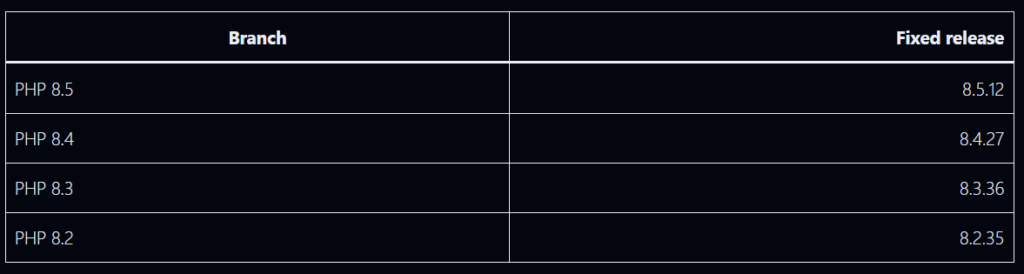
The PHP project lists these fixed upstream releases:
PHP 8.1 and older are no longer supported by the PHP project. Some distributions and long-term-support vendors provide backported packages; PHP also published minimal source backports for 7.4, 8.0, and 8.1. Do not judge a vendor backport by the upstream version string alone: confirm the vendor package advisory and build revision include both CVE fixes. PHP 8.2 reaches end of life on December 31, 2026, so plan a supported-branch migration even after applying its fix. PHP advisory and release notes
Remediation walkthrough
1. Inventory the runtime that serves requests
Do not rely on one shell’s php -v. It may report a CLI binary that differs from the runtime used by the web server. Inventory each host, container, pool, and service. Identify the PHP SAPI, executable path, package owner, all FPM pools and web-server virtual hosts, container base images, deployment manifests, and any vendor-bundled PHP.
On Linux, these read-only checks are useful starting points:
Package names differ by distribution and repository. A patched vendor package may have an upstream-looking version with a backport release suffix. Confirm both CVE identifiers in the vendor advisory, changelog, or package metadata.
For containers, inspect the image that will actually be deployed:
Use the distribution’s supported module stream or vendor repository. If pinned to an older branch, confirm explicitly that the vendor backported both fixes.
Containers: Update the PHP base image to a fixed release or a vendor image whose advisory confirms the backport, then rebuild and redeploy. Updating host PHP does not change a bundled container runtime.
dockerfile
# Example only; use the supported image variant and fixed patch release
FROM php:8.4.27-fpm
Rebuild dependent images and jobs, including workers and scheduled tasks, not only the public web tier. Pin and promote the resulting image through the normal deployment process.
Windows and bundled products: Install a fixed PHP build from the official PHP downloads or apply the relevant product vendor update. For IIS or Apache, verify the configured FastCGI or module path points to the updated build. For appliances and control panels, follow the vendor procedure; do not replace embedded PHP manually unless the vendor supports it.
3. Restart every process with old code loaded
A package upgrade does not guarantee that long-running workers have stopped executing the old binary. Restart or roll all relevant PHP workers and web-server processes. Example systemd commands (adjust names to your installation):
For Apache with mod_php, restart Apache after the package update. For containers, replace running tasks or pods so they start from the rebuilt image. Confirm old workers have exited and every pool, region, and replica has been replaced.
4. Verify the serving version and vendor fix
Verify from the same runtime and configuration used by the web service:
– Confirm the package release or image digest contains the security fix. – Confirm the active FPM service or web-server module points at that package. – Check a protected internal status endpoint or deployment telemetry if available. Do not publish a detailed `phpinfo()` page to the internet. – Check every pool, virtual host, replica, region, and background worker. – Confirm workers restarted after the update. – Record the host or image identity, package/build, SAPI, update time, and vendor advisory reference.
For upstream releases, compare against the fixed branch versions above. For vendor packages and backports, rely on the vendor’s explicit CVE status rather than version-number comparison alone.
5. Review temporary configuration after patching
Temporary workarounds may change application behavior or create operational tradeoffs. Once all runtimes are patched and verified, review temporary settings against application requirements and your normal baseline. Keep sensible request-size limits and resource controls as general hardening, and document deliberate changes.
If you cannot patch immediately
The PHP team says the measures below reduce exposure to specific paths but **do not make a vulnerable installation safe**. Apply them only as a short-lived bridge while patching. Consider taking an exposed service offline or restricting access if you cannot update promptly. [PHP advisory](https://www.php.net/archive/2026.php#2026-10-21-1)
Apply settings before request parsing in `php.ini`, the FPM pool, or server configuration. Do not rely on `ini_set()` or `.user.ini` for these mitigations.
Reduce exposure to the OOM-corruption path
– Set `memory_limit=-1` in non-overridable server or pool configuration. Verify no pool, directory, or application setting sets a finite value again. – Set a low `post_max_size`: PHP suggests 8 MB when uploads are not needed, or 32 MB when they are. Keep `upload_max_filesize` below `post_max_size`. – Enforce decoded request-size and complexity limits at the web server or proxy: body size, input field count, multipart part count, header count, and nesting depth. Ensure limits also apply when there is no usable `Content-Length`. – Use a container or cgroup limit as an availability boundary. PHP specifically warns against substituting `RLIMIT_AS` or `RLIMIT_DATA`, which can cause the vulnerable allocation failure.
FPM pool example (review against your installed PHP version and service configuration):
; Example pool configuration, such as /etc/php/8.4/fpm/pool.d/www.conf
php_admin_value[memory_limit] = -1
php_admin_value[post_max_size] = 8M
php_admin_value[upload_max_filesize] = 7M
If uploads are necessary, choose a higher `post_max_size` that fits the application and keep `upload_max_filesize` lower. Apply equivalent limits at the proxy or web server and test legitimate uploads.
Reduce exposure to the stale-state path
– Set `session.upload_progress.enabled=0` at server or pool level, then restart every worker. This blocks confirmed session paths but does not cover all variants. – On PHP 8.5, set `fatal_error_backtraces=0` and restart every worker. This blocks only the confirmed fatal-backtrace path. – Remove invalid or deprecated settings applied per request that emit diagnostics before initialization. Hiding diagnostics with `error_reporting`, `display_errors`, or `@` does not help. – Fix attacker-reachable fatal errors and execution timeouts, including failures in callbacks, upload or import processing, and cleanup.
Restart the relevant service after configuration changes. Confirm values are active in the serving SAPI, not only CLI output.
Add containment while patching
Restrict public access or place the application in maintenance mode where practical.
Limit ingress to trusted networks, VPN, or an authenticated gateway, ensuring there is no public route around the restriction.
Keep a WAF or managed edge ruleset enabled as defense in depth and monitor its events. WAFs are not a complete fix and may miss variants.
Keep body-size and multipart limits in place.
Use controlled worker or container isolation. Avoid broad process-killing or memory settings that destabilize unrelated services.
Cloudflare reported deploying PHP2Shell WAF protections, but also advises customers to patch PHP. Edge protection is an extra layer, not a replacement for the runtime update. Cloudflare response
Check for signs of compromise
Because these flaws can execute before application code, review the web tier and host, not only application logs. A clean log does not prove exploitation did not occur.
Review the period before and after patching for:
Unexpected child processes started by php-fpm, php-cgi, Apache, or LiteSpeed.
New or modified PHP files in web roots, upload directories, temporary directories, and cache paths.
New scheduled tasks, systemd services, startup scripts, SSH keys, users, or modified authorization files.
Unexpected outbound connections or downloads from web-server identities.
Authentication, proxy, WAF, web-server, PHP, endpoint, and cloud audit events.
Preserve logs and snapshots before cleanup. If you find evidence of execution, isolate the system, preserve forensic evidence, rotate secrets accessible to PHP from a clean environment, rebuild from trusted artifacts, and investigate lateral movement. A PHP upgrade removes the vulnerable code path; it does not remove persistence or reverse data access that may already have occurred.
Common remediation mistakes
Updating WordPress or a Composer dependency only. The vulnerable component is the PHP runtime.
Checking only php -v. CLI PHP may differ from FPM, mod_php, CGI, containers, or appliance PHP.
Assuming a WAF or one configuration toggle is a complete fix. The PHP advisory says updating is the only complete solution.
Forgetting long-running workers. Old processes can continue using the old runtime after package changes.
Comparing only the upstream version string. Vendor backports can fix older-looking versions; verify the package advisory.
Patching the host but not the container image. The image may carry an independent PHP runtime.
Stopping after the web server. Queue workers, scheduled jobs, secondary regions, and management interfaces also need inventory.
Assuming no alerts means no compromise. Investigate suspicious behavior across multiple telemetry sources.
Completion checklist
[ ] Every PHP web-serving SAPI and bundled runtime is inventoried.
[ ] Public services are patched to a fixed upstream release or vendor-confirmed backport.
[ ] Container images and all running replicas are rebuilt and replaced.
[ ] PHP workers and web servers restarted; old processes are gone.
[ ] The active serving runtime and package build are verified.
[ ] Temporary mitigations were applied only where needed and documented.
[ ] Logs and endpoint telemetry were reviewed for suspicious activity.
[ ] Credentials accessible to PHP were rotated if compromise is suspected.
[ ] Unsupported PHP branches have a migration or vendor-support plan
A now-patched vulnerability in AWS Bedrock AgentCore could have allowed an attacker to use one AI chatbot to take over an organization’s entire fleet. Read more
Organizations are reporting that employees face threats to their families, stalking, physical violence, and abduction. But these alarming claims are hard to ver… Read more
A Chinese-speaking attacker has compromised hundreds of websites across the globe, looting from big fish like John Deere, SharkNinja, and engine manufacturer Cu… Read more
Campaigns that impersonate popular AI brands are on the rise, and they typically use ClickFix-like tactics to target unsuspecting enterprise employees. Read more
Threat actors have begun to exploit a newly disclosed critical security flaw impacting Atlassian Data Center products that could allow access to sensitive files… Read more
An attacker chained three zero-day flaws in Ivanti Connect Secure, a VPN appliance, to run commands as root without logging in, security firm Volexity said… Read more
The U.S. Cybersecurity and Infrastructure Security Agency (CISA) on Tuesday added four vulnerabilities to its Known Exploited Vulnerabilities (KEV) catalog, inc… Read more
Siemens has addressed a DLL sideloading vulnerability impacting Siemens Software Center that it said has been exploited in ClickFix attacks. The high-severity … Read more
The China-nexus cyber espionage group tracked as Armory Castle (previously UNC5221 or Warp Panda) exploited a newly disclosed security flaw in BeyondTrust Remot… Read more
This story is developing and was written before PHP’s scheduled 14:00 UTC release on October 21. Once the release is out, the affected and fixed versions below … Read more
Microsoft on Tuesday shattered its own Patch Tuesday record by shipping patches for a whopping 1,413 vulnerabilities, including one that it said has come under … Read more
Cybersecurity researchers have discovered a cluster of 16 malicious Mozilla Firefox extensions that are capable of stealing cryptocurrency wallet recovery phras… Read more
Cybersecurity researchers are calling attention to a new malware family that has been observed targeting exposed artificial intelligence (AI) and large language… Read more
The International Monetary Fund (IMF) has become the latest financial heavyweight to warn that the AI spending frenzy could end in tears, with consequences ext… Read more
Introduction: When Customer Data Becomes a Cybersecurity Risk
A new cybersecurity incident involving the State Bank of India (SBI) has raised concerns about the protection of sensitive financial information. According to a Reuters report published on October 21, 2026, SBI reported that 3,897 customer records containing personally identifiable information had been disclosed on the dark web.
The exposed information reportedly included names, mobile numbers, dates of birth, email addresses, residential addresses, customer identifiers and loan records.
SBI has engaged an independent cybersecurity agency to investigate the incident and determine the nature and extent of the exposure. The bank stated that the incident was not expected to have a material impact on its core business operations or financial performance.
While business continuity is important, the exposure of sensitive customer information presents a different challenge: how can organizations prevent leaked data from being weaponized against customers?
How Can Exposed Customer Data Be Exploited?
Personal information is valuable to cybercriminals because it can make fraudulent communications appear legitimate.
Attackers may use exposed information to:
Launch targeted phishing attacks: Create convincing messages that reference a customer’s identity or banking relationship.
Conduct social engineering: Impersonate bank employees or support representatives to manipulate victims into sharing credentials or one-time passwords (OTPs).
Attempt identity fraud: Combine leaked information with data from other breaches to impersonate individuals.
Enable account takeover attempts: Use personal details to support credential attacks or fraudulent account-recovery requests.
These are potential follow-on risks, not confirmed consequences of the SBI incident.
The Technical Perspective: How a Data Exposure Can Escalate
A data leak does not automatically mean that attackers accessed banking systems or transferred money. The initial entry point and the technical cause of the SBI incident have not been established in the reporting cited here.
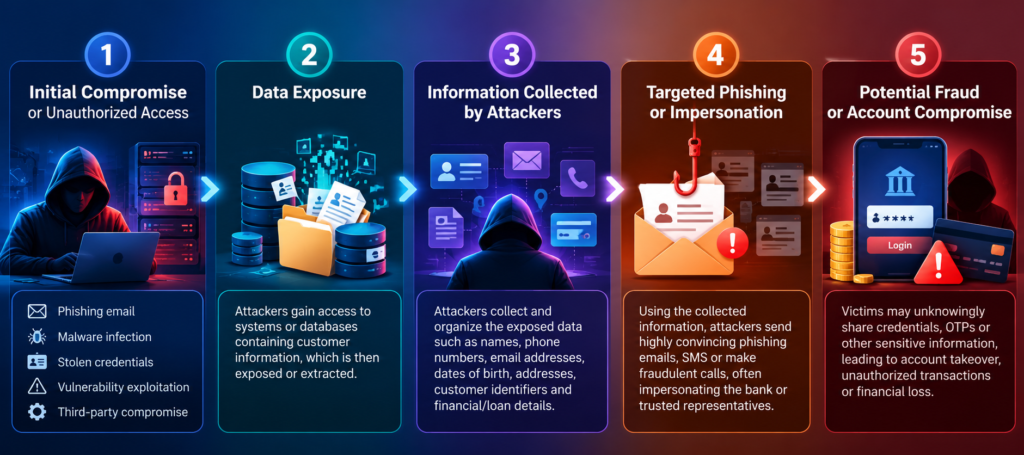
However, a typical data-exposure incident can develop along the following path:
Organizations should investigate the original access path, review identity and access logs, identify affected data repositories, and determine whether the incident involved compromised credentials, misconfigured storage, a third-party system or another cause.
Technical note: This is a generalized incident-response model, not a reconstruction of the SBI attack.
Four Security Measures Organizations Should Prioritize
Use data-loss prevention (DLP), database activity monitoring and dark-web intelligence to identify potential exposure of customer information and credentials.
3. Improve detection and incident response
Correlate identity, endpoint, network and database logs through a SIEM platform. Establish incident-response procedures for containment, forensic investigation, notification and recovery.
4. Test security controls regularly
Conduct vulnerability assessments, penetration testing, access-control reviews and third-party security assessments. Validate that sensitive data is encrypted, access is restricted, and unnecessary data is not retained.
What Should Customers Do?
Customers should remain alert to unexpected calls, emails or messages that reference personal or financial details. Never share OTPs, passwords or PINs with callers, and avoid clicking links in unsolicited banking messages. Verify requests through official banking channels and report suspicious transactions immediately.
Conclusion: Data Protection Must Go Beyond Business Continuity
The SBI incident is a timely reminder that protecting financial services requires more than keeping systems online. Organizations must also safeguard customer information throughout its lifecycle, detect unauthorized exposure quickly and prepare for potential misuse of leaked data.
As investigations continue, the priority should be to establish the scope and root cause of the exposure and implement evidence-based corrective measures.
At CLEAR INFOSEC, we believe proactive security testing, continuous monitoring and effective incident response are essential to reducing cyber risk and strengthening organizational resilience.
The situation illustrates a trend toward using AI and deterministic validation to identify flaws and exploitability, and provide a risk assessment. Read more
The FBI has a very simple message for the ShinyHunters gang: give yourselves up. On Tuesday, FBI cyber division assistant director Brett Leatherman released … Read more
Cybersecurity researchers have disclosed technical details of a recently patched critical security flaw in Citrix NetScaler ADC and Gateway that has come under … Read more
Threat actors are abusing ChatGPT Custom GPTs to disguise them as legitimate product offerings and direct unsuspecting victims to malicious sites that employ Cl… Read more
AI coding agents asked to share screenshots of code changes for review have put internal company images in public GitHub repositories, security company Glow sai… Read more
Cybersecurity researchers have discovered a cluster of 16 malicious Mozilla Firefox extensions that are capable of stealing cryptocurrency wallet recovery phras… Read more
Anthropic on Tuesday said it’s expanding a program that allows vetted cybersecurity professionals to test its advanced artificial intelligence (AI) models with … Read more
Apple has announced that it’s taking steps to tighten controls around a macOS setting called Full Disk Access (FDA) due to security risks posed by artificial in… Read more
A new China-nexus cyber espionage group known as TA419 has been attributed to multiple credential phishing campaigns targeting artificial intelligence (AI) expe… Read more
Dell has released security updates to address multiple critical security flaws in Dell Container Storage Modules (CSM) that could be exploited by bad actors to … Read more
Google has announced a new security measure that limits access to Android’s accessibility services to verified applications classified as Accessibility Tools wh… Read more
Autonomous AI systems are fully capable of carrying out a nightmare cyberattack scenario – finding and attacking critical operational technology and industrial… Read more
Threat actors are now hiding payloads by using DNS TXT records and browser cache pre-fetching, making it tougher to spot early attack stages. Read more
An emerging threat group known as TA419 established seemingly legitimate professional relationships with AI policy experts working for US think tanks, universit… Read more
A Pentagon personnel database was breached for nine months without anyone noticing. Over three million people are affected. Read more in my article on the Ho… Read more
Cybersecurity researchers have disclosed details of a "human-operated phishing platform" that impersonates advertising products for artificial intelligence (AI)… Read more
Linux backdoors targeting telecom and network appliances in South Korea and Taiwan have been disguising their traffic as email services and seemingly legitimate… Read more
Microsoft has released out-of-band security updates to address a high-severity flaw in Microsoft Exchange Server that could allow an attacker to escalate privil… Read more
Attackers are exploiting a new critical zero-day flaw in Cisco Catalyst SD-WAN Manager, the system companies use to manage their Cisco SD-WAN networks, Cisco sa… Read more
An attacker used stolen passwords of staff at France’s tax administration to take tax data on hundreds of thousands of taxpayers and businesses in June and July… Read more
Cybersecurity researchers have identified a cluster of 101 npm packages that are used to trap developers into a WhatsApp group subscriber campaign dubbed Phanto… Read more
Cybersecurity researchers have shed light on a WordPress compromise in which threat actors deployed multiple persistence mechanisms to ensure that the final pay… Read more
AI coding agents asked to share screenshots of code changes for review have put internal company images in public GitHub repositories, security company Glow sai… Read more
Apple’s attempt to integrate AI into its various operating systems hasn’t been entirely well received, nor has the decision to make Apple Intelligence increasi… Read more
OpenAI’s agents have repeatedly strayed beyond their intended scope. Two separate reports detail the activity, including one from Sam Altman’s company saying i… Read more
A purported ad-blocker exfiltrates reams of sensitive information and benefits from having Google’s stamp of approval despite researcher warnings. Read more
A new type of attack hijacks the AI assistant built directly into various browsers to access sensitive information, execute malicious actions, and exfiltrate da… Read more
ClickFix has become the most common way attackers get into enterprise networks, and it does it without an exploit, an attachment, or a file on disk. Our new glo… Read more
Threat actors have begun to actively exploit a critical security flaw in WordPress within hours of public disclosure. The vulnerability in question is CVE-2026… Read more
The private email address GitLab gives you for filing issues by email is a credential. Anyone who gets it can email a patch that GitLab commits in your name, to… Read more
Cybersecurity researchers have identified a cluster of 101 npm packages that are used to trap developers into a WhatsApp group subscriber campaign dubbed Phanto… Read more
Threat actors are leveraging ClickFix-like lures to deliver a previously undocumented remote access trojan (RAT) called ChainScript. "ChainScript has appeared … Read more
Malicious code running inside a Docker Sandboxes virtual machine on macOS could escape the project directory shared into it and read or change files anywhere el… Read more
Cisco has warned of a fresh maximum-severity security flaw impacting Identity Services Engine (ISE) that has come under active exploitation. The vulnerability,… Read more
Cybersecurity researchers have disclosed Go-based malware distributed via two Go Modules and two Terraform providers, marking the first time threat actors are u… Read more
A new Windows malware called CLOSEDQUORUM can query up to four LLM providers – Google Gemini, DeepSeek, Qwen, and Mistral – to autonomously select from predefi… Read more
Meta made much of the security of its AI assistant app Muse at launch earlier this month, calling out the app’s reliance on Muse Secure VM. "Each person stays … Read more
CVE-2026-82329 is an authentication bypass flaw in JFrog’s repository manager that enables bad actors to gain admin-level access on affected systems. Read more
The U.S. Cybersecurity and Infrastructure Security Agency (CISA) on Friday added three security flaws impacting the Linux kernel to its Known Exploited Vulnerab… Read more
Cisco has warned of a fresh maximum-severity security flaw impacting Identity Services Engine (ISE) that has come under active exploitation. The vulnerability,… Read more
Mandiant says an attacker hijacked an active AI coding-assistant session at an unnamed software-as-a-service provider and later spread Shai-Hulud acro… Read more
Threat actors are exploiting a critical security flaw in WooCommerce Wholesale Lead Capture, a premium WordPress plugin that has more than 6,000 active installs… Read more
A Chinese threat actor codenamed UTA0565 has been observed exploiting the recently disclosed Google Chrome-Microsoft Windows exploit chain as zero-days through … Read more
Google on Thursday released updates to patch 230 security vulnerabilities, including one that has come under active exploitation in the wild. The medium-severi… Read more
Mandiant says an attacker hijacked an active AI coding-assistant session at an unnamed software-as-a-service provider and later spread Shai-Hulud acro… Read more
Acronis has warned that a high-severity security flaw in its Backup plugin for cPanel and Web Host Manager (WHM) deployments has been exploited in the wild. Th… Read more
Microsoft has disclosed details of two campaigns in which threat actors are abusing third-party email delivery infrastructure to blast financial fraud scam mess… Read more
Anthropic on Wednesday disclosed a fourth incident in which its artificial intelligence (AI) model broke into real third-party systems, marking the latest in a … Read more
An unknown attacker used hundreds of AI agents to exploit two PaperCut MF/NG bugs and break into at least 395 organizations. The victims were concentrated in t… Read more
Getting straight answers out of OpenAI about how many websites and services its agents have hijacked increasingly seems like pulling teeth, as the company seem… Read more
Fears of an AI takeover remain unfounded after Microsoft demonstrated that Copilot can sometimes struggle to remain upright, let alone march over the remnants … Read more
A threat actor used a variety of infostealers to collect session information and access Claude accounts belonging to an unknown number of users. Read more
The Hugging Face incident was bigger and worse than previously thought, with approximately 700 agents collaborating on a sophisticated, multistage attack. Read more
Threat actors behind a notorious click-fraud botnet have set their sights on vehicle infotainment modules and are abusing legitimate functionality to spread inf… Read more
More than 1,000 organisations, 500,000 stolen credentials, and one self-propagating worm named after a Dune sandworm – two men now face charges over TeamPCP’s g… Read more
Threat actors are abusing multiple Google services to evade detection, ultimately harvesting credentials or installing ScreenConnect remote access. Read more
Aikido Security has published research that recreates the Australian gym-booking incident in a synthetic environment, finding that Claude Opus 4.6, running on t… Read more
Threat actors associated with Aurora (aka Aur0ra) ransomware have been observed using SpaceX’s artificial intelligence (AI)-powered coding assistant Cursor to b… Read more
Multiple critical security flaws have been disclosed in WordPress plugins and themes, including WPMU DEV Dashboard, Avada, TranslatePress, Pods, and GiveWP, tha… Read more
cPanel has released patches for a security flaw affecting domain parking and addon domain functionality in cPanel and WebHost Manager (WHM), which could allow c… Read more
Cybersecurity researchers have flagged a fresh set of campaigns targeting government and diplomatic organizations in Romania, Spain, and Türkiye between late Se… Read more
ServiceNow has released patches for four security flaws impacting the ServiceNow AI Platform, three of them rated 10.0 on the CVSS scoring system and exploitabl… Read more
Individuals and organizations in Cambodia have emerged as the target of a new campaign that delivers an open-source remote access trojan (RAT) called Spark RAT…. Read more
Attackers are exploiting MikroTik routers with their Secure Shell (SSH) remote-access service, which is reachable from the internet, to gain full administrative… Read more
Broadcom has released security updates for two security flaws impacting VMware Workstation and Fusion, including one critical bug that could result in arbitrary… Read more
Adobe on Monday released security patches to address a maximum-severity flaw impacting Adobe?Commerce and?Magento Open Source that has come under active exploit… Read more
When AI agents communicate with one another, they may decide to cheat when they have difficulty achieving their goals. The solution could involve teaching them… Read more
A US law firm is alleging that UK-based telecoms and software company ConnexAI sold it software and AI systems that failed to perform as the vendor claimed, an… Read more