Author: Clear Infosec

  • Trojans are targeting Microsoft teams

    Trojans are targeting Microsoft teams

    A recent harmful campaign is taking control over end-user computers by placing malicious documents in Microsoft Teams chat. Cybercriminals have targeted Microsoft’s omnipresent document creation and sharing suite – the legacy Office and its cloud-based successor Office 365 – with assaults on individual apps like PowerPoint, as well as business email compromise and other schemes.

    According to Statista, the number of teams users has nearly quadrupled in the last year, from 75 million in April 2020 to 145 million in the second quarter of 2021. As the application serves over 270 million monthly users as of January 2022, it became an appealing component for both cyber criminals and APT actors. Threat actors are attaching malicious files in chat and drop system-hijacking malware to penetrate into the app rapidly.

    Avanan began to recognize how hackers were placing harmful executable files in Teams talks in January 2022. The application may self-administer since the file writes data to the Windows registry, installs DLL files, and makes shortcut links. Thousands of similar attacks occur every month, according to Avanan. In this attack overview, we’ll look at how hackers in Microsoft Teams employ these.exe files.

    Attack

    Hackers are attaching .exe files to the Teams chats in this attack in order to install a Trojan. The trojan is utilized then to install malware.

    • Vector: Microsoft Teams
    • Type: Malicious Trojan File 
    • Techniques: .exe files
    • Target: Any end-user

    Email

    Hackers are breaking into the Teams app in this attack, which can be done via email-based East-West attacks or by faking a user. The threat actor then attaches a “User-Centric”.exe file to a chat. This file is a Trojan that will install DLL files and build self-administering shortcut links.

    Techniques

    Hackers have discovered a new way to easily target millions of users by adding the file to a Teams attack. Accessing Teams is the first step. Hackers can do this in a variety of ways. They can infiltrate a partner organization and listen in on inter-organizational conversations.

    They can gain access to Teams by compromising an email address. They can use stolen Microsoft 365 credentials from a prior phishing attack to gain full access to Teams and the rest of the Microsoft Office suite. 

    Given how well hackers can compromise Microsoft 365 accounts using classic email phishing techniques, they’ve figured out that the same credentials work for Teams. 

    Furthermore, once inside an organization, an attacker is usually aware of the technologies in place to secure it. That implies they’ll be able to predict which spyware will be able to get beyond existing defenses.

    This exploit shows that cybercriminals are starting to recognize and better utilize Teams as a potential attack vector. As the use of Teams grows, Avanan anticipates a large increase in these types of attacks.

    Tips and Best Practices

    Security experts can take the following steps to prevent these attacks:

    • Adopt a security solution that checks all files for malicious content in a sandbox.
    • With a comprehensive, full-suite security solution, protect all lines of company communication, including Teams.
    • End-users should be encouraged to contact IT if they come across an unexpected file.

    Reach out to Clear Infosec today to keep your workforce aware of evolving threat landscape and define an Information Security strategy that fortifies your systems.

    Reference:

    Montalbano, A. E., & Montalbano, E. (n.d.). Microsoft teams targeted with takeover trojans. Threatpost English Global threatpostcom. Retrieved February 21, 2022, from https://threatpost.com/microsoft-teams-targeted-takeover-trojans/178497/

    Fuchs, J. (n.d.). Hackers attach malicious .EXE files to teams conversations. Avanan. Retrieved February 21, 2022, from https://www.avanan.com/blog/hackers-attach-malicious-.exe-files-to-teams-conversatio

  • Hackers Infecting PCs With Windows Update Malware

    Trojanized version of IDA Pro:

    The North Korea state-sponsored group- Lazarus used a trojanized pirated version of the popular IDA Pro reverse engineering software (which translates machine language into assembly language) to target security researchers with available backdoors and remote access trojans.

    IDA Pro enables security researchers to analyze the malicious and debugger to detect errors. According to the Slovak cybersecurity firm, “attackers bundled the original IDA Pro 7.5 software developed by [Hex-Rays] with two malicious components.”

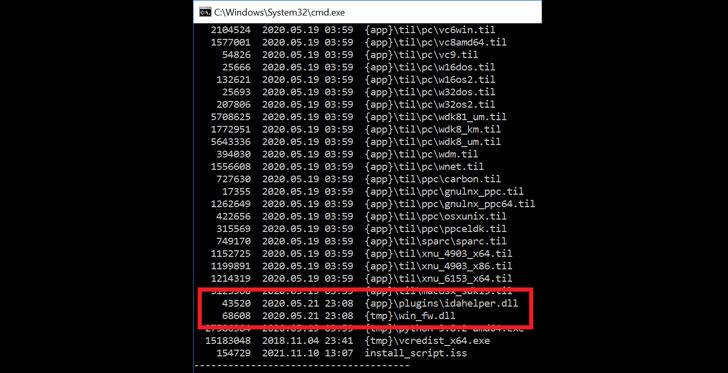
    During the installation of the application, an internal module called “win fw.dll” is executed. After that, a second component named “idahelper.dll” from the IDA plugins folder on the system is loaded. The “idahelper.dll” program connects to a remote server at “www[.]devguardmap[.]org” to obtain further payloads after successful execution.

    Windows update service Malware:

    The IP was previously tied to a similar North Korean-backed campaign aiming at security professionals, as revealed by Google’s Threat Analysis Group earlier this year. This North Korean nation-state hacking group APT38, also known as Hidden Cobra, Whois Hacking Team, and Zinc, has been active since at least 2009. The hacker was sending two files: Lockheed Martin JobOpportunities.docx and Salary Lockheed Martin job opportunities confidential.doc, which were clearly aimed towards people looking for work at Lockheed Martin.

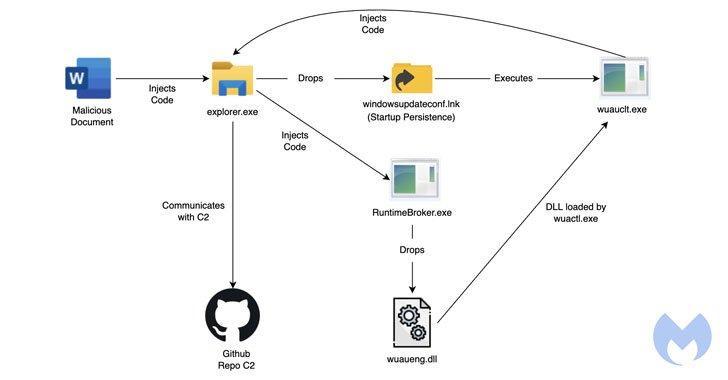
    The malicious macros once it is activated the documents drop a WindowsUpdateConf.lnk file in the target endpoint’s startup folder and a DLL file (wuaueng.dll) in the Windows/System32 folder. The .lnk file then launches the Windows Update Client and starts the malicious DLL. Also in order to get through antivirus and other security measures, Lazarus runs its malicious DLL using the Windows Update Client by passing the following arguments: /UpdateDeploymentProvider, Path to malicious DLL, and /RunHandlerComServer.

    Malwarebytes detected the most recent spear-phishing attempt on January 18 based on weaponized documents with job-themed lures emulating Lockheed Martin, an American global security and aerospace business.

    When you open the malicious Microsoft Word document, it activates the macro attached in the document, which then executes a Base64-decoded shellcode that injects malware into the “explorer.exe” process. Then one of the loaded files, “drops lnk.dll,” uses the Windows Update Client (“wuauclt.exe”) to run a command that loads a second module called “wuaueng.dll,” which is used as a defense evasion method to blend bad activity with trusted Windows software.

    This isn’t the first time the Windows Update Client has been used to spread malware; MDSec researcher David Middlehurst found the threat being exploited in October 2020. We’ll have to wait and see what Microsoft does about it, but meanwhile be cautious while downloading the attachment from the email, especially if they require macro activation.

    If you receive an email with attachments that appears to be legitimate but you are unsure, turn to our blog and use the methods to assess the attachments.

    Researchers, at last, reported that ”Lazarus APT is one of the advanced APT groups known to target the military industry. In order to escape security systems, the organization is constantly improving its toolkit.“

    Reference :

    shamili0508. (2022, January 29). North Korean hackers are infecting pcs with malware through  the windows update service. CyberWorkx. Retrieved February 2, 2022, from https://cyberworkx.in/2022/01/29/north-korean-hackers-are-infecting-pcs-with-malware-through-the-windows-update-service/

    North Korean hackers target cybersecurity researchers with Trojanized Ida Pro. The Hacker News. (2021, November 15). Retrieved February 2, 2022, from https://thehackernews.com/2021/11/north-korean-hackers-target.html

  • Ransomware Protection and Response

    Ransomware Protection and Response

    Over the past weeks, we discussed What is ransomware, and the Anatomy of ransomware attacks. Now, let us look into some ways to protect yourself from ransomware and how to respond if you fall victim to any.

    According to IBM, ransomware attacks are very high which contributes up to more than 23% of total cybersecurity attacks. The total amount of ransom amount was more than 120 million dollars in a year. To prevent a ransomware attack, the organization needs to have a specified plan, awareness, and cooperation from everyone in the organization. Below are some of the methods to prevent the organization from ransomware attacks.

    • Backups
    • Plans and policies
    • Port and endpoints
    • Awareness

    Backups

    The simplest and easiest way is to prepare a backup copy of the confidential data. It will be easy to recover the data if the backup is available and not infected. So, it should be noted that backup files should be protected properly offline or some other networks which can’t be accessed if the current system network was hacked. And the backup files should be routinely monitored. Some ransomware strains are specifically created to attack the data stored in the cloud system. Before doing recovery during an attack it is of utmost importance to check if the backup data are infected or not.

    Plans and policies

    Having a proper plan and policies will help a lot in mitigating ransomware attacks. Create incident response plans and policies if the system undergoes infection, so the cybersecurity team can handle it according to the plans without issues. It will prevent panic among the organization. The plans should also have who should be contacted if the attack happens.

    Ports and endpoints

    The systems in the organization should be customized by having security as their top priority. Having a proper secure configuration can help to prevent attacks and stop the security gaps provided in the standard configuration. The hackers mainly used certain ports to spread the malware strains. Knowing the ransomware strains can help in understanding the specified ports. It should be properly considered if the organization needs those ports to be open. If it is required to be set in open it should be limited only to the trusted hosts.

    Awareness

    It is highly recommended to develop a team specialized in cybersecurity. Every employee should be aware of ransomware attacks. A phishing email is the highest method hackers have used for spreading ransomware. The employees should know how to spot suspicious emails and report immediately to the cybersecurity team about the mail. Having a specified team with the latest updates and hardware will help in preventing or mitigating the attack faster.

    The systems should be updated regularly to not give the hackers to use of any kind of loophole to initiate the attack. Having regular patches of the software also help to reduce the vulnerability of the system.


    Ransomware Incident response

    If an organization was infected by ransomware, these are the best and most simple response plans that needed to be carried out.

    Identify and Validate

    First and foremost, confirm whether the attack was a ransomware attack or some other bugs, viruses, or malware. It is easy to confirm as the files will be encrypted or systems will lock with ransom notice published.

    Analyze

    If the attack was confirmed, immediately gather a response team to analyze the exact scope of the attack. How the malware is spreading, which network is affected, which network and systems are not affected should be analyzed as soon as possible.

    Containment

    After analyzing, disconnect all the systems that have been confirmed to be infected immediately from the networks. If it’s not possible, disconnect the network to prevent from infection spreading. Have a SOC team monitor the network traffic and block access to the ransomware command center.

    Investigation

    Next is to identify what kind of ransomware strain infects the systems. Having a clear understanding of the specified strain may help to mitigate the attack much faster. Some strains use low-level encryption algorithms which have decryption code publicly available.

    Erase and recovery

    This step includes formatting all the systems that have been infected and restoring the backup data. Backup data should be checked for infection before restoring and all the passwords, security keys should be changed.

    Post-infection actions

    After the infection is over, properly adhere to all the instructions stated in the contracts. Informing law enforcement agencies can help in mitigating the attack impact or capture the hacker as soon as possible. They might have encountered similar attacks and have ways to prevent the attack. If not, they may provide the proper guidance to pay the ransom and recover data without loss.

    Properly analyze and check how the attack was initiated, time taken for the security team to respond, logs created during the attack, type of strains of malware that infected the system and all such information should be noted. It will help to prevent from getting attacked by the same kind of vulnerability in the future. And from the reports, the policies can be improved further to prevent future attacks.

    With Clear Infosec, keep your workforce trained to stay fortified to any kind of social engineering attacks. Also, keep them informed of the evolving threat landscape.

  • TOP 10 CYBER SECURITY BEST PRACTICES TO FOLLOW IN 2022

    TOP 10 CYBER SECURITY BEST PRACTICES TO FOLLOW IN 2022

    Educate your workforce about the importance of security and about the highly evolving threat landscape. Make these below mentioned practices a part of your work culture to prevent your organization from ransomware attacks:

    1.Multi-Factor Authentication

    Multi-Factor Authentication is one of the most effective controls in preventing unauthorized access by bad actors. Authentication uses two or more different factors to achieve authentication. Factors can be (i) something you know (e.g., a password/PIN); (ii) something you have (e.g., a cryptographic identification device, a token); or (iii) something you are (e.g., a biometric).

    2.Password Security

    Strong password policy includes longer passwords (12-15 characters minimum), mix characters, password age shouldn’t be more than 60 days, using password manager.

    3.Security Culture

    Regularly conducting security awareness training fosters a security culture across the organization.

    4.Data Security

    Regular backups of the data and having a strong DLP policy and controls to prevent egression of data.

    5.End Point Security

    Endpoint security, or endpoint protection, is the cybersecurity approach to defending endpoints such as desktops, laptops, and mobile devices from malicious activity. Enabling strong spam filters, antivirus or anti- malware security on endpoints is proven to provide a layer of defense to secure the organization.

    6.Zero Trust and SASE adaption

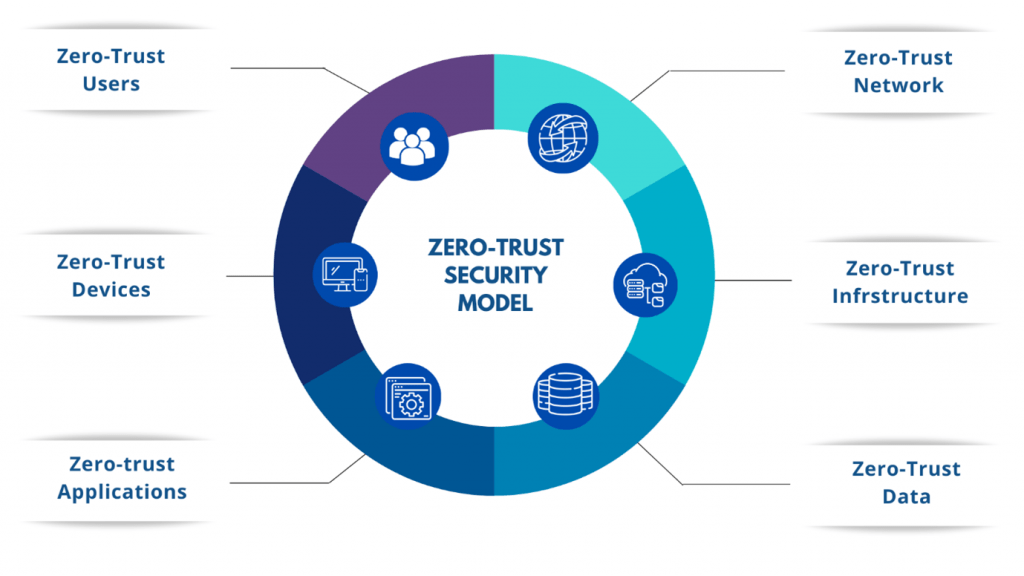
    The global pandemic further accelerated a trend toward remote work. Traditional, perimeter-based approaches to security will no longer work in a cloud-first environment. Hence, applying zero trust principles to every interaction with that data will enhance the overall security posture. This paradigm shift towards digital transformation calls for a modern architecture to combine cloud access security broker (CASB), Next Generation Secure Web Gateway (NG-SWG), and Zero Trust Network Access (ZTNA) capabilities as foundational for SASE (Secure Access Service Edge).

    7.Security Assessments & Upgrades

    Regular security assessments, like vulnerability assessments, pen tests, and social engineering assessments, will help in identifying the existing vulnerabilities, weak controls and provide compliance and information assurance.

    8.Threat Monitoring

    Real-time monitoring for threats helps in early detection and responding to threats while enhancing the security posture.

    9.Email Protection

    Email protection helps in filtering spam and provides a fortified approach to combat ransomware attacks and many other attacks where users fall prey to phishing attacks.

    10.DOS & DDOS protection

    Utilizing tools to protect against denial of service or distributed denial of service by whitelisting, blacklisting, and having strong firewalls alongside DNS Security will help in combating DOS/DDOS attacks.

  • Android malware BRATA strikes again with new dangerous capabilities

    Android malware BRATA strikes again with new dangerous capabilities

    Android malware BRATA gained new dangerous features in the latest version like GPS tracking, the ability to use various communication channels and factory reset to hide fraudulent wire transfer.

    BRATA – Brazilian Remote Access Tool (RAT) Android was a spyware, which was later known to be a banking trojan. This spyware was found out by Kaspersky as banking and financial institution-targeting Android RAT (The remote access trojan) in 2019. Before this RAT reach US and Spain, it used to target only Brazil.

    Cleafy published a research in December 2021 and highlighted BRATA as malware emerging across Europe. It was discovered that hackers posing as bank customer service representatives were targeting e-banking users and collecting their credentials.


    Variants and Capabilities:

    The BRATA trojan has been detected in three different variants so far:

    Source: Cleafy

    1. BRATA.A: This variation has been most popular for the last few months and hackers included 2 more capabilities to it in December. GPS tracking of the user’s device is the first capability that is under development and the second feature is wiping out the infected device.
    2. BRATA.B is quite comparable to the first variant. The partial concealment of the code and using customized banking overlay pages to steal the PIN is what sets this variant unique from the previous one.
    3. BRATA.C :  This variant consists of a trap that attacks by downloading and executing the malicious app.

    The creators of BRATA are constantly changing the malicious code to avoid antivirus software detection. “Although the majority of Android banking trojans try to obfuscate/encrypt the malware core in an external file (eg. .dex or .jar), BRATA uses a minimal app to download in a second step the core BRATA app (.apk),” the Cleafy team added.

    “When the victim clicks on the install button, the downloader app sends a GET request to the command-and-control (C2) server to download the malicious .APK,” they explained. “At this point, the victim has two malicious apps installed on their device.”

    After BRATA installs a malicious app and executes the code, the accessibility permissions had been granted and can take control over the compromised device. Here’s a list of commands discovered by McAfee in all of the payloads :

    • lock screen Theft (PIN/Password/Pattern)
    • Screen Capture: Screenshots are sent to a remote server after the device’s screen is recorded.
    • Execute Action: Abuse accessibility services to interact with the user’s interface.
    • Unlock Device: Use stolen PIN/Password/Pattern to unlock the device
    • Start/Schedule activity lunch: Opens a specific activity provided by the remote server
    • Start/Stop Keylogger: Captures user’s input on editable fields and leaks that to a remote server
    • UI text injection: Injects a string provided by the remote server in an editable field
    • Hide/Unhide Incoming Calls: Sets the ring volume to 0 and creates a full black screen to hide an incoming call
    • Clipboard manipulation: Injects a string provided by the remote server in the clipboard
    • In addition to the commands above, BRATA also performs automated actions by abusing accessibility services to hide itself from the user or automatically grant privileges to itself:
    • Hides the media projection warning message that explicitly warns the user that the app will start capturing everything displayed on the screen.
    • Grants itself any permissions by clicking on the “Allow” button when the permission dialog appears on the screen.
    • Disables Google Play Store and therefore Google Play Protect.
    • Uninstalls itself in case the Settings interface of itself with the buttons “Uninstall” and “Force Stop” appears on the screen.

    Here are some of the apps which are compromised :

    Source: McAfee


    Prevention against Android Malware:

    Here are some suggestions to help you avoid being deceived by Android malware.

    • Be aware of the Android application available in the official store before you download. Most victims are induced to install the app with the promises of a secure device but with a fake update. Users shouldn’t need to install a third-party app to keep their devices updated.
    • To detect malware applications the users should install a trustworthy and up-to-date antivirus on their devices.
    • Do not click on any suspicious links from an unknown sender, because it may download malicious applications through it.
    • Check the developer information, requested permissions, the number of installations, and the content of the reviews before installing an app. There is a chance that an application’s positive rating be a result of a majority of fake reviews.

    As a result, Android users must exercise extreme caution when allowing this access to any app. As accessibility services are so powerful, a malicious application may exploit them to completely take over device data, online banking, and funds.

    Get the protection you need and the privacy you want, with Clear Infosec. Check out our services and reach out to know more about how to secure your data.


    Reference :

    Fernando Ruiz Apr 12, Ruiz, F., Fernando Ruiz Mobile Malware Researcher Fernando Ruiz is a Security Researcher in McAfee, Researcher, M. M., & Fernando Ruiz is a Security Researcher in McAfee Labs. He specializes in mobile threats and Android malware. Ruiz performs deep analysis and reverse engineering of malicious code. (2021, April 12). Brata keeps sneaking into Google Play, now targeting USA and Spain. McAfee Blog. Retrieved January 25, 2022, from https://www.mcafee.com/blogs/other-blogs/mcafee-labs/brata-keeps-sneaking-into-google-play-now-targeting-usa-and-spain/

  • Anatomy of ransomware attacks

    Anatomy of ransomware attacks

    As we discussed in our previous blog “What is Ransomware”, let us look into the anatomy of ransomware attacks today.

    Ransomware attacks have been very high in all fields, and many have lost so much of money. In this section, different stages of ransomware attacks are explained. There are five stages of attacks in general, they are

    • Initiation,
    • Infection,
    • Attack,
    • Encryption,

    Initiation

    This is the first stage where the ransomware infiltrates the system. This is how cybercriminals will use their endeavors to take advantage of an environment. There are many ways the hacker may utilize this method, like setting up malicious websites, phishing mail, exploits on web servers, etc. In general, the most used method by hackers is a phishing email. The victim may download the contents or go to the email’s link, and the malware will easily enter the system. The number of users the organization has, as many exploits the hacker can use. Even if one user downloads the malware, it can affect the organization’s entire security.

    Infection

    The malware will be successfully downloaded into the system in the second stage. We can consider this the official stage where the ransomware attack has successfully gotten hold of our systems. The malware downloaded may also open back door communication with the hacker. Which, in turn, helps the hacker to install more malware. This may continue for weeks or months, without anyone knowing till the hacker decides to attack.

    Attack

    In this stage, the hacker will initiate the attack remotely. The already downloaded ransomware had infected many systems will start scanning across the systems to find the confidential data. It can also look for files stored in the cloud or any other backups as the hacker will not allow the victim to restore the data easily. The attacker usually will select the time when the company is less guarded and initiate the attack. Once the attack is started, then everything is racing against time. If specific plans are already devised and implemented, the attack may be mitigated in time. If not, the loss of money and the organization’s reputation will be huge.

    Encryption

    After the data scanning is done, the encryption of the data will begin. Different ransomware strains use different encryption algorithms to encrypt data successfully. The data may be the boot files, some classified pieces of information, or the whole machine itself. When the local data files are taken care of, the cloud data will also be encrypted. The simpler way is to download the data to the local network, encrypt the data, and then upload the encrypted data to the cloud by replacing the existing data file. This is done mainly to prevent the backup from recovering the encrypted data. Decrypting the data is a difficult task unless the organization has high lever specialists in that field.

    Ransom

    At this stage, you are a victim of a ransomware attack. The attacker would have sent a ransom note which explains the condition to decrypt the data file. In recent times the ransom demanded is in some cryptocurrency. Some hackers will delete a portion of data or corrupt the data if the time taken for ransom is not delivered exactly on time. If the organization cannot decrypt the data without crashing the file or there are no other backups available, the only option left is to pay the ransom. It is the loss of money and the loss of reputation, as this kind of attack exposes the organization is vulnerable to attacks easily.

    After the attack, the malware will be identified and eliminated by the system. But it is highly recommended to check the infected systems to identify any malware that is still hidden. There are also possibilities that hackers may not decrypt the data after the ransom is paid. Having a better cybersecurity team in an organization and equipped them with knowledge and technology can prevent ransomware attacks.

    Stay Aware and Stay Safe with Clear Infosec

    All of your employees play a role in recognizing and addressing security threats. Level up their skills with our Security Awareness Training.

  • Log4j related RCE flaw found in H2 Database – Earns critical rating

    Log4j related RCE flaw found in H2 Database – Earns critical rating

    Researchers have found that cyberattacks surged by 50% year over year in 2021, peaking in December due to a log4j exploit frenzy. Millions of Log4j targeted attacks have been recorded per hour since the bug was detected last month. The result was a global peak of 925 cyberattacks per week.

    Source: CPR

    Now in the popular open-source H2 Java database console, JFrog security detected and rated the flaw critical. This critical issue is similar to the Log4J vulnerability where the vulnerability in the Log4J logging library allows the attacker to execute remote code on vulnerable systems.

    It has got a lightweight in-memory solution that eliminates the need for data to be saved on a disc. However, this issue does not offer the same risk as the one previously discovered in Log4Shell.

    Researchers said the H2 flaw may be highly critical and the most severe attacking method is directly hitting the H2 console. This flaw allows unauthenticated RCE through the systems running H2 console connected to LAN or WAN.

    “ There are likely less than 100 servers on the internet impacted by the H2 flaw according to open-source intelligence (OSINT), so only a very limited number of organizations are directly affected.” Blumira’s Warner said. He also added that “This vulnerability is a good reminder that it is important to ensure that sensitive services are only internally exposed to mitigate potential future risks”

    H2 Bug and Log4J:

    “H2 bug (CVE-2021-42392) is similar to Log4Shell (CVE-2021-44228) but not of a much widespread and less severe than Log4Shell because the susceptible servers should be easier to discover.” JFrog researchers wrote in their post. The main similarity is JNDI remote class loading is the primary cause of the H2 vulnerability. This bug permitted many H2 database framework code paths to deliver unfiltered attacker-controlled URLs to the javax.naming.Context.lookup function which enables remote codebase loading (also known as Java code injection or remote code execution).

    “The org.h2.util.JdbcUtils.getConnection method requires a driver class name and database URL as parameters,” they wrote in the blog post. “The function creates an object from the driver’s class and executes its lookup method if the driver’s class is assignable to the javax.naming.Context class.”

    Unlike Log4Shell, The remote code execution (RCE) bug will directly affect the H2 console server which processes the initial request and the H2 console only listens to localhost connections by default on vanilla H2 database releases which makes the default setting safe.

    “Log4Shell was vulnerable under Log4j’s default configuration and comparatively H2 console also can be easily modified according to remote connections. But in comparison to the Log4j, the severity of H2 is less because of its execution aspects. Despite the fact that many companies run the H2 database, they may not run the H2 console along with it” researchers said.

    Recommendations:

    Numerous developer tools depend on the H2 database and expose the H2 console. This is concerning because of a “current trend of supply chain attacks targeting developers, such as malware packages in prominent repositories,”. These attacks highlight “the significance of securing development tools for all legitimate use cases and after applying their recommended update, many H2-dependent tools should be safer.,” according to the researcher.

    The JFrog team recommends upgrading the H2 database with version 2.0.206, which can fix CVE-2021-42392 by limiting JNDI URLs to use only local java protocol and excludes any remote LDAP/RMI queries. “This fix is so much similar to the fix which is recommended for Log4j 2.17.0” researchers explained.

    With Clear Infosec security experts, find and fix any bugs before someone bad does and stay away from being in the next headline. Keep your IT infra secured.

    Reference:

    Montalbano, A. E., & Montalbano, E. (n.d.). LOG4J-related RCE flaw in H2 database earns critical rating. Threatpost English Global threatpostcom. Retrieved January 11, 2022, from https://threatpost.com/log4j-related-flaw-h2-database/177448/

  • What is RANSOMWARE ?

    What is RANSOMWARE ?

    Ransomware is an ever-evolving type of malware. It is designed to encrypt files on a device and corrupt the device or system that depends on the files. The cybercriminal may encrypt the classified data or block access to the system itself. Later, they will ask the victims to satisfy their demands or threaten them with selling or leaking the confidential data in their control. In recent years, ransomware attacks became very prevalent in all kinds of organizations, small or big, private or government. No organization is safe from cybercriminals.

    To prevent a ransomware attack, it is highly recommended to have a professional cyber security team that monitors the organization 24/7. Even with the increase in security, cybercriminals also increase their tactics of attacks, so the security professional must always increase their knowledge. If the ransomware infection has happened, the victims generally have three solutions pay the ransom, remove the malware, or reboot the system completely. The last option is only when the system is corrupted, and data is not stolen already.

    Impact of ransomware

    The ransomware attack may happen to any individual or an organization itself. Anyone with a system or mobile connected to the internet is at risk of being subjected to ransomware.

    The effects of ransomware differ with their intent of attacks. It can be destructive to an individual or an organization. Even if the victims pay the ransom to recover their corrupted files, it cannot be guaranteed that files will recover. If the ransom is not paid and the organization cannot decrypt the data by themselves, they need a third-party specialist to recover or decrypt the specified files. This may also be costly as reputed recovery specialist organization fees may be higher.

    Ransomware has a huge impact, as it leaves a company or individual without the data they need to operate or deliver. The monetary and reputation loss will be devastating to any organization. With the development of technology, ransomware infections also increased significantly, and their effects are very destructive. The recovery from a destructive ransomware attack is also very tedious for organizations. Some organizations cannot overcome the impact caused even after paying the ransoms.

    Types of Ransomware

    The most common types of ransomware are :

    1. Locker ransomware

    The basic function of this kind of ransomware is to deny access to computer functions. Such as, the victim may be blocked from using the desktop, the mouse or keyboard functions may be disabled, etc. And allow only to work in the window which contains the ransom demand. If the victim didn’t pay the ransom, they could not get the access back. This kind of attack can be mild, as it only makes the victim deny their access to the computer and not concentrate their attacks on critical files or confidential data.

    2. Crypto ransomware

    Crypto ransomware is opposite to the function of locker ransomware. It mainly encrypts or corrupts the critical data and does not block the computer functions. The victim can see their files but cannot access those files. In general cases of crypto-ransomware, the attackers often provide a countdown. If the ransom is not paid within a certain time limit, they may threaten to delete or leak the important data.

    Examples of Ransomware

    Some of the Ransomware strains are listed below

    Reveton

    Reveton locks the victim’s device completely and asks the victim to log in credentials. In general, the attackers show a fake official (any government security organization) message on the victim’s display. The whole system will be locked completely, and only by paying the ransom, the login credentials can be obtained. In some cases, the attackers also installed a trojan to steal passwords and other data in the victim’s computer.

    Locky

    It is a ransomware strain developed to lock the victim’s system completely. These kinds of ransomware are usually affected by email messages. When the email is opened, the victim is asked to enable macros to read the attached document. If the victim enables the macros, Locky begins its encryption process and encrypts many files. Usually, the email will be disguised as an invoice message.

    Cryptolocker

    It is one of the oldest forms of cyberattacks used for more than a decade. The attackers used the Cryptolocker botnet approach in ransomware in 2013. Even though the original Cryptolocker botnet was shut down in 2014, the attackers managed to earn more than millions. And many kinds of variants are still used. It is often impossible to decrypt the files or system without paying the ransom when Cryptolocker ransomware was used as the algorithms used to encrypt are very strong

    Cerber

    It is a type of ransomware that mainly targets cloud-based Microsoft office 365 users. Millions of users are fallen for this attack with large phishing operations.

    Crysis

    This ransomware encrypts files on fixed, removable, and network drives. It uses a strong encryption algorithm making it difficult to crack or decrypt the files. It usually spreads from email or installer files.

    Bad Rabbit

    This ransomware spreads from compromised websites that contain a fake adobe player installer file like “install_flash_palyer.exe.” If the victim executes the file, the system will reboot, and after rebooting, the screen will show the ransom details on the victim display.

    Jigsaw

    It is one of the destructive types of ransomware, which encrypts many data files and deletes them progressively until the ransom is paid. Usually, the attack will have a countdown of 72 hours, and files will be deleted for every hour until the ransom is paid or ultimately deleted every single file.

    Cryptowall

    It can be considered an advanced form of the crypto locker. There are multiple strains of this ransomware used worldwide with different names.

    KeRanger

    This ransomware was found on the BitTorrent client, and it is the first ransomware developed to block Mac OS applications.

    Apart from these, there exist many other ransomware strains that can infect the systems of an organization or individual. Let us see the anatomy of ransomware attacks in coming weeks.


    Stay Aware and Stay Safe with Clear Infosec

    It is always necessary to provide Security Awareness Training to your workforce to keep them aware of the evolving threat landscape and stay fortified for any kind of targeted social engineering attacks. Get adapt to technologies and security trends with Clear Infosec

  • 6 Crucial Features of a Reliable GRC Tool for Your Company

    6 Crucial Features of a Reliable GRC Tool for Your Company

    With the uncertainty brought by the pandemic, businesses need to check on their governance, risk, and compliance framework.

    According to the 2019 State of Enterprise Risk Management, 62% of the surveyed organizations have experienced a critical risk event for three years.

    Such risks are inevitable, which is why governance, risk management, and compliance must be checked.

    • Governance refers to the process by which companies manage and mitigate business risks.
    • Risk management is the evaluation of business risks and mitigation of this in an orderly manner.
    • Compliance refers to the programs that meet industry mandates, regulations, and policies.

    If you want to mitigate and avoid new and emerging threats and risks, you must invest in reliable GRC systems with the following features:

    Automation

    The traditional way of managing governance, risk, and compliance is via spreadsheets, which is time-consuming. You may stick with this process. However, there is no guarantee that operational adjustments will be made promptly, especially if your organization is growing.

    Opting for an automated GRC software will lessen possible human errors like duplication or inconsistencies, making more transactions.

    The best GRC software can integrate and automate routine auditing and compliance processes.

    Dashboards

    GRC systems available in the market were proven to collect data, but not all provide a dashboard feature. According to an Exasol survey, 90% said that data democratization is a priority in their company. Don’t get left behind and find a GRC system that allows data democratization through dashboards and reports. In the same study, 82% reported that their organization uses dashboards to communicate insights.

    Maximize the capacity of your GRC platform by ensuring that it allows the creations of dashboards to better guide your employees in making decisions since they can easily see the key information at one glance.

    ClearGRC is one software that utilizes dashboards for effective management and segregation of controls. This feature ensures that all files, standards, and frameworks are aligned. You may create separate dashboards for policies, processes, and audits which are simple to use and easy to understand.

    Centralization

    The three elements of GRC produce a wide array of data available for your reference. Without centralization features, your GRC software may cause more confusion than a better organization for your company. Experian’s data management report reveals that 83% of businesses see data as a vital part of forming a business strategy. Hence, the data stored in your GRC software must be carefully regulated to hold value.

    Your GRC framework will not work to its full potential without clean, reliable data. In fact, according to the 2018 Nintex survey, 49% of employees have trouble locating documents. You wouldn’t want to waste your employees’ time, which they can use better for meaningful tasks.

    ClearGRC has a dedicated document system where you can classify, group, and control versions of documents. Another centralization feature of GRC that may aid your operations is its End-to-End Policy Life Cycle Management feature, which allows easy alignment of policies to standards and processes.

    Customized Report Generation

    Reporting data and results is tedious and time-consuming. GRC solutions may help in this aspect if it has an automatic reporting feature.

    GRC tools such as ClearGRC assist in gathering audit evidence by creating dashboards and reports allowing you and your team to understand specific areas you need to focus on. It also streamlines the process management as ClearGRC provides reminders and timely reports.

    Having a customized report allows you to see the overall progress of your compliance program and risks to manage. This will lead to better decision-making and promotes efficiency.

    Integration services

    When your company uses software for different functions, it is vital to check if integration is possible. Part of the computer science degree requirements is learning about integration, which refers to linking tools, systems, and software applications.

    Without integration, your business may further decline despite implementing technologies for various functions, as you will have to do manual work to align the data from each tool.

    Support services

    As you find the GRC solution for your company, choose one that offers support in different modes. You wouldn’t want to waste the money you invest because you are having difficulty navigating and using the GRC tool. ClearGRC is one tool that offers email and phone support, live support, and training.

    Finding the best GRC tool

    The above-listed features will just serve as a guide as you try to find the best GRC tool. You should do your research and due diligence to ask experts. Several GRC solutions in the market offer consultations and trials. Maximize these opportunities to know whether it is an excellent fit for your company.

    You may book a consultation with ClearGRC by filling out the form here.

  • Impact and Fixes for Apache Log4J Zero-Day Vulnerability :

    Impact and Fixes for Apache Log4J Zero-Day Vulnerability :

    Apache Log4J vulnerability (CVE-2021-44228) commonly known as “Log4Shell,” is a zero-day vulnerability that was first discovered on December 9, has earned a CVSS score of 10 which is the highest possible severity level. Everything from the cloud to developer tools and security devices is affected by the Log4j vulnerability with warnings that it could provide unauthenticated remote code execution and server access.

    A Log4j flaw where the Apache Software Foundation produced the library, which is a key Java logging framework. Several national cybersecurity agencies, including the Cybersecurity and Infrastructure Security Agency (CISA) and the UK’s National Cyber Security Centre, have issued warnings since CERT New Zealand announced last week that CVE-2021-44228, a remote code execution flaw in Log4j, was already being exploited in the wild (NCSC)

    Log4J Vulnerability Impact :

    When using a vulnerable version of Log4J to log untrusted or user-controlled data, your application may be vulnerable to Remote Code Execution (RCE). If Apache Log4J, version 2.0 to 2.14.1, is installed on a device that is connected to the internet, it is vulnerable. According to the NCSC, the affected version of Log4j is used in Apache Struts2, Solr, Druid, Flink, and Swift frameworks.

    AWS has outlined how the issue affects its services and stated that it is working on patching its Log4j-based services as well as releasing mitigations for CloudFront. Similarly, IBM stated that it is “actively responding” to the Log4j issue in its own infrastructure and products. Websphere 8.5 and 9.0 are affected, according to IBM. Oracle has also released a fix for the problem. “Organizations should be prepared for a constant stream of downstream advisories from third-party software producers who include Log4j among their dependencies,” said Rapid7.

    Second Log4J Vulnerability Impact:

    After days of attempting to patch the first vulnerability, cybersecurity experts discovered a second vulnerability involving Apache Log4j on Tuesday. The CVE description says it could allow the attackers to craft malicious input data to result in a Denial of Service (DOS) attack. When the logging configuration uses a non-default Pattern Layout with either a Context Lookup or a Thread Context Map pattern, this could allow attackers with control over MDC input data to craft malicious input data using a JNDI Lookup pattern, and it results in a denial of service (DOS) attack. Log4j 2.15.0 restricts JNDI LDAP lookups to localhost by default.

    Log4J Vulnerability Patches:

    In some non-default configurations, the fix for CVE-2021-44228 in Apache Log4j 2.15.0 was found to be incomplete. CISA’s main advice is to identify internet-facing devices running Log4j and upgrade them to version 2.16.0, or to apply the mitigations provided by vendors “immediately”. We recommend at least one of the following mitigations for vulnerable versions greater than or equal to v2.10:

    • version >=2.10: Set log4j2.formatMsgNoLookups to true
    • versions from 2.0 to 2.10.0 >= Run the following command to remove the LDAP class from Log4J: zip -q -d log4j-core-*.jar org/apache/logging/log4j/core/lookup/JndiLookup.class.
    • version 2.16 – fixes the problem by removing support for message lookup patterns and disabling JNDI functionality by default.
    • Set the log4j2.formatMsgNoLookups system property to true.
    • In the Java Virtual Machine, mitigate: Java 8 (or later) Upgrade to release 2.16.0.
    • Users requiring Java 7 should upgrade to release 2.12.2 when it becomes available (Work in progress)
    • If upgrading isn’t an option, make sure to remove all JndiLookup class from the classpath: zip -q -d log4j-core-*.jar org/apache/logging/log4j/core/lookup/JndiLookup.class

    Please keep in mind that Log4J v1 is no longer supported and will not be patched for this issue. Other RCE vectors are also vulnerable to Log4J v1, hence we urge that you upgrade to Log4J 2.16.0/2.15.0 as soon as possible.

    The Log4j problem has been reported in Australia, New Zealand, Canada, the United Kingdom, Sweden, Germany, Singapore, and other countries. According to the CBC, Canada’s Revenue Agency took some services offline on Friday after learning of the issue. Finally, For mitigating attacks on the Log4j vulnerability, Microsoft has released a set of compromise indicators and guidelines. Installing currency miners, using Cobalt Strike to facilitate credential theft and lateral movement, and exfiltrating data from hacked computers are all examples of post-exploitation that Microsoft has witnessed.

    You can find the list of software that is affected by the vulnerability here (Released by Dutch Natural Cyber Security Center) and the attack surface of log4j and list of impacted manufacturers here.


    Reference: Rubin, S. (2021, December 14). LOG4J “Log4shell” zero-day vulnerability: Impact and fixes – fossa. Dependency Heaven. Retrieved December 14, 2021, from https://fossa.com/blog/log4j-log4shell-zero-day-vulnerability-impact-fixes/