Author: Clear Infosec

  • CPUs and Registers

    CPUs and Registers

    TL; DR

    ·      CPU architecture defines how instructions are executed:

    o  CISC = complex but fewer instructions

    o  RISC = simple but more instructions

    ·      Processor bitness (16-bit, 32-bit, 64-bit, etc.) depends on the size of registers
    and memory addresses, not the instruction length.

    ·      Registers are the CPU’s fastest memory:

    o  General-Purpose Registers store operands, intermediate results, and memory addresses for computations.

    o  Instruction Pointer (IP/PC) tracks the next instruction.

    o  Flags Register tracks CPU state for decision-making (Zero, Sign, Carry, Overflow, Parity, Auxiliary).

    ·      Implementation evolution:

    8-bit CPUs: single 8-bit A register.

    o  16-bit CPUs: AX (16-bit), accessible as AL (low 8 bits) and AH (high 8 bits);
    only AX, BX, CX, DX allow high/low byte access.

    o  32-bit CPUs: EAX (32-bit), still accessible as AX, AL, AH; same restrictions for
    EAX, EBX, ECX, EDX.

    o  64-bit CPUs: RAX (64-bit), accessible as RAX (64-bit), EAX (32-bit), AX
    (16-bit), AL/AH (8-bit); new low-byte registers added for other General Purpose Registers – SI, DI, SP, BP – low 8 bits only.

    ·      Types of registers: General-Purpose, Special-Purpose, Segment Registers (CS, DS, SS,
    ES, FS, GS). Some registers not covered here for simplicity. 

    ·      AMD introduced 64-bit architecture and created a new naming convention.

    Intro

    This is a very basic post about CPUs and registers. It discusses the evolution of CPUs over time and how the implementation of registers has changed. This information serves as a starting point for learning assembly language and reverse engineering. Efforts were made to avoid unexplained terms, but you may come across some unfamiliar terms, such as the stack, in a few places. Please don’t worry if some terms are unclear; they will be covered in future posts. If you are completely new to this topic, you may not fully understand the uses of different registers, and that’s perfectly fine. These are concepts that one becomes comfortable with through practice and familiarity. Use this post as a starting point to introduce yourself to the very basics and to have an idea about CPU architecture and the types of registers and their implementation across different processors.   

    Memory Hierarchy

    CPU throughout their working requires different types of memory based on the accessibility. Having the same type of memory for all use cases won’t be efficient. Using only the fastest memory type for all use cases like storing a movie would definitely be inefficient, as these fast-accessible memories are expensive, and having gigabytes of such memory would be costly. Volatility also plays a role. Not all information needs to persist in memory. So, the usage of
    non-volatile memory in all scenarios is not the right way, as it’s slow and pointless to use slow non-volatile storage while sacrificing speed. This why there are different types of memories that the CPU can make use of based on the need. This is why the CPU utilizes different types of memory depending on the specific requirements.

    Memory Hierarchy:

    1.     CPU Registers

    2.     Cache Memory

    3.     Main Memory (RAM)

    4.     Secondary Storage (Hard drives, SSDs)

    5.     Tertiary Storage (Magnetic tapes, optical
    disks)

    Use Cases for Each Level

    ·      CPU Registers: These are the smallest and fastest volatile memory located inside the CPU. The CPU uses registers to hold the data, instructions, and addresses it is actively processing. Registers provide the immediate workspace for instruction execution, enabling extremely fast operations critical for assembly language and low-level programming.

    ·      Cache Memory: Cache acts as a fast-access intermediary storing frequently used data and instructions recently fetched from main memory. The CPU first checks cache for needed data to minimize the latency of memory access, which helps accelerate instruction execution when registers do not contain the required data.

    ·      Main Memory (RAM): RAM stores programs and data currently in use. When the required data is not present in cache, CPU fetches it from RAM. While slower than cache, RAM provides a large, volatile storage space for active processes and running applications.

    ·      Secondary Storage: This includes hard disk drives and solid-state drives that provide non-volatile long-term data storage. The CPU accesses secondary storage via slower I/O
    processes only when data is not found in main memory.

    ·      Tertiary Storage: Used primarily for archival or backup purposes, tertiary storage such as magnetic tapes or optical disks are very large but slow and rarely accessed directly by
    the CPU, primarily supporting long-term retention.

    CPU Architectures

    The history of CPU architecture is a very interesting journey especially if you see the evolution from 4-bit to 64-bit processors. The architecture of a CPU defines how a processor executes instructions and performs computations, balancing speed, power consumption, complexity, and efficiency. CPU architectures fall into two main categories:

    ·      CISC (Complex Instruction Set Computing) architectures: These processors are designed to handle complex instructions, allowing them to complete tasks with fewer instructions.
    However, this complexity leads to higher power consumption. Because of their ability to process intricate tasks efficiently despite using more power, CISC processors are well-suited for personal computing and are commonly found in desktops, laptops, and servers.

    ·      RISC (Reduced Instruction Set Computing) architectures: These processors use simpler instructions and often require more instructions to complete a task. However, this simplicity allows them to execute instructions faster and use less power. RISC architectures like ARM and RISC-V have become very popular, especially in mobile devices, embedded systems, and are increasingly being used in laptops and servers.

    In addition to the classification based on the type of instruction set (CISC and RISC), processors are also classified by their bitness. Historically, CPUs started with 4-bit designs (used in early calculators like the Intel 4004), then moved to 8-bit (such as the Intel 8080 and the MOS 6502, common in early home computers), followed by 16-bit (like the Intel 8086, which powered the first
    IBM PCs). The industry later shifted to 32-bit processors (such as Intel’s 80386 and the Pentium series), and today, most modern processors are 64-bit (like Intel Core i7, AMD Ryzen, and ARM-based Apple M-series chips).

    Each step in this progression allowed processors to handle larger numbers, access bigger
    memory spaces, and perform more complex operations more efficiently.

    Understanding Instruction Size and Processor Bitness

    The bitness of a processor (16-bit, 32-bit, 64-bit, etc.) defines how much data the CPU can
    handle in a single operation, which depends on the size of its registers, as well as the size of the memory addresses it can work with.

    ·      A 16-bit processor can work with data chunks and memory addresses up to 16 bits (2
    bytes) wide.

    ·      A 32-bit processor can work with up to 32 bits (4 bytes).

    A 64-bit processor can work with up to 64 bits (8 bytes).

    There can be a misunderstanding that when we say a processor has a 16-bit or 32-bit
    instruction set, it means every instruction is exactly 16 or 32 bits long. Instead, it refers to the default size of operands and memory addresses that the processor is designed to work with.

    The actual length of an instruction in machine code is variable. When we say the length of
    an instruction, it is not just the size of the instruction itself but also includes the size of its operands and any memory addresses it references. 

    On 32-bit processors, an instruction can be anywhere from 1 byte up to 15 bytes in size. 15
    bytes equals 120 bits, which is clearly larger than 32 bits.

    This shows that instruction size is not the same as processor bitness—what matters is the
    size of the data the instruction is handling, not the total bytes taken by the instruction itself.

    For example:

    ·      MOV 5 → Here, 5 is the operand (the value being moved). Since it is a small constant, the instruction is short and only takes a few bytes.

    ·      MOV [12345678], 5 → In this case, the operand 5 must be stored at a specific memory address (12345678). To represent this instruction, the machine code must include the entire memory address along with the value, so the instruction becomes much longer.

    But in both cases, if the processor is 32-bit, the size of the operand (5) or the memory address (12345678) cannot exceed 32 bits.

    Registers

    When a CPU carries out a task, it uses registers in several ways:

    1.     Holding Operands: Registers store the data values (operands) that will be used in arithmetic or logical operations. For example, to add two numbers, the CPU loads them into registers first.

    2.     Storing Instructions: Some registers hold the current instruction being executed or point to the next instruction to fetch (instruction pointer).

    3.     Addressing Memory: Registers can hold memory addresses, helping the CPU quickly locate data in RAM or cache.

    4.     Temporary Results: During computations, intermediate results are kept in registers for quick access as the CPU works through instructions.

    5.     Control and Status: Certain registers keep track of the state of the CPU and control the flow of operations, such as flags that indicate conditions like zero or overflow.

    By using registers to hold data close to the processing units, the CPU avoids slower memory accesses, greatly speeding up task execution.

    Types of Registers

    Different registers serve different purposes, and t we usually group them based on their function. But this grouping isn’t strict—some registers might be called general-purpose by some sources, while others might list them as special-purpose. Before proceding, this does not cover all existing
    registers
    —it focuses only on the ones most relevant for understanding CPU operations and the topics discussed here.

    Types of registers:

    ·      General-Purpose Registers

    ·      Special-Purpose Registers

    ·      Segment Registers

    General Purpose Registers

    These registers are used to temporarily hold data that the CPU is actively working on. They hold temporary data, operands, intermediate results, memory addresses, and control information during program execution. They are the main working registers used by the CPU for most computations.

    ·      AX (Accumulator): Used for arithmetic and logic operations. Result data from operations or syscalls stored in this register.

    ·      BX (Base): Often serves as a base pointer for memory references to data that is to be read or written.

    ·      CX (Counter): Counter register Used mainly for loop counting and string operations.

    ·      DX (Data): Used for I/O operations and extended arithmetic.

    ·      SI (Source Index) and DI (Destination Index): Used for string and array manipulation.

    ·      BP (Base Pointer): Points to the base of the current stack frame for accessing function variables.

    ·      SP (Stack Pointer): Points to the top of the stack, essential for managing function calls and local variables.

    ·      R8 to R15: Additional registers in 64-bit architectures for increased operational capacity.

    Special Purpose Registers

    ·      IP (Instruction Pointer): The CPU has to know which instruction to execute next. This register, also known as the Program Counter (PC), keeps track of the address of the next instruction. Each time the CPU finishes an instruction, the instruction pointer updates to the address of the following

    instruction in the program. This allows the CPU to step through instructions one by one in the correct order. If the program needs to jump to a different part (for example, in loops, branches, or function calls), the instruction pointer is updated to point to the new location, so the CPU knows where to continue.

    ·      Flags: The flag or status register is a special register in the CPU that is used for decision-making and flow control in CPU operations, allowing instructions to “know” what happened previously and respond accordingly. It keeps track of important information about the outcome of operations and the current state of the processor. It consists of individual bits called “flags,” and each flag records a specific condition, such as whether the result of a calculation was zero.

    These flags are automatically set or cleared by the CPU after arithmetic or logic instructions. One simple use case of this register is the ‘JMP’ instruction, which alters the flow of the program. Basically, all the “if-else” statements in our high-level code make use of this register underneath.

    Common flags include:

    o  Zero Flag (ZF): Set if an operation’s result is zero.

    o  Sign Flag (SF): Shows if the result is negative.

    o  Carry Flag (CF): Indicates if an arithmetic operation produced a carry out or borrow into the highest bit.

    o  Overflow Flag (OF): Shows if an operation produced a result too large for the register.

    o  Parity Flag (PF): Set if the number of set bits in the result is even.

    o  Auxiliary Carry Flag (AF): Used in specialized arithmetic (e.g., BCD).

    Segment Registers

    Segment registers are special registers in the CPU that hold the base (starting) addresses of specific memory segments.

    The segments Registers are:

    ·      Code Segment (CS): Contains the executable program instructions.

    ·      Data Segment (DS): Stores variables and program data.

    ·      Stack Segment (SS): Used for the stack, which handles function calls and local variables.

    ·      Extra Segment (ES), FS, GS: Additional data segments used for various purposes.

    Each segment register stores the base address of its corresponding segment. When the CPU
    accesses memory, it combines the segment base address from the segment register with an offset address to calculate the full physical memory location.

    One thing to keep in mind is that we were now looking at the case where the memory is
    segmented. But there’s another case where the memory is not segmented and this is decided based on the memory model the CPU uses. Memory models say how the memory is laid out in a CPU. There are two types – Segmented and Flat.

    Segmented Memory Model

    The memory is segmented into different segments. These segments are logical divisions of the
    system memory, each used to organize different types of data or instructions. As discussed above, the CPU combines segment registers with offsets to calculate physical addresses. This segmentation was essential in early CPUs with limited address spaces.

    Flat Memory Model

    The memory is treated as one continuous block. The CPU then uses simple linear addresses for
    memory access, simplifying programming and increasing flexibility. Here, segment registers are typically all set to point to the same base address (often zero), effectively disabling segmentation for software. Segment registers remain present mainly for backward compatibility.

    Implementation of Registers

    Now that we know what registers and the different CPU architectures are, let’s go ahead to 
    see how registers have been implemented and how it has been extended to be used in 16-bit and other successive processor. 

    8-bit Architecture

    Initially in the Intel 8-bit 8008 processor (pre-x86), there was only an 8-bit A register.

    16-bit Architecture

    With the 16-bit 8086 architecture, this evolved into a 16-bit AX register which was extended from the previous 8-bit A, which stands for “A-extended,”. The AX register could still be accessed as two separate 8-bit registers: AL (lower 8 bits) and AH (higher 8 bits). However, individual access to the 8-bit registers (higher or lower) is only restricted to the four AX, BX, CX, and DX registers
    and not the rest.

    32-bit Architecture

    With the 32-bit architecture, AX was further extended to EAX (Extended AX), creating a 32-bit register. The assembly instructions could still access the 16-bit AX or the 8-bit AL and AH parts. Similar to the 16-bit architecture, individual access to the 8-bit registers (higher or lower) is only restricted to the four EAX, EBX, ECX, and EDX registers and not the rest.

    64-bit Architecture

    AMD was the first to develop the 64-bit architecture, which was later adopted and licensed
    by Intel. In AMD’s 64-bit extension, EAX was extended to RAX, a 64-bit register where “R” stands for “register” or “really wide.” In this architecture, it is possible to access RAX (64-bit), EAX (32-bit), AX (16-bit), as well as the 8-bit AL and AH registers.

    However, AMD also introduced the ability to individually access the least significant (lower)
    8 bits of all general-purpose registers, not just AX, BX, CX, and DX. This was done by adding new 8-bit registers such as SIL (low 8 bits of RSI), DIL (low 8 bits of RDI), BPL (low 8 bits of RBP), and SPL (low 8 bits of RSP). Unlike AX, BX, CX, and DX, these new registers only provide access to their low 8 bits and do not have separate high-byte counterparts.


    Naming Conventions

    CPU Architecture

    The x86 architecture refers to the 32-bit instruction set originally developed by Intel. The x86-64 is the official name for the 64-bit extension of the x86 architecture The term x64 is simply Microsoft’s marketing name for the same x86-64 architecture.

    The term x86 originates from the naming pattern of these Intel processors, many of which
    ended with “86” (like 8086, 80286, 80386, and 80486). This family of processors and their successors became collectively known as the x86 architecture.

    Registers
    Following the introduction of the 64-bit processor, AMD introduced a new naming convention to provide a consistent way to refer to the expanded set of registers in the 64-bit architecture. In this scheme, the traditional register names were mapped to a numeric system: for example, the 64-bit RAX register could also be called R0, representing register 0. Similarly, the 32-bit EAX became R0D, where the “D” indicates a double word (32-bit) size. In x86, a word is 16 bits (2 bytes), so a double word equals 32 bits (4 bytes).

    This pattern extended to all 16 general-purpose registers, named R0 through R15. Each register could be accessed in multiple sizes by appending suffixes: for the 64-bit full register (e.g., R8), the 32-bit lower portion (R8D), 16-bit word (R8W), and 8-bit byte (R8B). This naming system created uniformity across registers and sizes, improving clarity and simplifying assembly programming.

    Despite this new numeric naming convention, most disassemblers and programmers typically
    continue to use the traditional alphabetical names (such as RAX, RBX, RCX) as mnemonics for ease of understanding and continuity with older architectures.

    Conclusion

    This post has covered the basics of registers, their types, and their use cases. The initial plan was to also include basic assembly instructions and simple assembly code examples, but to keep each post clear and focused, those topics will be covered in the next post to prevent cramming too much content at once. I hope this post was on point and has given you an overview of the concepts, helping you better understand the upcoming topics.

  • Charon Ransomware Targets Middle East with APT Tactics

    Charon Ransomware Targets Middle East with APT Tactics

    Introduction & Targeting

    A novel ransomware strain known as Charon has surfaced, specifically targeting critical infrastructure in the Middle East—namely, the public sector and aviation industry. 

    thehackernews.com/2025/0...

                                                            Fig1: Overview of Charon ransomware’s infection chain and attack flow

    Analysts note that Charon exhibits unmistakable Advanced Persistent Threat (APT) hallmarks, such as DLL sideloading, process injection, and anti-EDR (Endpoint Detection & Response) evasion techniques, signaling a troubling shift in ransomware sophistication.

    Attack Chain: From Legitimate Binary to Malicious Payload

    trendmicro.com/en_us/res...
                      Fig2: Attack chain of Charon ransomware from legitimate binary execution to malicious payload deployment.
    1. Abuse of Trusted Executables
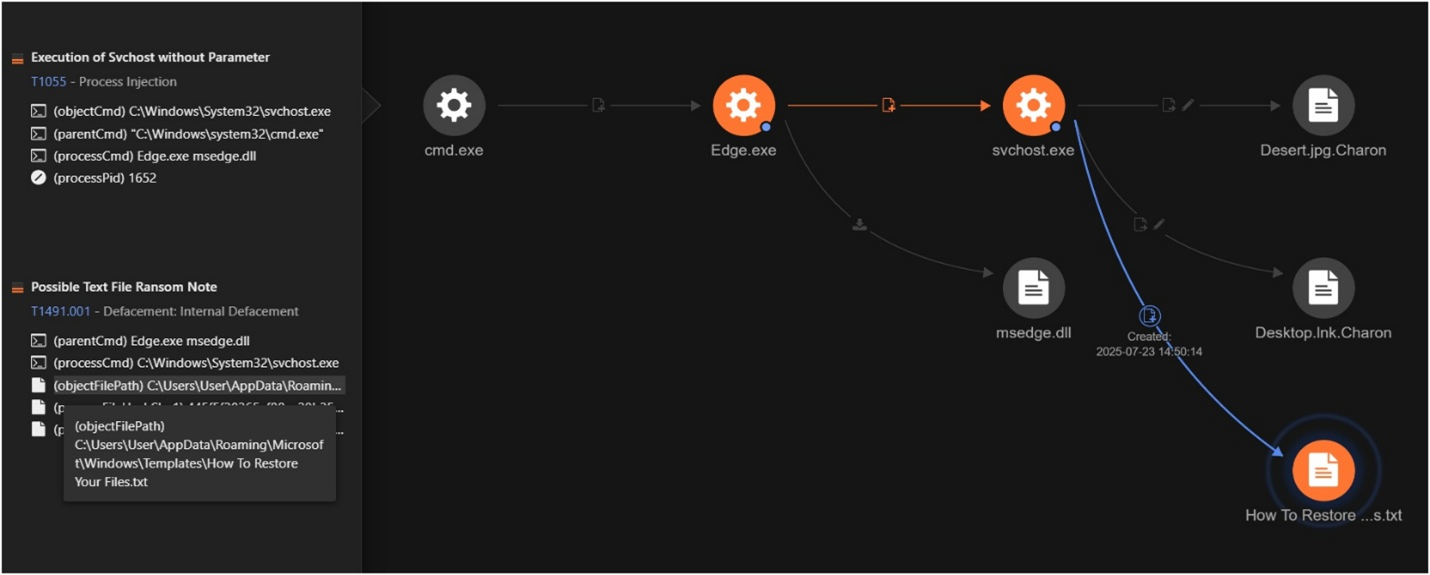
      The intrusion begins when attackers execute a legitimate Windows binary, Edge.exe (originally dubbed cookie_exporter.exe), to sideload a malicious DLL named msedge.dll—also known by its internal codename SWORDLDR.

    2. Encrypted Multi-Stage Payload Loading
      SWORDLDR loads a seemingly innocuous file DumpStack.log—initially missing from telemetry but later recovered—that contains encrypted shellcode. This shellcode undergoes multi-stage decryption: first revealing an intermediate payload with embedded configuration directives (such as targeting svchost.exe for injection), and then fully unpacking the Charon ransomware executable (PE).securityaffairs.com/1810...

    3. Process Injection for Stealth
      The decrypted payload is stealthily injected into a new svchost.exe process, enabling impersonation of a legitimate service to evade endpoint security mechanisms.

    Post-Delivery Behavior & Encryption Techniques
    1. Disabling Defenses & Destroying Recovery Artifacts
      Prior to encryption, Charon disables security services, corrupts or deletes shadow copies, and empties the Recycle Bin—actions aimed at thwarting recovery attempts.

    2. Partial File Encryption for Speed
      Leveraging a hybrid cryptographic method with Curve25519 ECC and ChaCha20, Charon employs a partial encryption strategy. Smaller files (≤ 64 KB) are fully encrypted; medium files have selective chunks encrypted; larger files are handled in evenly distributed chunks—an approach that balances speed and file disruption .

    3. Network Propagation
      Charon aggressively scans for and encrypts network shares—excluding ADMIN$—using NetShareEnum and WNetEnumResource APIs. It targets both mapped drives and UNC paths to maximize impact.

    4. Dormant Anti-EDR Driver
      Inside its data section, Charon contains a driver (e.g., WWC.sys), derived from the open-source Dark-Kill project, designed to disable EDR via a BYOVD (Bring Your Own Vulnerable Driver) tactic. Notably, this module remains inactive in current versions—likely reserved for future use.

    Targeted Theft & Ransom Messaging

    Charon’s ransom notes are meticulously customized—they explicitly reference the victim organization by name and often include a list of encrypted files along with tailored payment instructions. This approach underscores a targeted rather than opportunistic modus operandi.

    Attribution & APT-Style Convergence

    The technical execution of Charon—particularly the DLL sideloading workflow—mirrors what is seen in campaigns attributed to the China-linked APT group Earth Baxia (also known as APT41, Wicked Panda). Nonetheless, researchers stop short of definitive attribution. They outline three possibilities:

    • Direct involvement by Earth Baxia

    • A deliberate mimicry or false-flag operation

    • An independently developed but similar playbook

    At present, there’s no conclusive infrastructure overlap to confirm attribution.

    This merging of APT-level tactics with ransomware reflects a dangerous evolution—ransomware actors are adopting stealth, precision, and persistence, raising the stakes for defenders.

    Defensive Recommendations

    To counter this sophisticated threat, security teams should consider the following multilayered defenses:

    • Harden Execution Policies
      Restrict which executables are permitted to load DLLs, especially in commonly abused directories. Monitor chains like Edge.exe → suspicious DLL → svchost.exe and flag unvalidated DLLs placed next to signed binaries.

    • Strengthen Endpoint Controls
      Ensure that EDR and antivirus agents cannot be tampered with, disabled, or uninstalled by malicious actors.

    • Isolate Sensitive Resources
      Restrict lateral movement by safeguarding network shares and disabling admin shares like ADMIN$. Use robust authentication controls for remote access.

    • Robust Backup Strategy
      Maintain offline or immutable backups that can’t be compromised by malware. Regularly test backup restores and centralize backup permissions to trusted, monitored accounts.

    • Educate and Limit Privileges
      Train staff to recognize phishing and suspicious payloads. Enforce least privilege principles to reduce the attack surface and limit the impact of a breach.

    • Proactive Detection via IOCs
      Leverage threat intelligence platforms (e.g., Trend Vision One) to hunt for Charon-related indicators and deploy tailored detection rules.

    Conclusion

    Charon marks a worrying trajectory in ransomware evolution. By borrowing techniques from APT playbooks—such as stealthy DLL sideloading, multi-stage encryption, customized ransom demands, and latent anti-EDR capabilities—it blurs the line between cyber espionage and cyber extortion.

    Organizations in high-risk sectors—especially within the Middle East—must urgently reevaluate their posture. The fusion of APT-level stealth and rapid destructive capability makes this a formidable adversary. Only an equally adaptive, layered defense strategy can hope to keep pace.

    References

    1. The Hacker News – Charon Ransomware Hits Middle East Critical Infrastructure
      https://thehackernews.com/2025/08/charon-ransomware-hits-middle-east.html

    2. Dark Reading – Charon Ransomware Uses APT-Style Tactics to Target Middle East
      https://www.darkreading.com/threat-intelligence/charon-ransomware-apt-tactics

  • Is Integrated GRC the Future of Compliance?

    Is Integrated GRC the Future of Compliance?

    In an era of escalating regulatory complexity, digital interconnectivity, and real-time cyber threats, Governance, Risk, and Compliance (GRC) has evolved from a backend function into a strategic business enabler. Enterprises across finance, healthcare, manufacturing, and critical infrastructure are no longer asking whether they need GRC. Instead, they are grappling with how to transform traditional, siloed GRC practices into an Integrated GRC architecture that is agile, scalable, and cyber-aware. The convergence of GRC domains into a unified, intelligent framework is not just a passing trend—it’s the future of enterprise resilience.

    What is Integrated GRC? A Technical Perspective

    Integrated GRC is not merely about connecting governance, risk, and compliance units. Technically, it involves consolidating data models, harmonizing taxonomies, integrating workflows, and orchestrating risk intelligence across business processes, assets, systems, and third parties. At the architectural level, an Integrated GRC solution typically includes:

    • Federated Data Lake Integration: Connecting logs, control evidence, asset inventories, risk registers, and compliance artifacts from disparate systems (ERP, IAM, SIEM, DLP, CMDB, etc.) into a structured GRC ontology.

    • Metadata-Driven Control Mapping: Utilizing control libraries like UCF, NIST CSF, or ISO 27001 Annex A to dynamically map controls across regulatory requirements, business units, and assets.

    • Risk Analytics Engine: Leveraging machine learning and Bayesian models to quantify inherent and residual risks, simulate impact-likelihood heatmaps, and forecast compliance exposure based on threat modeling and external intelligence feeds.

    • Orchestrated Workflows: Policy review cycles, risk treatment plans, incident response actions, and audit readiness workflows are orchestrated via BPMN (Business Process Model and Notation)-compliant engines.

    • APIs & Microservices: Modular APIs expose GRC functionality (e.g., policy attestation, control assessments) to external tools like ServiceNow, Splunk, or HRMS platforms, supporting a composable architecture.

    Core Capabilities of Advanced Integrated GRC Platforms

    1. Unified Control Frameworks

      • Crosswalks between regulations (e.g., GDPR, PDPL, HIPAA) are abstracted to control objectives

      • Tag-based inheritance of controls across business units

      • Live regulatory change updates from global databases

    2. Automated Evidence Collection and Control Testing

      • Agent-based data collectors or RPA bots extract logs, configurations, and screenshots for control testing

      • Cryptographic time-stamping of evidence for audit integrity

    3. Third-Party Risk Scoring and Ingestion Pipelines

      • Integration with threat intelligence platforms and vendor risk databases

      • Continuous vendor control monitoring via shared assessment repositories (e.g., SIG, CAIQ)

    4. Natural Language Processing for Policy Compliance

      • Ingestion of regulatory text and internal policy documents

      • Extraction of obligations and auto-tagging controls using NLP classifiers

    5. Advanced Reporting & Decision Support Dashboards

      • Graph-based risk propagation models

      • Real-time compliance scorecards by geography, LOB, or system

      • Board-level metrics with drill-down capability to evidence-level artifacts

    Future Trajectories: Intelligent, Autonomous GRC

    The future of Integrated GRC is not just digital—it’s autonomous. With the rise of Generative AI and real-time graph databases, we foresee:

    • Predictive Compliance Management: ML models that recommend control optimizations before audit failures.

    • Autonomous Control Enactment: Self-healing configurations for cloud environments based on non-compliance triggers.

    • Conversational Risk Interfaces: LLM-powered GRC chatbots for querying risk postures or generating compliance reports.

    • Blockchain-based Audit Trails: Tamper-evident, distributed ledgers for storing audit and control evidence.


    Final Thoughts on Integrated GRC

    Integrated GRC is not a checkbox transformation. It’s a deep architectural shift from reactive compliance to risk-aware digital trust platforms. For CISOs, CROs, and compliance leaders, the mandate is clear: either evolve your GRC ecosystem into an integrated, intelligence-driven framework, or risk irrelevance in a world where trust, transparency, and resilience define competitive advantage.

    The future is integrated, intelligent, and inevitable.

  • 5 Identity Attack Tactics Used Against Global Retail Brands

    5 Identity Attack Tactics Used Against Global Retail Brands

    Modern cyberattacks have evolved far beyond firewalls and malware. Instead of brute-forcing their way into networks, attackers are slipping through the cracks using something far more subtle: legitimate credentials and over-permissioned identities.

    In the past year, high-profile retail giants such as Adidas, The North Face, Dior, Victoria’s Secret, and others have become targets of identity-centric attacks. These aren’t incidents driven by sophisticated zero-days or ransomware payloads. Instead, they highlight a chilling trend: your greatest vulnerability may already be inside your system — and logged in.

    Let’s examine five critical patterns showing how identity is being exploited—and what organizations can do to defend against this stealthy new wave of cyberattacks.


    1. Compromised Third Parties: The Unseen Entry Point

    One of the most effective attack vectors today doesn’t involve attacking your infrastructure directly—it’s about hitting your vendors. In the case of Adidas, attackers infiltrated through a third-party partner who had retained access to internal systems, long after the initial contract had ended.

    Because vendors often hold access tokens to your SaaS applications and are not required to follow your internal MFA policies, they present a soft target. Worse still, these credentials often have elevated access privileges that go unmonitored.

    What you should do:

    • Regularly audit all third-party access.

    • Ensure all vendor accounts expire after contract termination.

    • Require MFA and token rotation even for external collaborators.


    2. Credential Reuse and Account Takeover: A Quiet Invasion

    The attack on The North Face wasn’t through malware. It was through credential stuffing—a tactic where attackers use previously leaked usernames and passwords to log into systems. Because many users still reuse passwords across platforms, one old breach can open the door to another.

    This form of attack is fast, automated, and incredibly difficult to detect, especially when the login is coming from a legitimate IP or device.

    What you should do:

    • Enforce unique passwords and implement account lockout thresholds.

    • Use anomaly-based login monitoring.

    • Educate customers and employees on the risks of password reuse.


    3. Bypassing MFA Through Social Engineering and SIM Swaps

    You’d think Multi-Factor Authentication (MFA) would stop most attacks. But threat actors have found a way around that too. Using SIM swapping, attackers convince telecom providers to port a user’s number to their own SIM card. Once in control, they intercept SMS-based OTPs and reset credentials.

    In other cases, attackers impersonate employees and trick helpdesks into resetting login credentials, effectively bypassing MFA altogether.

    What you should do:

    • Avoid SMS-based MFA; opt for app-based or hardware token solutions.

    • Train support staff to verify all identity reset requests with multi-layer verification.

    • Monitor for unusual password resets or SIM change behavior in your logs.


    4. Overpowered Admin Roles: When Access Becomes a Liability

    Imagine someone gaining access not to a file—but to your entire cloud environment. That’s what happened to Victoria’s Secret, where the breach of a single over-permissioned admin account led to operational shutdowns both online and in physical stores.

    SaaS platforms often lack granular role controls, and admin accounts are rarely audited for excessive permissions. Once compromised, attackers can reconfigure systems, disable monitoring, or exfiltrate sensitive data undetected.

    What you should do:

    • Apply the principle of least privilege across all admin roles.

    • Implement just-in-time access for privileged accounts.

    • Monitor and log all admin-level activities for anomalies.


    5. Support Systems and CRMs: The Backdoor to Customer Data

    Support platforms and CRMs hold goldmines of sensitive customer information. In breaches involving luxury brands like Dior and Cartier, attackers didn’t hack into databases—they simply accessed support portals using valid user sessions or API tokens, which often go unmonitored.

    APIs, tokens, and session IDs tied to these platforms can persist far beyond intended lifespans and, if compromised, provide unfettered access to customer profiles, communications, and order history.

    What you should do:

    • Use short-lived session tokens and regularly revoke idle ones.

    • Secure API endpoints with behavioral analytics and rate limiting.

    • Continuously review role-based access in customer-facing platforms.


    A New Paradigm: Identity as the Security Perimeter

    The lesson is clear: identity is no longer just a user attribute—it’s the frontline of your security strategy. Attackers aren’t trying to break in through firewalls anymore; they’re logging in through the front door.

    Organizations must shift from device-centric or network-centric models to identity-first security architectures, which include:

    • Stronger authentication: Go beyond MFA to adopt phishing-resistant standards like FIDO2 and passkeys.

    • Continuous monitoring: Detect anomalous behavior tied to session reuse, geo-velocity, or sudden permission escalations.

    • Access governance: Audit users, roles, and service accounts frequently. Remove unused accounts proactively.

    • Zero Trust enforcement: Validate every user, device, and action continuously—especially within SaaS platforms.

    • Dedicated ITDR tools: Leverage Identity Threat Detection and Response systems to spot lateral movement via accounts.


    Wrapping Up

    Identity-based threats represent the next frontier in cybersecurity—one where trust, not technology, becomes the weakest link. These attacks are stealthy, persistent, and devastatingly effective. Whether it’s a compromised vendor, a hijacked session, or a socially engineered support desk, attackers are playing the long game with stolen identities as their primary weapon.

    To defend against this evolving threat landscape, businesses must stop treating identity as just another checkbox. It must become the core lens through which all risk is assessed and all access is granted.


    Reference:

    This article was inspired by insights from: The Hacker News – 5 Ways Identity-Based Attacks Are Breaching Retai

  • Golden DMSA Attack: A New Stealth Technique That Bypasses Windows Security

    Golden DMSA Attack: A New Stealth Technique That Bypasses Windows Security

    Cybersecurity researchers have unveiled a newly discovered post-exploitation technique targeting Microsoft Windows systems. Dubbed Golden DMSA (Golden Distributed Monitoring Service Account), this stealthy attack vector exploits Microsoft’s own Windows Management Infrastructure (WMI) architecture to maintain persistent, undetectable access on compromised machines — posing serious threats to enterprise networks.

    What Is the Golden DMSA Attack?

    The Golden DMSA attack enables adversaries to plant persistent payloads using legitimate WMI subscription mechanisms. The attackers leverage Distributed Monitoring Service Accounts — typically used by Microsoft System Center Operations Manager (SCOM) — to execute malicious activities under the guise of a trusted and authorized user account.

    This is not just a new method — it’s a highly evasive technique. Threat actors can execute malicious scripts or commands without creating new services, registry modifications, or scheduled tasks, which are typically picked up by EDR (Endpoint Detection and Response) tools or SIEM solutions. The technique effectively bypasses detection by hiding within native system processes.

    The Role of SCOM and DMSA Accounts

    Microsoft’s System Center Operations Manager (SCOM) is used by enterprises to monitor IT infrastructure. It deploys agents across machines and leverages Delegated Managed Service Accounts (DMSA) to perform tasks and retrieve telemetry data.

    Delegated Managed Service Accounts (DMSA) is a new feature introduced by Microsoft in Windows Server 2025, designed to replace legacy service accounts and help counter advanced threats like Kerberoasting attacks.

    Unlike traditional service accounts, DMSAs bind authentication directly to authorized machine identities in Active Directory (AD). This prevents unauthorized usage and significantly reduces the chances of credential theft or lateral movement. By tying access control to device identity, only explicitly permitted machines can use the account, creating a robust layer of trust.

    However, in the Golden DMSA attack, this very trust is abused. Threat actors hijack or spoof DMSA accounts to configure malicious WMI event subscriptions, thus creating a stealth persistence backdoor that looks like legitimate monitoring behavior.

    Why This Attack Is So Dangerous

    Here’s what makes the Golden DMSA attack uniquely threatening:

    • No File Drops or Registry Modifications: Unlike traditional persistence mechanisms, this technique doesn’t rely on modifying the registry or dropping files, making it harder for EDR systems to detect.

    • Blends With Legitimate Traffic: Since DMSA accounts are used legitimately by SCOM, malicious behavior can be easily misattributed as normal system monitoring activity.

    • Bypasses Most Detection Tools: EDRs typically focus on well-known persistence techniques (scheduled tasks, registry run keys, services), but this method leverages WMI — an area often under-monitored.

    • Long-Term Persistence: Once set, the attacker’s payload can remain functional and dormant for long periods, surviving reboots and user logouts.

    How the Attack Works: Technical Breakdown

    1. Discovery: The attacker identifies an organization running SCOM and using DMSA accounts.

    2. Hijack or Spoof: They hijack a DMSA account or create a fake one with similar permissions.

    3. WMI Subscription: The attacker sets up a WMI Event Consumer — a legitimate Windows mechanism — to execute payloads when specific triggers (like system reboot or user login) occur.

    4. Execution: Malicious commands or scripts are executed invisibly, often leveraging PowerShell or VBScript.

    5. Persistence: Since it’s tied to system events and hidden under the DMSA account, the attack remains under the radar.

    Detection and Mitigation Challenges

    Security tools that focus on signature-based detection are largely ineffective here. Most EDR solutions are not tuned to detect WMI-based persistence, especially when executed under legitimate accounts.

    Moreover, since the DMSA account is seen as “trusted,” its actions often bypass heuristic anomaly-based monitoring too.

    Recommendations for Security Teams

    Security experts recommend the following steps to detect and defend against Golden DMSA-style attacks:

    1. Audit WMI Subscriptions Regularly: Use PowerShell or WMI Explorer tools to list existing Event Filters, Consumers, and Bindings.

    2. Monitor SCOM Account Usage: Track unusual activity or deviations in behavior by DMSA accounts using UEBA (User and Entity Behavior Analytics).

    3. Isolate Monitoring Accounts: Limit DMSA privileges strictly to necessary operations and avoid giving them interactive login permissions.

    4. Use Sysmon: Enable and configure Microsoft Sysmon to monitor WMI activity and log suspicious behavior.

    5. Deploy Advanced Threat Detection Tools: Utilize XDR (Extended Detection and Response) platforms capable of correlating WMI activity across the enterprise.

    6. Use Application Whitelisting: Tools like AppLocker or WDAC can prevent unauthorized script execution through WMI.

    Comparisons to Past Attacks

    The Golden DMSA attack draws parallels to older WMI-based persistence techniques such as:

    • WMI Event Subscription Backdoors: First documented in 2015, these involved setting up malicious WMI consumers tied to system events.

    • APT Techniques: Advanced Persistent Threat groups like APT29 (Cozy Bear) have used WMI persistence in nation-state campaigns.

    However, the use of legitimate enterprise monitoring tools like SCOM makes Golden DMSA more deceptive and harder to trace.

    A Wake-Up Call for Enterprises

    This discovery highlights a major blind spot in many organizations’ security frameworks. Monitoring and security teams often exclude trusted accounts and tools from their threat models, giving adversaries the perfect hiding place.

    The Golden DMSA attack is a powerful example of how attackers continuously innovate to exploit trusted components in enterprise environments. As reliance on monitoring solutions like SCOM grows, so does the attack surface.


    Final Thoughts

    The Golden DMSA technique is a sobering reminder that attackers no longer need malware to compromise systems — they just need access and creativity. Security isn’t just about watching the doors and windows anymore; it’s also about knowing what’s happening inside the house, especially in the corners we think are safe.

    Organizations must broaden their detection lenses, pay closer attention to WMI activity, and start treating every system process — even legitimate ones — with a degree of healthy suspicion.


    Sources Referenced

  • Ransomware Skies & Crashing Defenses: A Cybersecurity Recap

    Ransomware Skies & Crashing Defenses: A Cybersecurity Recap

    What if the biggest cybersecurity risks aren’t flaws at all—but features working as intended? This week’s cyber incidents shine a spotlight on a new and troubling trend:
    attackers aren’t just exploiting vulnerabilities—they’re taking advantage of the way things are supposed to work. Misused APIs, default trust settings, outdated routers, and socially engineered workflows are proving to be just as dangerous as zero-days.

    From nation-state surveillance campaigns to phishing operations and critical infrastructure attacks, this week’s stories illustrate how the boundaries between misconfiguration, oversight, and outright exploitation are increasingly blurred. It’s no longer enough to patch your systems—now you have to rethink how they’re designed and used.

     This Week in Cybersecurity: Top 5 Threats You Should Know (July 2025)


    1. LapDogs ORB Network: Over 1,000 Routers Compromised in Global Espionage Campaign

    A China-linked APT group has constructed a massive covert surveillance operation dubbed LapDogs, leveraging over 1,000 compromised SOHO routers across five countries. The campaign uses known Linux vulnerabilities to implant ShortLeash, a stealthy backdoor that converts everyday routers and IoT devices into Operational Relay Boxes (ORBs). These ORBs act as persistent entry points, facilitating encrypted
    command-and-control (C2) traffic and lateral movement into sensitive networks.

    Why it matters: This operation reveals how attackers weaponize aging consumer-grade infrastructure to bypass enterprise defenses. It’s not the router’s job to protect a nation—but its compromise could endanger one.


    2. Iranian Hackers Target Israeli Cybersecurity Experts

    The Iranian state-aligned group APT35 (a.k.a. Charming Kitten) has escalated its spear-phishing campaign targeting Israel-based cybersecurity professionals, professors, and journalists. The campaign uses convincing Google Meet links, fake interview requests, and cloned Gmail login pages. Attackers are contacting targets through email and WhatsApp to increase credibility.

    Why it matters: Cyber professionals are now themselves targets—not just defenders. This attack underscores how threat actors are expanding beyond traditional government or corporate targets to exploit trust within the infosec community itself.


    3. Citrix NetScaler Under Fire for Dual 0-Days

    Two actively exploited zero-day vulnerabilities (CVE-2025-6543 and CVE-2025-5777) have rocked Citrix’s NetScaler ADC platform. The flaws allow memory overflow and unauthorized remote access, raising alarms across enterprises that rely on NetScaler for VPN and application delivery. While patches are available, incomplete details on
    exploitation methods have left many scrambling to assess exposure.

    Why it matters: NetScaler is deeply embedded in enterprise IT stacks. Even a short exploitation window could offer attackers privileged access to core business applications—underscoring the importance of prompt patching and real-time telemetry.


    4. U.S. House Bans WhatsApp on Official
    Devices

    The U.S. House of Representatives has officially banned WhatsApp from all government-issued devices, citing opaque data handling and potential foreign influence. Despite WhatsApp’s end-to-end encryption, lawmakers expressed concern over how metadata and message storage are managed, especially given Meta’s ownership and international hosting practices.

    Why it matters: The decision reflects a broader shift in policy thinking—where metadata and app governance are now as important as message content. It’s a cautionary tale for any platform operating in sensitive environments.


    5. Akamai’s XMRogue: A Weapon Against Cryptomining Botnets

    Akamai has released XMRogue, a novel proof-of-concept that targets cryptomining botnets not by disinfecting systems, but by financially starving them. By spoofing login attempts to mining pools using the attacker’s wallet, XMRogue causes the pool to temporarily block the attacker—disrupting the profit model behind the botnet.

    Why it matters: It’s a shift in strategy—from cleanup to counterattack. While not a full solution, it represents an emerging trend in threat disruption: hit attackers where it hurts—their wallets.

     Also in the Headlines: Expanded Developments

    Airline Cyber Incidents Under Investigation

    Multiple major airlines reported outages and IT disruptions this week, with at least one launching a formal cyber investigation. The FBI has warned of increased activity from the Scattered Spider group, known for sophisticated social engineering and SIM-swapping attacks.

    What’s unfolding: Critical infrastructure like aviation is under increasing pressure. The concern isn’t just disruption—it’s the potential access to crew systems, flight paths, or passenger data.

     Outlook Malware Campaigns Surge

    Outlook users are the target of a new malware wave that hijacks email threads to spread banking trojans, info stealers, and ransomware. Messages appear to come from trusted senders in ongoing threads, with malicious links deeply embedded in reply to chains.

    What to watch: This tactic drastically reduces suspicion from recipients, bypassing even well-trained employees. Email security filters and behavioural monitoring are more essential than ever.

     BreachForums Admins Taken Down

    French authorities arrested five top administrators of BreachForums, including notorious hacker IntelBroker, in a coordinated global sting. The U.S. is seeking extradition. 

    Why it’s important: BreachForums was a major hub for stolen data trading, responsible for breaches affecting healthcare, education, and government sectors. Its takedown is a rare and welcome blow to the cybercrime economy.

     Canada Bans Hikvision Over Security Concerns

    Citing national security risks, Canada has ordered Chinese surveillance tech firm Hikvision to shut down operations and banned its use in government systems. 

    Geopolitical impact: The move aligns with growing efforts by Western
    nations to reduce reliance on Chinese tech in critical infrastructure. Similar
    reviews are ongoing in the U.K., U.S., and EU.

     Quick Bytes: Headlines That Matter

    • Microsoft is decoupling security modules from the Windows kernel to avoid global outages like the CrowdStrike crash.
    • New Outlook token-stealing malware poses risk to cloud access.
    • REvil ransomware group leaders released in Russia, prompting international concern.
    • Python package found to be intentionally destructive, part of a growing trend of software supply chain threats.
    • Chinese hackers hit South Korean infrastructure, continuing regional tensions.
    • AndroxGh0st botnet evolves, now exfiltrating API keys and credentials at scale.
    • CapCut scam emails target iOS users, disguising fraudulent invoices as app receipts.
    • Smartwatch malware used to exfiltrate air-gapped data, hinting at increasingly creative attack methods.
    • Bluetooth vulnerabilities put wireless headsets and mics at risk of eavesdropping.
    • Rust promoted as a secure-by-default language by U.S. cyber agencies for future software systems.


    Conclusion: What This Week Tells Us

    This week’s incidents remind us that cybersecurity isn’t just about patching holes—it’s about rethinking the architecture. Attackers are increasingly manipulating systems as designed, weaponizing trust, default settings, and human behaviour to achieve their
    goals. Whether it’s nation-state actors building hidden botnets, criminals hijacking email threads, or policy responses to app insecurity, the trend is clear:

    The perimeter is long gone. Assumptions are the new attack surface.

    Security leaders must focus not just on detection and response but also on architectural risk, user behaviour, and systemic exposure. The challenge ahead isn’t just to stop the breach—but to predict where trust will be misused next.


    Reference:

    The Hacker News. (2025b, July 3). ⚡ weekly recap: Airline Hacks, Citrix 0-day, Outlook malware, banking trojans and more. https://thehackernews.com/2025/06/weekly-recap-airline-hacks-citrix-0-day.html

  • Security at a Breaking Point? Key Lessons from This Week’s Major Exploits

    Security at a Breaking Point? Key Lessons from This Week’s Major Exploits

    Cybersecurity isn’t slowing down—and neither are the adversaries. This past week has been a whirlwind of high-impact zero-days, aggressive malware campaigns, certificate trust shifts, and nation-state operations. At ClearInfosec, we break down the noise to highlight what matters to your cyber defense strategy.

    Below is our deep-dive recap of the week’s most alarming developments and what they mean for enterprises worldwide.


    1. Google Chrome Zero‑Day (CVE‑2025‑5419) – Actively Exploited in the Wild

    Google disclosed a high-severity vulnerability in Chrome’s V8 JavaScript engine that could allow attackers to execute arbitrary code via out-of-bounds memory manipulation. Tracked as CVE-2025-5419, this zero-day is actively exploited in the wild—affecting users across all major desktop platforms.

    Key Details:

    • Vulnerability: Out-of-bounds memory access in V8 engine.

    • Affected versions: Chrome for Windows, macOS, and Linux.

    • Patched version: Chrome 137.0.7151.69 (Windows) and 137.0.7151.68 (Mac/Linux).

    • Impact: Remote code execution through malicious JavaScript payloads.

    What You Should Do:

    • Push emergency patch updates across all managed endpoints.

    • Leverage browser isolation for high-risk users or contractors.

    • Use web content filters to block known malicious JavaScript exploit kits.


    2. PathWiper Malware Wreaks Havoc in Ukraine

    A sophisticated wiper malware dubbed PathWiper has been observed erasing files in critical Ukrainian infrastructure. Unlike ransomware, PathWiper is not monetarily motivated—its sole goal is data destruction and disruption.

    What We Know:

    • Target: Ukrainian IT infrastructure.

    • Behavior: Deletes files and renders systems unrecoverable.

    • Attribution: Suspected to be politically motivated, possibly state-sponsored.

    • Noteworthy: The malware is similar in behavior to past tools like NotPetya and HermeticWiper.

    Strategic Response:

    • Employ immutable backup solutions that are air-gapped from the network.

    • Monitor system logs for abnormal deletion activities or failed boot processes.

    • Utilize endpoint detection and response (EDR) tools with behavior-based detection.


    3. APT Spotlight: BladedFeline’s Advanced Espionage in Kurdistan & Iraq

    The Iranian-linked BladedFeline (aka OilRig) APT group has been discovered using multiple custom backdoors against high-ranking government and diplomatic entities.

    Threat Profile:

    • Tools: Whisper (Veaty), Spearal, Optimizer.

    • Initial Access: Unknown, but possibly phishing or supply chain compromise.

    • Objective: Espionage and long-term surveillance.

    • Active Since: At least 2017; expanded aggressively since 2024.

    Mitigation Guidance:

    • Perform deep forensic analysis of systems handling sensitive government or strategic intel.

    • Audit all installed software for known command-and-control (C2) backdoor variants.

    • Conduct network segmentation for high-value targets.


    4. UNC6040 Group Targets Salesforce via Vishing and Fake Apps

    UNC6040—a threat actor believed to be aligned with Scattered Spider TTPs—is employing voice phishing (vishing) to target Salesforce customers. They impersonate IT support teams to trick employees into installing a malicious Data Loader clone.

    Attack Flow:

    1. Cold-call users under the guise of IT support.

    2. Direct victims to download a fake “Salesforce Data Loader.”

    3. Steal credentials and access CRM data, potentially leading to mass data exfiltration.

    Prevention:

    • Train employees to verify IT requests through official internal channels.

    • Restrict downloads and installations via admin policies.

    • Log and monitor for new OAuth tokens and API activity in Salesforce.


    5. Certificate Distrust Incoming: Chrome 139 to Revoke Chunghwa & Netlock CAs

    Google Chrome will officially distrust certificates issued by Chunghwa Telecom (Taiwan) and Netlock (Hungary) starting with Chrome 139 (August 2025).

    Reason for Distrust:

    • Failure to meet baseline compliance requirements.

    • Risk of compromised or misissued certificates.

    • Apple already distrusted Netlock as of Nov 15, 2024.

    For Enterprise:

    • Replace all certificates issued by these CAs before August.

    • Run an inventory check across your infrastructure to ensure certificate hygiene.

    • Audit internal PKI systems for any embedded dependency on these root certificates.


    6. Crocodilus Android Trojan Spreads Globally

    Originally spotted in Turkey, Crocodilus has now expanded its infection base to Poland, Spain, parts of Asia, and South America. The malware disguises itself as fake banking apps to steal credentials and crypto wallet seed phrases.

    Capabilities:

    • Block legitimate financial apps.

    • Harvest SMS codes and 2FA tokens.

    • Create fake contact entries to support future phishing or scam campaigns.

    Mobile Security Recommendations:

    • Mandate app downloads from Google Play Store or other trusted sources.

    • Deploy Mobile Threat Defense (MTD) for corporate-managed devices.

    • Enforce mobile OS patch compliance via Mobile Device Management (MDM).


    7. Zero‑Click iMessage Exploit: “NICKNAME” Strikes Apple Devices

    Apple patched a zero-click vulnerability (dubbed NICKNAME) in the imagent daemon, exploited via iMessage. This allowed remote attackers to gain access to iPhones without any user interaction.

    Key Details:

    • Exploit vector: Apple’s iMessage service.

    • Patched in: iOS 18.3.1 (released January 2025).

    • Target: High-profile individuals likely under surveillance.

    Defense Plan:

    • Apply iOS security updates immediately, especially on executive devices.

    • Enforce iMessage usage policies for high-risk profiles (e.g., diplomats, execs).

    • Monitor Apple logs for anomalous imagent behavior.


    8. Rising Abuse of Trusted Tools and Plugins

    Attackers are leveraging legitimate applications and trusted platforms to deploy malicious code or steal credentials—raising supply chain and shadow IT concerns.

    Recent Examples:

    • Fake Chrome extensions with credential harvesting capabilities.

    • Malicious Salesforce plugins impersonating productivity tools.

    • “Shadow apps” installed without IT department knowledge.

    Proactive Measures:

    • Enforce zero trust for third-party tools.

    • Vet all extensions and plugins before deployment.

    • Monitor OAuth token issuance and third-party app access logs.


    9. Critical CVEs You Need to Patch Now

    Here are some newly disclosed vulnerabilities organizations must prioritize for remediation:

    CVE Description
    CVE‑2025‑20286 Cisco Identity Services Engine RCE
    CVE‑2025‑5419 Chrome V8 Zero-Day
    CVE‑2025‑49113 Roundcube Webmail RCE
    CVE‑2025‑21479 / 21480 / 27038 Qualcomm Chipset Vulnerabilities
    CVE‑2025‑37093 HPE StoreOnce Backup Appliance Flaws
    CVE‑2025‑48866 ModSecurity WAF Bypass
    CVE‑2025‑25022 IBM QRadar Suite XSS
    CVE‑2025‑22243 VMware NSX Manager Privilege Escalation
    CVE‑2025‑24364 / 24365 Vaultwarden Server-Side Issues
    CVE‑2024‑53298 Dell PowerScale OneFS DoS Bug

    Use vulnerability management platforms to prioritize based on exploitability and patch accordingly.


    Final Thoughts: What This Week Teaches Us

    Cyber attackers are moving faster, exploiting zero-days more frequently, weaponizing plugins, and deploying destructive malware that bypasses traditional defenses. In this hostile landscape, cybersecurity isn’t just a technical function—it’s a business survival strategy.

    ClearInfosec Recommendations:

    1. Enforce browser and mobile OS updates within 48 hours of release.

    2. Apply the Principle of Least Privilege (PoLP)—especially on CMS platforms.

    3. Validate plugin and third-party software integrity before deployment.

    4. Prepare for data loss with secure backups and rapid recovery playbooks.

    5. Stay updated with CVE feeds and subscribe to trusted advisories.

    At ClearInfosec, we’re committed to helping organizations stay ahead of the curve. Whether it’s vulnerability management, incident response, or GRC strategy, we bring clarity to security chaos.

    Reference:

    The Hacker News. (2025, June 9). ⚡ weekly recap: Chrome 0-day, data wipers, misused tools and zero-click iPhone attacks. https://thehackernews.com/2025/06/weekly-recap-chrome-0-day-data-wipers.html 

  • Why Exposed Credentials Remain a Security Risk

    Why Exposed Credentials Remain a Security Risk

    In today’s cybersecurity landscape, exposed credentials such as API keys, tokens, passwords, and certificates pose one of the most significant threats to organizational security. While detection capabilities have vastly improved, a worrying trend remains: once credentials are exposed, they often stay valid and unfixed for months or even years. This creates a persistent risk that attackers can exploit repeatedly, long after the original exposure.

    This blog unpacks the findings from GitGuardian’s State of Secrets Sprawl 2025 report and explores why exposed secrets remain unrevoked, the dangers this poses, and best practices for mitigating the problem, an alarming percentage of credentials detected as far back as 2022 remain valid today:


    The Longevity of Exposed Credentials — A Deep Dive

    GitGuardian’s analysis of millions of public GitHub repositories uncovered that many secrets exposed in 2022 remained valid and active well into 2025. This persistence demonstrates a critical failure in organizational security processes: detection is happening, but remediation is either slow or absent. Here are the key factors contributing to this problem:

    1. Lack of Awareness and Visibility

    Organizations often lack sufficient visibility over their codebases and deployment environments. Secrets might be hardcoded deep within legacy code, or scattered across multiple repositories and environments, making it difficult to find all exposed credentials. Even if automated detection tools are in place, they might not cover all repositories or branches, leading to incomplete awareness.

    2. Complex and Risky Remediation

    Remediation is not always straightforward. Rotating or revoking secrets requires updating them across all dependent services and applications. This coordinated update is complex and prone to risk—if a secret is rotated but one system still relies on the old one, it can cause outages or service failures.

    3. Resource and Priority Constraints

    Many organizations operate with limited security resources and competing priorities. Consequently, remediation efforts may be deprioritized, especially if the exposed secret appears low risk or the impact of a breach is underestimated.


    The Stakes: High-Risk Services Most Affected

    The credentials that remain valid post-exposure are not trivial or test accounts; rather, they are often keys to critical infrastructure and data:

    • Databases like MongoDB, MySQL, and PostgreSQL continue to be exposed with valid credentials, allowing attackers potential full read/write access to sensitive data stores.

    • Cloud service credentials such as API keys and tokens for providers like AWS, Google Cloud, and Tencent Cloud remain active after exposure, putting entire cloud infrastructures at risk.

    • Access to these services can enable attackers to extract sensitive data, modify configurations, deploy malware, or pivot to other parts of an organization’s network.

    Statistics from GitGuardian’s report show alarming trends:

    • Valid exposed cloud credentials increased from under 10% in 2023 to nearly 16% in 2024.

    • Credentials leaked for critical services like MongoDB and Google Cloud increased each year, underscoring a growing attack surface.


    Why Do Exposed Credentials Remain Valid For So Long?

    Beyond the awareness and operational issues, technical challenges play a big role:

    Hardcoded Secrets in Source Code

    Developers sometimes embed secrets directly into source code for convenience, but these secrets can end up committed into public or private repositories and remain unnoticed. These secrets are often hardcoded in numerous places, making identification and revocation a massive, error-prone task.

    Legacy and Non-Modern Systems

    Older systems may lack the capability to handle ephemeral or short-lived credentials, forcing organizations to use long-lived static credentials, which once exposed, are a persistent risk.

    Secret Rotation is Disruptive

    Rotating secrets is often perceived as disruptive to business operations. This can cause downtime, service interruptions, or require coordination across multiple teams, discouraging frequent rotation.


    Strategies for Addressing the Persistence Problem

    The good news is that modern security practices and technologies can effectively tackle this problem. Organizations must combine visibility, automation, and culture changes to reduce credential persistence risks:

    1. Comprehensive Secret Detection

    Automated scanning tools should be integrated into the software development lifecycle (SDLC) to continuously detect exposed secrets in code repositories, including branches and forked repositories.

    2. Automated and Rapid Remediation

    Automating secret rotation and revocation reduces the remediation window. Tools and platforms that integrate with CI/CD pipelines can facilitate seamless secret replacement without manual errors.

    3. Adopt Ephemeral Credentials

    Moving to short-lived, ephemeral credentials significantly reduces risk since even if exposed, they expire quickly and are unusable after their short lifespan.

    4. Centralized Secret Management

    Centralizing secrets in dedicated management platforms (e.g., HashiCorp Vault, AWS Secrets Manager) ensures consistent policy enforcement, audit trails, and easy rotation without scattering credentials in source code.

    5. Shift-Left Security and Developer Training

    Educate developers on secure coding practices and implement secret scanning early in the development lifecycle to prevent secrets from being committed in the first place.

    6. Regular Auditing and Monitoring

    Perform periodic audits of secrets and monitor cloud service usage for anomalies that could indicate misuse of exposed credentials.


    Final Thoughts

    Exposed credentials are an open door for attackers. The persistence of these credentials long after exposure reflects gaps in organizational processes, tooling, and culture around security.

    Organizations must move beyond detection and invest in swift remediation, secret lifecycle management, and secure development practices. The adoption of ephemeral credentials, centralized secret management, and automated remediation will play a critical role in shrinking this persistent attack surface.

    By taking these proactive steps, organizations can significantly reduce the risk associated with leaked secrets and enhance their overall security posture in the face of growing cloud and software complexity.

    Rerefence: 

    The Hacker News. (2025, May 12). The persistence problem: Why exposed credentials remain unfixed-and how to change that. https://thehackernews.com/2025/05/the-persistence-problem-why-exposed.html

  • The AD Pentest Mindset

    The AD Pentest Mindset

    TL;DR

    ·      AD pentesting is different from traditional app testing, focusing on
    misconfigurations, permissions, and relationships.

    ·      The goal is to move from a foothold to the Domain Controller (DC) by
    escalating privileges and leveraging lateral movement.

    ·      Key steps after gaining a foothold: escalate privileges, enumerate
    permissions, map the network, and pivot.

    ·      Common tools: SharpUp, BloodHound, Mimikatz, Rubeus, PowerView.

    ·      OpSec is crucial—use quieter tools and techniques to avoid detection.

    ·      The process involves strategic mapping, privilege escalation, credential
    dumping, and exploiting trust relationships.

    Introduction

    This article is intended for individuals beginning their journey into Active Directory (AD) pentesting and is put together from personal experience gained while pursuing the CRTP certification. The goal is not to provide a deep, all-in-one technical breakdown, but rather a quick and practical read that gives an idea of what to expect and helps set things in the right direction. It’s meant to build the proper mindset for approaching AD environments, offer a foundational understanding of how attacks typically flow,
    and highlight the areas most targeted. Hopefully by understanding the right mindset early on, this should serve as a head start, helping avoid the trial-and-error process of figuring things out the long way.

    Mindset

    The mindset required for Active Directory (AD) pentesting is quite different from traditional application security testing. These differences also demand a change in methodology when approaching an AD environment.

    Perspective

    The first major shift is in perspective—application pentesting is usually conducted from an outsider’s point of view, attempting to break into asystem from the perimeter. In contrast, AD pentesting typically starts from an internal, low-privileged foothold that’s either obtained through techniques like phishing or pre-assigned as part of the engagement.

    Nature Of Vulnerabilities

    Another key difference lies in the nature of the vulnerabilities. In application security, flaws are often rooted in the code—think injection attacks, authentication bypasses, or logic flaws. But in AD, it’s less about exploitable software and more about misconfigurations. While traditional internal network pentests may focus on outdated software and unpatched systems, AD pentesting revolves around weak permissions, overly permissive group memberships, and flawed trust relationships. Many attacks—such as Kerberoasting or DCSync—abuse features that function as intended. They don’t rely on traditional exploits; instead, they take advantage of how the environment is configured, exploiting design flaws and weak operational practices.

    Environment

    Unlike applications, which are finite and functionally scoped, AD environments are interconnected ecosystems. The attacker must think in terms of relationships across users, computers, services, and groups. While chaining vulnerabilities is common across all forms of security testing, AD pentesting heavily emphasizes lateral movement—navigating and abusing relationships rather than targeting isolated exploits.

    Long Game

    Unlike application pentests that can result in individual high-impact wins, AD attacks are strategic and incremental. Pentesters must adopt a long-game approach—gathering information, chaining missteps, and thinking of abusing relationships to move deeper into the network.

    Methodology

    The core idea behind Active Directory (AD) pentesting is to move from a starting
    point (foothold)
    to the final target (Domain Controller). All the other systems in the environment—especially those with high-value users or roles—are considered stepping stones. These intermediate machines help us gradually escalate our privileges and move closer to the Domain Controller (DC).

    Once we gain access to the network as a low-privileged user, the first goal is to elevate privileges on the current machine to local administrator. This is important because it allows us to perform actions like credential dumping, which helps with further movement across the network. If local privilege escalation isn’t possible on the foothold, we look to pivot to other machines and try to find one where we can gain local admin access. 

    After Gaining a Foothold – Key Directions to Explore

    1. Privilege Escalation on the Foothold Machine

    ·      Try to move from a low-privileged user to local admin.

    ·      This enables techniques like credential dumping, process injection,
    and deep enumeration of the environment.

    2. Permission Enumeration

    ·      Check what permissions the current user has, including group memberships and DACLs (Discretionary Access Control Lists).

    ·      Enumerate permissions of the foothold machine itself—some systems
    have rights over other machines.

    3. AD Enumeration

    ·      Identify other computers in the domain.

    ·      Identify machines where high-privileged users are logged in. Then, check if your current user or system has any level of access or control over those machines. If so, you may be able to dump their account hashes and use techniques like Pass-the-Hash to move forward.

    ·      Check if the foothold user has local admin access on other machines.

    ·      Identify delegation settings like Unconstrained, Constrained, or Resource-Based Constrained Delegation (RBCD), which can often be abused for privilege escalation.

    4. Build a Map of Knowns and Unknowns

    ·      Create a list of what you currently know: users, computers, permissions,
    relationships, and access levels.

    ·       Then note what’s missing or unclear—these are your “unknowns.”

    ·      Mapping out these knowns and unknowns helps you understand how things
    are connected and where the gaps are. This will help you identify the next
    target
    , which may be the “missing link” between you and the Domain Controller.

    5. Pivot Step-by-Step

    ·      Start with the first machine in your list of knowns where the foothold user has an exploitable path.

    ·      Once you gain access, repeat the enumeration process.

    ·      Use new access to fill in the unknowns, uncover more relationships, and
    move deeper into the network.

    This process continues in a loop—foothold → privilege escalation → enumeration → lateral movement → repeat—until you finally reach and compromise the Domain Controller. AD pentesting is all about smart mapping, strategic movement, and making connections across the domain.

    Common Tools and Techniques

    Active Directory pentesting relies on a combination of smart enumeration, privilege abuse, and lateral movement. Here are some of the most used tools and techniques you’ll come across during an assessment:

    Enumeration Tools

    Before exploiting anything, you need good intel. Enumeration tools help map out the domain, users, permissions, and potential attack paths. These are essential for understanding how the environment is structured and where to move next.

    ·      net, whoami, dsquery, PowerView – For gathering basic AD information like
    user accounts, group memberships, domain trusts, and more.

    ·      Seatbelt, SharpUp, winPEAS, linPEAS – Help identify local privilege escalation
    opportunities by collecting system-specific information like service
    configurations, user privileges, and vulnerable settings.

    ·      BloodHound (with SharpHound) – Visualizes AD relationships by collecting data on users, groups, sessions, permissions, and trusts. It’s widely used to identify privilege escalation paths and lateral movement opportunities across the domain.

    Kerberoasting

    Kerberoasting is a technique that abuses how Kerberos works in AD. Any domain user can request a service ticket (TGS) for services running under user accounts. These tickets are encrypted with the service account’s password hash. You can extract these tickets and attempt to crack the hashes offline to recover plaintext passwords, potentially revealing high-privileged credentials like SQL service accounts or domain admins.

    Tools: Rubeus, Impacket, or GetUserSPNs.py.

    Pass-the-Hash (PtH)

    This technique allows an attacker to authenticate using NTLM hashes instead of plaintext passwords. If you can dump the hash of a privileged user, you can use it to access other systems without cracking it. This is useful for lateral movement and privilege escalation.

    Tools: Mimikatz, Evil-WinRM, psexec.py.

    Credential Dumping

    Dumping credentials from memory or disk is key to AD movement. Once local admin access is gained, tools like Mimikatz can extract cleartext passwords, hashes, Kerberos tickets, and more. This often gives you access to other systems or users.

    Tools: Mimikatz, lsass
    dump
    , procdump + pypykatz.

    DCSync

    DCSync is a powerful technique where an attacker simulates the behavior of a Domain Controller and asks another DC to replicate credentials. If the current user has replication rights (like Replicating Directory Changes permissions), you can pull password hashes of any user in the domain, including the domain admin or KRBTGT account.

    Tools: Mimikatz, Impacket’s
    secretsdump.py
    .

    Ticket Attacks

    Ticket attacks in Active Directory take advantage of Kerberos authentication to forge
    access tokens. A Golden Ticket is a forged Ticket Granting Ticket (TGT) created using the KRBTGT account’s hash, allowing full domain access. A Silver Ticket is a forged service ticket (TGS) used to access specific services without contacting the Domain Controller. A Diamond Ticket involves modifying a real, valid TGT to escalate privileges while preserving legitimate ticket structure. These attacks are powerful for maintaining persistence and lateral movement.

    Tools: Mimikatz, Rubeus.

    These tools and techniques work best when used together, as part of a well-planned strategy. AD pentesting isn’t about finding one big vulnerability—it’s about combining small weaknesses to eventually take over the domain.

    Staying OpSec-Safe During AD Pentesting

    When pentesting an Active Directory (AD) environment—especially in a mature or heavily monitored network—stealth is critical. Many common tools, commands, and techniques can trigger alerts, shut down your access, or even burn the entire operation.

    It’s also important to understand that red teaming is not the same as traditional pentesting. In a red team engagement, the goal isn’t just to find vulnerabilities—it’s to simulate a real-world attack while avoiding detection by the blue team. That means your actions must not only be effective but also quiet and unnoticeable.

    To help you stay under the radar, here are some key habits for keeping your operations OpSec-safe:

    Be Smart with Your Tools & Commands

    ·      Use winrs instead of PowerShell Remoting:
    PowerShell remoting (Invoke-Command, Enter-PSSession, etc.) is often logged and detected by Microsoft Defender for Identity (MDI) and Microsoft Defender for Endpoint(MDE).  Replace it with winrs, which is quieter and less likely to trigger alerts.

    ·      Avoid noisy recon commands like whoami and hostname:
     Instead, use built-in environment variables:

    o  PowerShell: $env:COMPUTERNAME, $env:USERNAME

    o  CMD: set computername, set username

    ·      Prefer LDAP-based tools over net commands:
    Commands like net user, net group, and others are simple and effective—but they’re also noisy. These legacy commands generate logs that stand out and can quickly catch the attention of monitoring tools. Instead, use LDAP-based
    enumeration tools like PowerView, ADFind. It’s used constantly by legitimate
    systems and services. So, when you stick to LDAP queries, your activity blends
    in with normal traffic—making it far less likely to raise any red flags.

    Choose Safer Credential Dumping Methods

    LSASS holds juicy credentials, but it’s also one of the most heavily monitored processes. Touching it directly is risky. Instead, consider these quieter sources:

    ·      SAM Hive (Registry) – For local user account hashes

    ·      SECURITY Hive / LSA Secrets – For service account passwords and cached domain credentials

    ·      DPAPI-Protected Files – For saved browser data, credentials, and Azure tokens

    ·      PSReadline History – Often contains credentials or mistyped secrets in plain text

    Be Tactical with Kerberos Ticket Attacks

    ·      Avoid Domain Admins:
    These accounts are highly sensitive and constantly watched. Instead, go after privileged service accounts or delegated admins, which are usually less guarded.

    ·       Golden Tickets: Use With Caution

    o  Always use AES keys instead of NTLM/RC4 for lower detection rates

    o  Golden Tickets skip the Kerberos AS-REQ/AS-REP process, making them moresuspicious in logs

    o  Use only when necessary and keep lifetimes short

    ·       Prefer Silver Tickets

    o  These target services (like CIFS, MSSQL, etc.) and avoid Domain
    Controllers altogether

    o  Less likely to be detected because they don’t involve the KDC

    o  RC4 can be used here, especially for older service accounts still using
    it

    ·       Use Diamond Tickets for Stealth

    o  Modify real, captured TGTs instead of forging new ones

    o  Since the original ticket passed through AS-REQ/AS-REP, it blends in
    naturally and is far less suspicious

    Minimize Noise During Enumeration

    ·      Kerberoast One Account at a Time: 
     Bulk Kerberoasting is a red flag. Instead,
    identify high-value SPNs and target them individually.

    ·      Don’t Touch LSASS Unless You Must:
     Exhaust registry and file-based credential
    sources before considering LSASS dumping.

    ·      Even klist Can Be Loud:
     Some EDRs flag the klist command. If needed, run it via Rubeus using a loader to stay quiet.

    OpSec isn’t just about hiding—it’s about being intentional. Every action you take can either blend in or stand out. Choosing the right tools, using native alternatives, and thinking like a blue team defender will let you explore more, escalate better, and operate longer.

    A Basic AD Attack Path

    The attack path used in this example is just a basic, straightforward
    one. In real-world scenarios, the path can go in different directions depending
    on the environment, available privileges, and opportunities for lateral
    movement. The actual flow of an AD attack may involve more complexity, with
    attackers taking advantage of various misconfigurations, vulnerabilities, or
    trust relationships to reach the Domain Controller.

    Let’s say you’re inside a company’s internal network after a successful
    phishing attack. You land on an employee’s Windows machine as a low-privileged
    domain user.

    Step 1: Settling Into the Foothold

    You check the basics:

    ·       Who am I?
     (Instead of noisy commands like whoami, you use PowerShell’s quieter: $env:USERNAME, $env:COMPUTERNAME)

    ·       What am I running on?
     (Seatbelt gives you a full breakdown of OS
    info, processes, services, UAC settings, and more.)

    You’re just a normal user. No admin rights yet.

    Step 2: Escalating Privileges Locally

    You run SharpUp to look for misconfigurations.

    Boom—there’s a service running with SYSTEM privileges, but the binary
    path is unquoted and writable by you. You replace it with your payload and
    restart the service.

    Now, you’re local admin on this machine.

    Step 3: Dumping Credentials

    With admin rights, you dump credentials.

    Instead of going for LSASS (too noisy), you check:

    ·      The SAM hive for local accounts.

    ·      The LSA secrets for cached domain creds.

    ·      You also peek at PSReadline history—and jackpot! A developer had stored
    a password in cleartext while testing.

    You now have a password for another user, who seems more privileged.

    Step 4: Mapping the Network

    Time to plan your next move.

    You deploy SharpHound to collect AD data, then load it in BloodHound.
    You see that this newly found user has local admin rights on another server.

    That’s your next stop.

    Step 5: Lateral Movement

    You use Pass-the-Hash with the cracked NTLM hash from earlier to access
    the next server using Evil-WinRM.

    You’re now in.

    Step 6: Discovering Domain Escalation Paths

    On the new server, BloodHound reveals something critical:
     Your current user has GenericAll permission
    over a group that includes a user with DCSync rights.

    You update group membership using PowerView, wait for the change to
    apply, and then use Mimikatz’s DCSync feature to replicate all the hashes in
    the domain—including the KRBTGT hash.

    Step 7: Domain Dominance

    With the KRBTGT hash in hand, you forge a Golden Ticket using Mimikatz.

    You now have unlimited access across the domain, disguised as a Domain
    Admin.

    You’ve won. And you never touched LSASS directly or ran a single noisy
    net command.

    Conclusion

    Now that the foundation is in place, the next step is to explore each stage of an AD attack in detail—such as recon, lateral movement, and privilege escalation. More focused articles on these topics will be published soon.

    It’s important to note that the tools mentioned here are not the only set of tools available. Take the time to explore other tools as well. While the ones highlighted here are some of the most commonly used and effective in AD pentesting, there may be better alternatives that suit individual preferences or specific environments. Experimenting with different tools can help identify what works best for each unique situation.

    Hopefully, this article has provided a helpful head start. With the right mindset from the beginning, the learning process will be faster and more efficient, allowing you to avoid
    unnecessary mistakes as you progress.

  • Salt Typhoon Strikes: Over 1,000 Cisco Devices Compromised

    Salt Typhoon Strikes: Over 1,000 Cisco Devices Compromised

    The ever-evolving landscape of cyber threats has once again seen a sophisticated attack targeting critical infrastructure. In a recent cybersecurity alert, researchers uncovered a large-scale cyber-espionage operation orchestrated by a threat group known as Salt Typhoon. This state-backed hacking group exploited vulnerabilities in Cisco network devices, affecting over 1,000 systems worldwide.

    How the Attack Unfolded

    Salt Typhoon, identified as an advanced persistent threat (APT) group, leveraged unpatched vulnerabilities in Cisco’s IOS XE operating system to gain unauthorized access to targeted devices. The attackers exploited critical flaws, particularly CVE-2023-20198 and CVE-2023-20273, which allowed them to escalate privileges and obtain administrative control over network routers.

                                                                                     Source: cybersecuritynews 

    Once access was gained, the hackers deployed malicious configurations that enabled the creation of covert communication channels. One of the primary techniques involved setting up Generic Routing Encapsulation (GRE) tunnels, which allowed them to maintain stealthy and persistent access. These tunnels facilitated the extraction of sensitive data while bypassing conventional security controls.

    Key Targets and Impact

    Salt Typhoon’s attack campaign predominantly focused on high-value targets, including:

    • Telecommunications Providers: A major focus of the attack, as these networks provide critical infrastructure for communications and data transfer.

    • Academic Institutions: Universities and research centers with a strong emphasis on engineering, IT, and cybersecurity were affected, potentially exposing proprietary research and sensitive collaborations.

    • Government and Enterprise Networks: Organizations involved in strategic sectors, including defense and finance, also found themselves in the crosshairs.

                                                                                  Source: cybersecuritynews

    The attack had global ramifications, with the highest concentration of breaches reported in the United States, India, and South America. The scale of infiltration suggests a well-coordinated effort aimed at long-term intelligence gathering rather than immediate financial gains.

    Methods of Exploitation

    Salt Typhoon’s methodology showcases a high level of sophistication in targeting unpatched and outdated network devices. Their approach included:

    1. Initial Reconnaissance: Identifying publicly exposed Cisco devices and assessing their vulnerability status.

    2. Privilege Escalation: Exploiting zero-day vulnerabilities to gain root-level access.

    3. Stealthy Persistence: Deploying GRE tunnels to maintain covert control and exfiltrate data over encrypted channels.

    4. Manipulating Network Traffic: Redirecting or intercepting data flows to monitor and extract intelligence.

    Why This Attack Is Alarming

    This large-scale breach underscores a significant gap in network security across organizations relying on outdated Cisco hardware. The attack highlights key concerns such as:

    • Insufficient Patch Management: Many organizations failed to apply security updates in a timely manner, leaving them exposed to known exploits.

    • Underestimated Risk of Network Appliances: While endpoint security receives significant attention, network infrastructure security is often overlooked, making routers and switches attractive targets for attackers.

    • Advanced Tactics in Cyber-Espionage: The use of GRE tunnels and privilege escalation techniques reflects the increasing sophistication of state-backed hacking groups.

    Steps to Mitigate Such Attacks

    To prevent similar breaches in the future, organizations should adopt proactive cybersecurity strategies:

    • Immediate Patching: Apply security updates for Cisco IOS XE software to close the exploited vulnerabilities.

    • Access Restriction: Disable unnecessary web-based administrative interfaces and limit access to trusted IPs.

    • Continuous Monitoring: Deploy security solutions that detect unauthorized configuration changes or suspicious tunneling activities.

    • Network Segmentation: Implement segmentation strategies to restrict lateral movement within an organization’s infrastructure.

    • Incident Response Planning: Establish robust incident response protocols to quickly detect and mitigate network intrusions.

    The Bigger Picture: State-Sponsored Threats on the Rise

    The Salt Typhoon attack serves as a stark reminder that state-sponsored cyber threats are growing in scale and complexity. These operations are not driven by financial motives but by geopolitical objectives, focusing on intelligence gathering and long-term surveillance.

    As cyber-espionage campaigns become more sophisticated, organizations must prioritize security at the infrastructure level, ensuring their network devices are not the weakest link in their cybersecurity posture.

    Conclusion

    The exploitation of over 1,000 Cisco devices by Salt Typhoon is a wake-up call for enterprises and government agencies alike. Proactive security measures, timely patching, and advanced threat detection mechanisms are crucial in mitigating such threats. With cyber warfare intensifying, staying ahead of adversaries requires constant vigilance and a robust security framework.

    Reference: Baran, G. (2025b, February 14). RedMike hackers exploited 1000+ cisco devices to gain admin access . Cyber Security News. https://cybersecuritynews.com/salt-typhoon-hackers-exploited-1000-cisco-devices/